
Example Code for Raspberry Pi-Read Battery Voltage, Remaining Power and Set Low Power Interrupt Alert
Last revision 2025/12/11
The guide on using the MAX17043 sensor for monitoring battery voltage and remaining power on Raspberry Pi, including hardware and software setup, wiring, and sample code for setting low power interrupt alerts.
Hardware Preparation
- Raspberry Pi 4 Model B (or similar) * 1
- Gravity: 3.7V Li Battery Fuel Gauge * 1
- Gravity 4P sensor wire (Comes with Gravity 3.7V Li Battery Fuel Gauge) * 1
Software Preparation
- Download and install the DFRobot_MAX17043 RaspberryPi library
- RASPBIAN
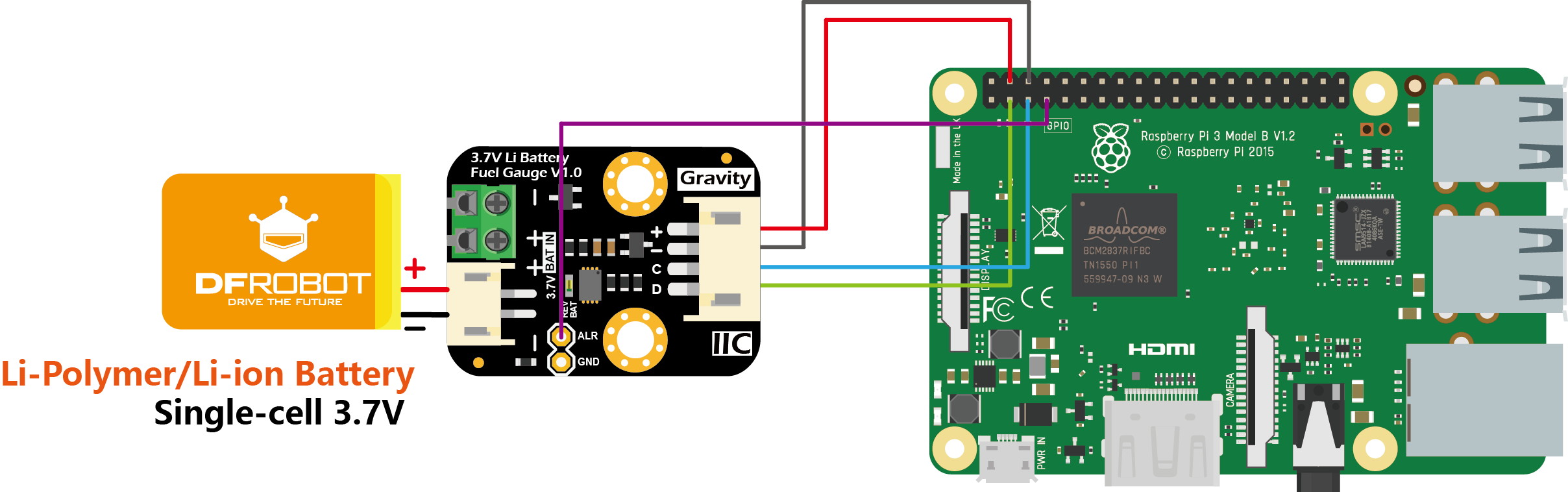
Wiring Diagram
Other Preparation Work
- Start the I2C interface of the Raspberry Pi. If it is already open, skip this step. Open Terminal, type the following command, and press Enter:
Then use the up and down keys to select “5 Interfacing Options” -> “P5 I2C” and press Enter to confirm “YES”. Reboot the Raspberry Pi.pi@raspberrypi:~ $ sudo raspi-config - Installing Python libraries and git (networking required). If it is already installed, skip this step. In the Terminal, type the following commands, and press Enter:
pi@raspberrypi:~ $ sudo apt-get update pi@raspberrypi:~ $ sudo apt-get install build-essential python-dev python-smbus git - Download the driver library and run it. In Terminal, type the following commands, and press Enter:
pi@raspberrypi:~ $ git clone https://github.com/DFRobot/DFRobot_MAX17043.git pi@raspberrypi:~ $ cd ~/DFRobot_MAX17043/RaspberryPi/python pi@raspberrypi:~/DFRobot_MAX17043/RaspberryPi/python $ python DFRobot_MAX17043.py - Connect the module to the RaspberryPi according to the connection diagram. The battery can be connected to the 2P terminal or JST-PH2.0 2P connector. These two connectors are connected internally in parallel. The I2C address is fixed to 0x36.
- Install DFRobot_MAX17043 RaspberryPi library.
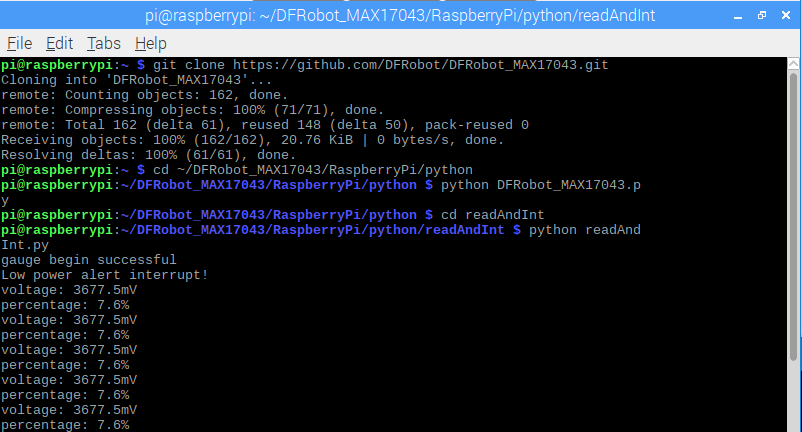
- In the Terminal, type in the following commands and press Enter to run the sample code:
pi@raspberrypi:~/DFRobot_MAX17043/RaspberryPi/python $ cd readAndInt
pi@raspberrypi:~/DFRobot_MAX17043/RaspbeeryPi/python/readAndInt $ python readAndInt.py
Result
- RaspberryPi prints the current voltage (voltage), remaining power (percentage), and interrupt alert information (if any) every 2 seconds.
- Battery low power interrupt alert ALR instructions:
- The default value of the battery low power interrupt alert threshold is 32%. That is, when the remaining power is lower than 32%, a falling edge interrupt is generated on the ALR pin. This threshold can be set to any integer between 1-32 (corresponding to 1%-32%, respectively) with the function setInterrupt().
- When the battery's initial remaining power is higher than interrupt alert threshold, the ALR pin is set high. If it falls below the threshold (due to discharge) , the ALR pin is pulled to low. The controller is triggered to print ”Low power alert interrupt!”, and then clear interrupt through clearInterrupt(), which causes ALR back to high immediately.
- When the battery's initial remaining power is below interrupt alert threshold, the ALR pin will generate an interrupt at the beginning.
- After the battery remaining power grows higher than interrupt alert threshold (due to discharge) , another interrupt will be generated when the power again falls below the threshold (due to discharge). If the clearInterrupt() is not called after the interrupt is occurred, the ALR pin will remain low regardless of the statue of the battery.
Was this article helpful?