
Reference
Last revision 2026/01/06
Library
To use the analog and PWM ports in the board, download the driver library first.
- Press Ctrl+Alt+T to open the terminal, input the following command and hit Enter:
git clone https://github.com/DFRobot/DFRobot_RaspberryPi_Expansion_Board.git - Download the library and unzip the file:
tar -xvzf DFRobot_RaspberryPi_Expansion_Board - Enter the directory of the uncompressed files:
cd DFRobot_RaspberryPi_Expansion_Board/raspberry/
Communication Protocol Description
PWM
The PWM signal of this expansion board is generated by the on-board STM32. PWM0~PWM3 are output via multiple channels of one timer with same frequency. The duty ratio can be set by users. PWM4 adopts another timers to output PWM. The PWM can be powered by Raspberry Pi(5V) or external power(6-12V).

- When the VP port is not power by external power, the voltage of PWM ⊕ is 5V.
- When the VP port is powered by external power, the voltage of PWM ⊕ is equal to that of the VP external power (6-12V).
Analog
The IO expansion board comes with an on-board MCU STM32 that provides 12 bit ADC. The voltage of analog sensor will be input into the 12-bit ADC sent to Raspberry Pi via IIC when the analog data is converted into digital data, by which to allow Raspberry Pi to read values of analog sensor.

Digital
The board leads out 10 GPIO (BCM encode) ports of Raspberry Pi: GPIO16, GPIO17, GPIO18, GPIO19, GPIO20, GPIO21, GPIO22, GPIO23, GPIO24, GPIO25.

IIC
There are two IIC ports on the board, and they are led out via Raspberry Pi's IIC. Connect the two ports to GPIO2(SDA.1)and GPIO3(SCL.1) of Raspberry Pi.

For using IIC interface, input the command to enable the Raspberry Pi IIC first:
sudo raspi-config
Select [Interfacing Options]-[I2C]-[Yes]-[OK]-[Finish]. Restart the Raspberry Pi when completed these steps.
The usage of IIC ports on the expansion board is same with that of raspberry Pi
UART
The UART ports on the expansion board are led out through Pi's GPIO14(TXD)and GPIO15(RXD). Use UART port to communicate with Arduino, Esp8266 and so on.

The usage of UART ports on the expansion board is same with that of raspberry Pi.
SPI
Connect the SPI ports on the board to GPIO12(MOSI)and GPIO13(MISO).
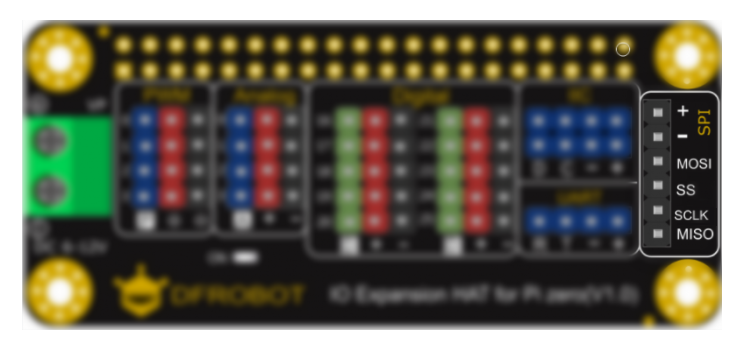
For using SPI interface, input the command to enable the Raspberry Pi IIC first:
sudo raspi-config
Select [Interfacing Options]-[I2C]-[Yes]-[OK]-[Finish].Restart the Raspberry Pi when completed these steps.
The usage of SPI ports on the expansion board is same with that of raspberry Pi.
Compatility Test
| MCU | Pass | Fail | Untest | Remark |
|---|---|---|---|---|
| Raspberry Pi 3B | √ | |||
| Raspberry Pi 3B+ | √ | |||
| Raspberry Pi Zero W | √ | |||
| Raspberry Pi 2B+ | √ | |||
| Raspberry Pi Zero | √ | |||
| Raspberry Pi 4B | √ |
Was this article helpful?