
Getting Started
Last revision 2025/12/24
This guide walks you through setting up the DFRduino UNO R3 with a 1.54" LCD, detailing necessary hardware, software installation, and wiring instructions for successful integration.
Hardware Preparation
- DFRduino UNO R3 (or similar) x 1
- 1.54" 240x240 LCD Module x 1
- M-M/F-M/F-F Jumper wires
- Wires
Software Preparation
- Arduino IDE
- Download and install the DFRobot_GDL Library. (About how to install the library?)
- DFRobot_GDL API Function, click to find more detailed information
Wiring Diagram
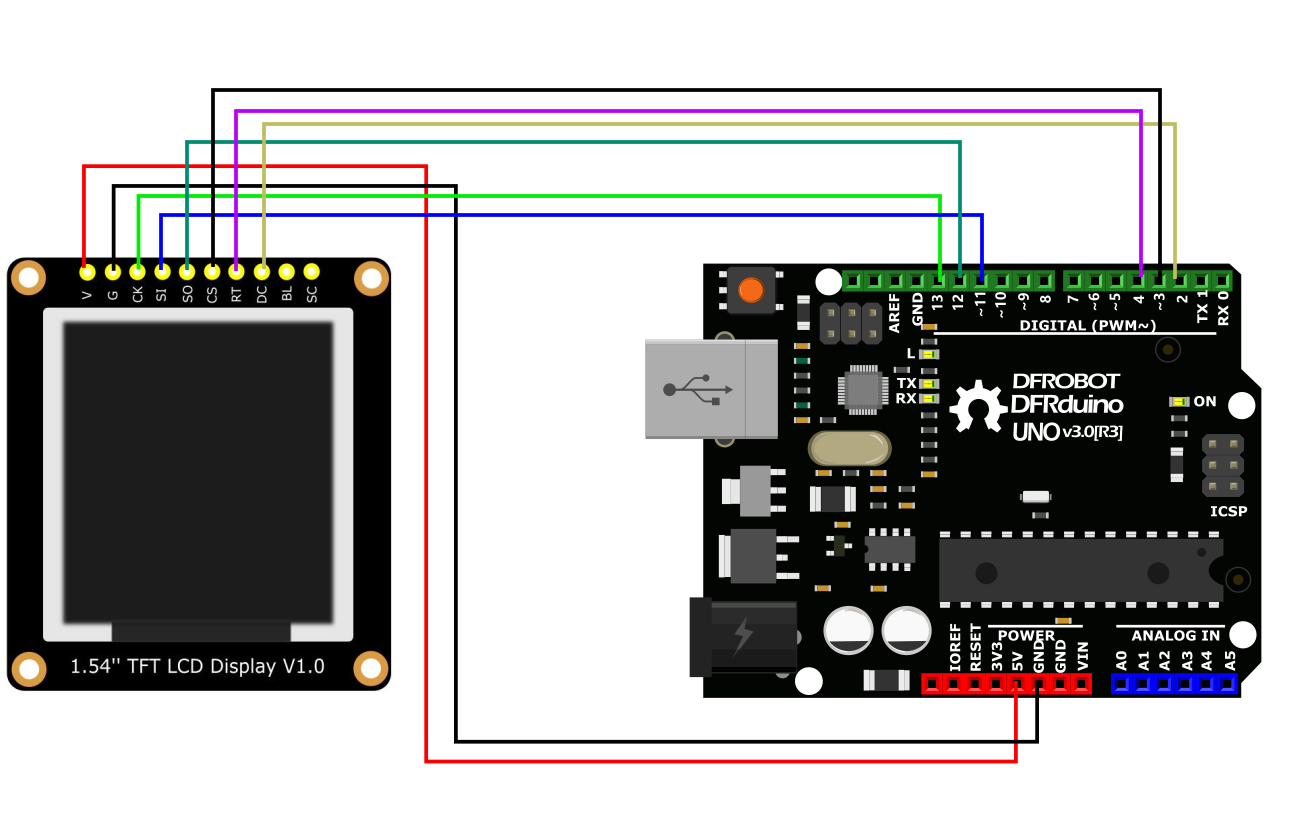
- All the demo files of this product are stored in file DFRobot_GDL->example->basic.
- Please open the corresponding constructed functions (DFRobot_ST7789_240x240_HW_SPI) before burning demo into your device.
The product is a Breakout module. It adopts SPI communication and has onboard GDI interface, which reduces the complexity of wiring and can easily display the contents read from SD card.
- GDI interface could only work well with maincontrollers with GDI.
- It is recommended to use Arduino 1.8.10 and above.
- If the SD card is not in good contact, it may fail to initialize, and then please try to replug it.
Was this article helpful?