
Example Code for Arduino-PWM-driven DC Motors
This project demonstrates how to use PWM signals to control the direction and speed of DC motors connected to the Romeo Mini. By adjusting PWM values and direction pins, users can learn the basics of motor control, PWM application, and proper wiring for motor drivers.
Hardware Preparation
- DC Motors: x2
- Romeo Mini: x1
Software Preparation
- Arduino IDE (download link: https://www.arduino.cc/en/software)
- ESP32 board support package (version 2.0.0) installed via Arduino Boards Manager (follow the [Arduino Environment Configuration] steps)
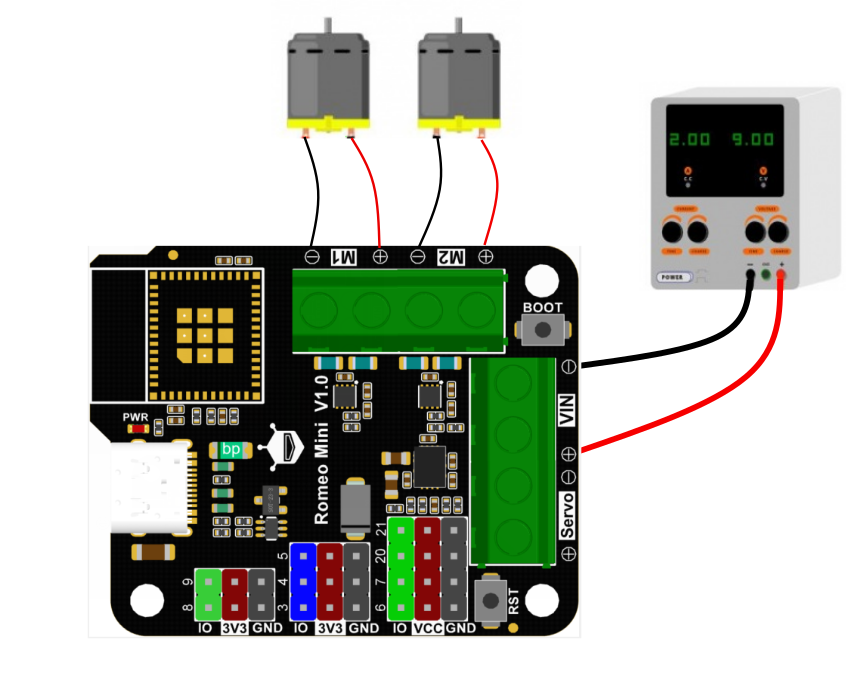
Wiring Diagram
The module is powered by 5-12V. Choose an appropriate power supply voltage based on the motors.
Other Preparation Work
- Add the ESP32 board URL to Arduino IDE: https://raw.githubusercontent.com/espressif/arduino-esp32/gh-pages/package_esp32_index.json
- Install the ESP32 board support package (version 2.0.0) via Tools -> Board -> Boards Manager
- Select "ESP32C3 Dev Module" from Tools -> Board
- Configure USB CDC to "Enable" for serial monitor use
- Select the correct serial port (press and hold BOOT + RST if the port is not recognized)
| EN | PH | Function |
|---|---|---|
| H | H | Forward |
| H | L | Reverse |
| PWM | L | Forward |
| PWM | H | Reverse |
Sample Code
int EN1 = 0; // M1 PWM control
int PH1 = 1; // M1 direction control
int EN2 = 2; // M2 PWM control
int PH2 = 10; // M2 direction control
void setup() {
pinMode(EN1, OUTPUT);
pinMode(PH1, OUTPUT);
pinMode(EN2, OUTPUT);
pinMode(PH2, OUTPUT);
}
void loop() {
M1_Forward(200);
M2_Forward(200);
delay(5000);
M1_Backward(200);
M2_Backward(200);
delay(5000);
}
// ----- M1 control functions -----
void M1_Forward(int Speed) {
Speed = constrain(Speed, 0, 255);
analogWrite(EN1, Speed);
digitalWrite(PH1, LOW); // LOW = Forward rotation
}
void M1_Backward(int Speed) {
Speed = constrain(Speed, 0, 255);
analogWrite(EN1, Speed); // PWM value remains unchanged
digitalWrite(PH1, HIGH); // HIGH = Reverse rotation
}
// ----- M2 control functions -----
void M2_Forward(int Speed) {
Speed = constrain(Speed, 0, 255);
analogWrite(EN2, Speed);
digitalWrite(PH2, LOW);
}
void M2_Backward(int Speed) {
Speed = constrain(Speed, 0, 255);
analogWrite(EN2, Speed);
digitalWrite(PH2, HIGH);
}
Result
Flash the sample program: motors M1 and M2 will first rotate forward simultaneously for 5 seconds, then rotate in reverse for 5 seconds.
Was this article helpful?