LattePanda JHL6340 Thunderbolt to PCIE Module

SKU: DFR1169

This is a cost-effective Thunderbolt to PCIE docking station for LattePanda Sigma users. Compact with Type-C interface and PCIEX16 slot, it uses Intel’s 6th-gen Thunderbolt JHL6340 chip for excellent anti-interference and minimal signal loss. Fully compatible with Thunderbolt 3/4 and USB4, it offers up to 21.5Gbps speed for smooth performance. Easy to pair with LattePanda Sigma or notebooks, it connects to high-performance GPUs/PCIE devices, greatly boosting their performance!

Board Overview of Thunderbolt PCIe x16 Graphics Cards Expansion Docking Station

Downloadable Resources

  • Docs
  • Tech Specs
  • Specification

    Type-C interface specifications

    Parameter Value
    Speed bandwidth 21.5G/bps=2700MB/S=2.68GB/S
    Supported interfaces USB4, Thunderbolt 3, Thunderbolt 4

    Power supply interface specifications

    Parameter Value
    PD3.0-12V Max 60W
    DC5.5*2.1-12V Max 120W
    CPU4+4Pin Chassis power interface
    Large 4Pin Chassis power interface

    PCIE interface specifications

    Parameter Value
    Card slot PCIEx16
    Speed bandwidth PCIE 3.0x4 (32Gbps)
    Compatible systems Windows10, Windows11, Linux, Mac Os
    Support independent graphics cards NVIDIA series, AMD series
    Weight 90g
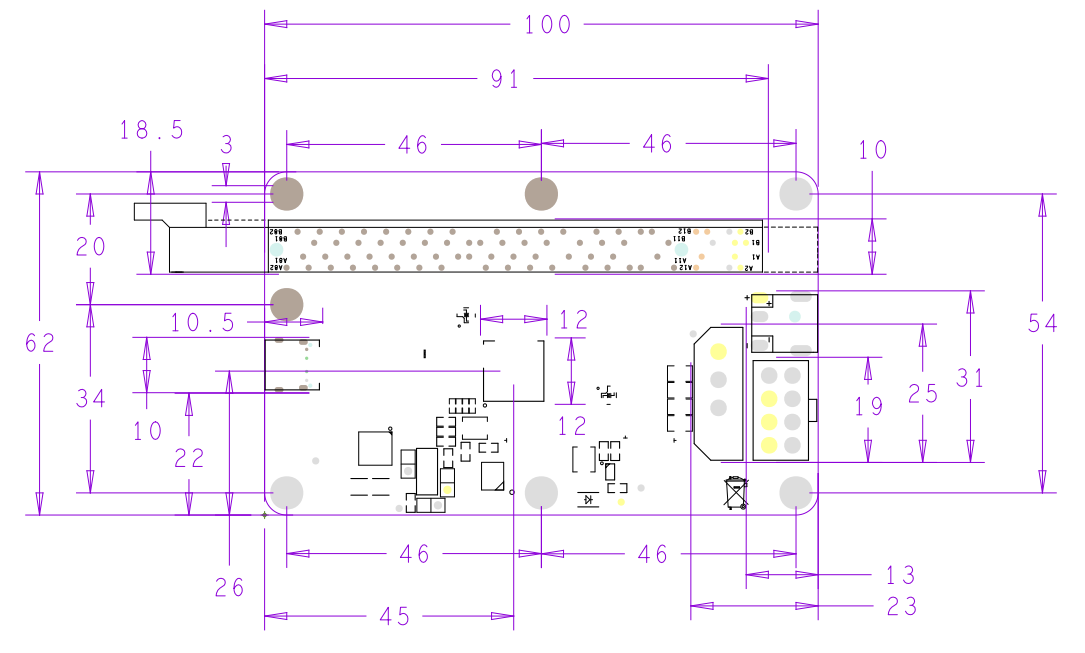
    Size 100x62x17mm

    Pinout

    Interface diagram

    Label Name Function Description
    1 Left Type-C Supports Thunderbolt 3, Thunderbolt 4, USB4
    2 Right Type-C PD3.0-12V docking station power interface
    3 Square large 4Pin Computer case power supply standard interface
    4 CPU4+4Pin Computer chassis power supply standard interface
    5 DC5.5*2.1 12V docking station power interface
    6 PCIEx16 PCIE device interface
    7 Blue LED LattePanda Sigma status detection indicator light
    8 Green LED Thunderbolt port connection indicator
    9 White LED Power indicator light

    Note: Choose one of the four interfaces 2, 3, 4, and 5 to power the docking station.

    Dimensional Drawing

    FAQ

    • The indicator light of the Thunderbolt dock is normal, but the desktop is not displayed when the computer is turned on or a yellow exclamation mark appears on the graphics card model in the device manager.
      Connect LattePanda Sigma to the Internet, or manually download the driver from the corresponding graphics card official website, reinstall it, and restart LattePanda Sigma.

    Explore More Related Questions >

    Was this article helpful?

    TOP