
Example Code for Arduino - I2C Address Detection
Last revision 2026/10/21
This tutorial covers setting up an Arduino UNO R4 WiFi with a Gravity: STCC4 CO2 Sensor, including hardware and software preparation, wiring, and sample code for I2C address detection. It's like learning to connect and communicate with sensors in your projects.
Prepare
Hardware Prepare
- Arduino UNO R4 WiFi (SKU:DFR1084) ×1
- Gravity: STCC4 CO2 Sensor(SKU:SEN0678)×1
- Gravity to Qwiic Adapter x1
Software Prepare
- Download Arduino IDE: Click to download Arduino IDE
- Download DFRobot_STCC4 library:DFRobot_STCC4 library
- Arduino IDE V1.8.19(or below) install library: How to load library
- For Arduino IDE V2.0.0 (or above), please directly search and install "DFRobot_STCC4" library in the library manager.
Wiring Diagram

| Sensor | Pin | Dev board | Pin |
|---|---|---|---|
| Gravity STCC4 CO2 Sensor | VCC | Aduino UNO R4 wifi | 5V |
| Gravity STCC4 CO2 Sensor | GND | Aduino UNO R4 wifi | GND |
| Gravity STCC4 CO2 Sensor | SCL | Aduino UNO R4 wifi | SCL |
| Gravity STCC4 CO2 Sensor | SDA | Aduino UNO R4 wifi | SDA |
Sample code 1-I2C Address detection
Note: For the Qwiic port on Arduino UNO R4 WiFi, the identifier in the Wire library is Wire1, not the default Wire.
#include <Wire.h>
void setup() {
 Wire1.begin(); // If you need to run this code on boards other than the UNO R4 WiFi, change this line to `Wire.begin();`.
 Serial.begin(115200);
 while (!Serial);
 Serial.println("\nI2C Scanner");
}
void loop() {
 byte error, address;
 int nDevices = 0;
 Serial.println("Scanning...");
 for (address = 1; address < 127; address++) {
   Wire1.beginTransmission(address);// If you need to run this code on boards other than the UNO R4 WiFi, change this line to `Wire.beginTransmission(address);`.
   error = Wire1.endTransmission();//error = Wire.endTransmission();
   if (error == 0) {
     Serial.print("I2C device found at address 0x");
     if (address < 16) Serial.print("0");
     Serial.println(address, HEX);
     nDevices++;
   } else if (error == 4) {
     Serial.print("Unknown error at address 0x");
     if (address < 16) Serial.print("0");
     Serial.println(address, HEX);
   }
 }
 if (nDevices == 0)
   Serial.println("No I2C devices found\n");
 else
   Serial.println("Scan complete\n");
 delay(5000); // Wait for 5 seconds before scanning again
}
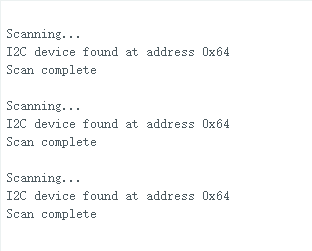
Result
Serial monitor output I2C address:
Was this article helpful?