
Example code for Arduino - Get sensor data
Last revision 2026/10/21
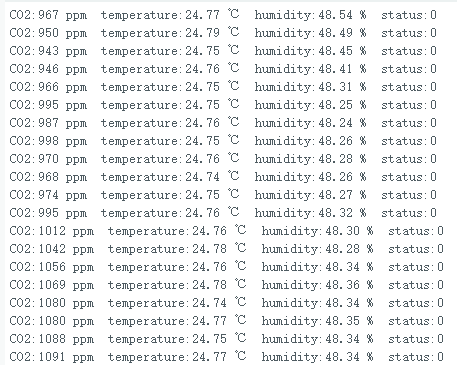
This tutorial covers setting up and using an Arduino UNO R4 WiFi with a Gravity: STCC4 CO2 Sensor. It includes hardware and software preparation, wiring, and sample code to read sensor data. The setup involves downloading the necessary libraries, connecting the sensor, and initializing it in the Arduino IDE. The provided code demonstrates how to continuously read and print CO2 concentration, temperature, and humidity. Ensure you have the correct library version for your Arduino IDE. It's like following a recipe to make a dish, step by step.
Prepare
Hardware Prepare
- Arduino UNO R4 WiFi (SKU:DFR1084) ×1
- Gravity: STCC4 CO2 Sensor(SKU:SEN0678)×1
- Gravity to Qwiic Adapter x1
Software Prepare
- Download Arduino IDE: Click to download Arduino IDE
- Download DFRobot_STCC4 library:DFRobot_STCC4 library
- Arduino IDE V1.8.19(or below) install library: How to load library
- For Arduino IDE V2.0.0 (or above), please directly search and install "DFRobot_STCC4" library in the library manager.
Wiring Diagram

| Sensor | Pin | Dev board | Pin |
|---|---|---|---|
| Gravity STCC4 CO2 Sensor | VCC | Aduino UNO R4 wifi | 5V |
| Gravity STCC4 CO2 Sensor | GND | Aduino UNO R4 wifi | GND |
| Gravity STCC4 CO2 Sensor | SCL | Aduino UNO R4 wifi | SCL |
| Gravity STCC4 CO2 Sensor | SDA | Aduino UNO R4 wifi | SDA |
Sample code 2- Get sensor data
#include "DFRobot_STCC4.h"

#define ARDUINO_UNO_R4_WIFI //如需非UNO R4 WiFi上使用此代码,删除此行

const uint16_t tCompensation = 26;
const uint16_t hCompensation = 55;
const uint16_t pCompensation = 950;
float temperature;
float humidity;
uint16_t co2Concentration;
uint16_t sensorStatus;

const uint8_t ADDR = 0x64;

DFRobot_STCC4_I2C* sensor = NULL;

void setup() {
  Serial.begin(115200);
  unsigned long serialWaitStart = millis();
  while(!Serial && (millis() - serialWaitStart < 3000)) {
    delay(10);
  }

#if defined(ARDUINO_UNO_R4_WIFI)
  static DFRobot_STCC4_I2C sensorInstance(&Wire1, ADDR);
#else
  static DFRobot_STCC4_I2C sensorInstance(&Wire, ADDR);
#endif
  sensor = &sensorInstance;

  Serial.println("[STCC4] setup start");
  Serial.println("This is a demo of continuous reading sensor data.\n");

  /* Initialize the sensor */
  while(!sensor->begin()){
    Serial.println("Init error!");
    delay(500);
  }

  /* Wake up the sensor */
  sensor->wakeup();
  delay(10);

  /**
   * Get the ID of the sensor.
   * The ID values read should all be 0x901018A.
   */
  Serial.print("ID: 0x");
  Serial.println(sensor->getID(), HEX);

  /**
    * @brief Set temperature and humidity compensation
    * @param temperature Temperature compensation value
    * @param humidity Humidity compensation value
    * @return true if successful, false otherwise
    */
  if(sensor->setRHTcompensation(tCompensation, hCompensation)){
    Serial.println("Set RHT compensation successful.");
  }else{
    Serial.println("Set RHT compensation error!");
  }

  /**
    * @brief Set pressure compensation
    * @param pressure Pressure compensation value
    * @return true if successful, false otherwise
    */
  if(sensor->setPressureCompensation(pCompensation)){
    Serial.println("Set pressure compensation successful.");
  }else{
    Serial.println("Set pressure compensation error!");
  }

  sensor->startMeasurement(); // Start measurement
}

void loop() {
  delay(2000);
  if(sensor == NULL) {
    return;
  }
  /**
    * @brief Read measurement data
    * @param co2Concentration Pointer to store CO2 concentration
    * @param temperature Pointer to store temperature
    * @param humidity Pointer to store humidity
    * @param sensorStatus Pointer to store sensor status, 0 means normal, otherwise error.
    * @return true if successful, false otherwise
    */
  if(sensor->measurement(&co2Concentration,&temperature,&humidity,&sensorStatus)){
    Serial.print("CO2:");
    Serial.print(co2Concentration);
    Serial.print(" ppm ");
    Serial.print(" temperature:");
    Serial.print(temperature);
    Serial.print(" ℃ ");
    Serial.print(" humidity:");
    Serial.print(humidity);
    Serial.print(" % ");
    Serial.print(" status:");
    Serial.println(sensorStatus);
  }
}
Result
Was this article helpful?