
Turtle Robot Kit Assembly and Motor Debug Guide
Last revision 2025/12/09
This article provides a step-by-step guide to building a Turtle 2WD Mobile Platform, including assembling the robot chassis, wiring the hardware, and debugging the motors using Arduino code to control speed and direction.
This Kit will teach you how to build a Turtle Robot
STEP 1: Assemble Robot
Refer to Instruction Manual
Precautions:
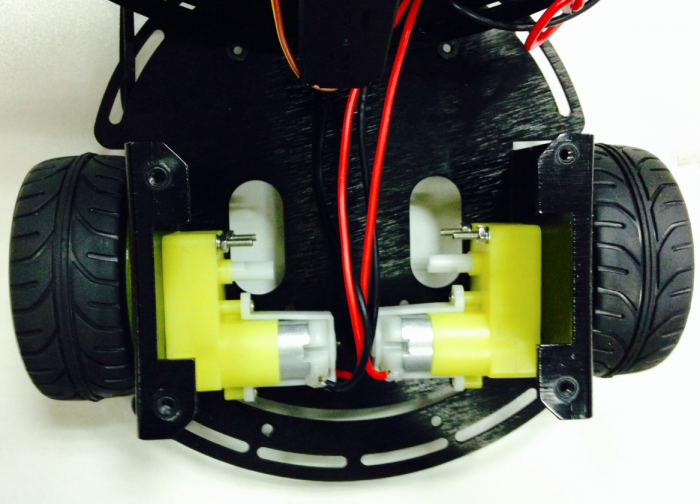
1. Instruction Manual says nothing about how to deal with motor wire. The next pictrue tells it.
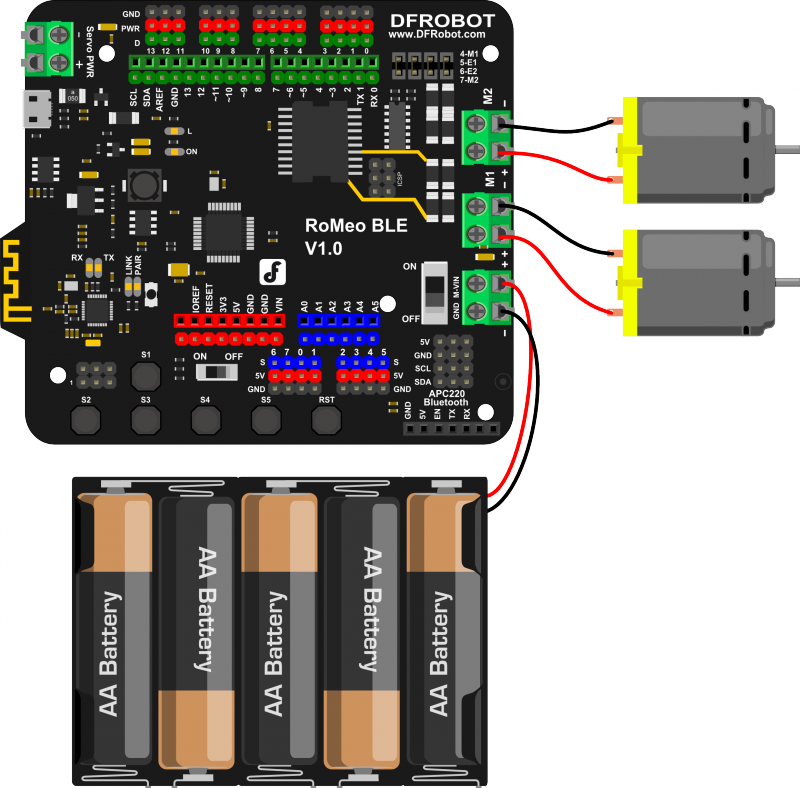
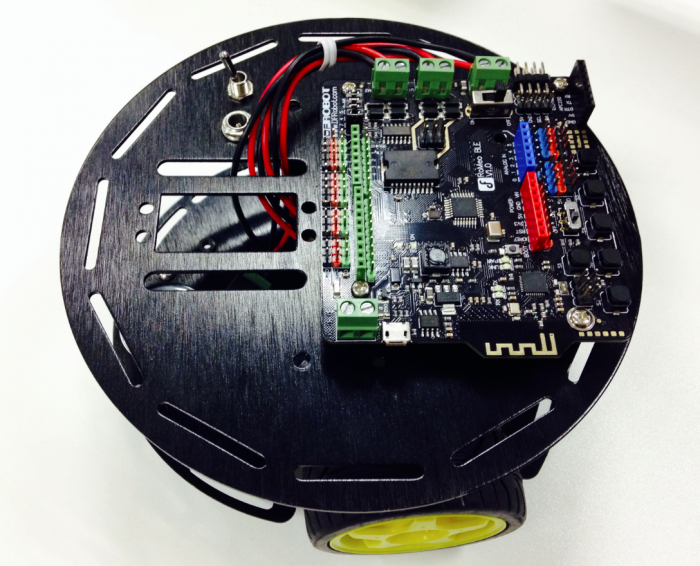
2. Finished the robot chassis.Then following the connection diagram to wire the hardware.
STEP 2: Debug Motor
   int speedPin_M1 = 5;     //M1 Speed Control
   int speedPin_M2 = 6;     //M2 Speed Control
   int directionPin_M1 = 4;     //M1 Direction Control
   int directionPin_M2 = 7;     //M1 Direction Control

   void setup(){

   }

   void loop(){
       carAdvance(100,100);
       delay(1000);
       carBack(100,100);
       delay(1000);
       carTurnLeft(250,250);
       delay(1000);
       carTurnRight(250,250);
       delay(1000);
   }

   void carStop(){                 //  Motor Stop
     digitalWrite(speedPin_M2,0);
     digitalWrite(directionPin_M1,LOW);
     digitalWrite(speedPin_M1,0);
     digitalWrite(directionPin_M2,LOW);
   }

   void carAdvance(int leftSpeed,int rightSpeed){         //Move forward
     analogWrite (speedPin_M2,leftSpeed);              //PWM Speed Control
     digitalWrite(directionPin_M1,HIGH);
     analogWrite (speedPin_M1,rightSpeed);
     digitalWrite(directionPin_M2,HIGH);
   }

   void carBack(int leftSpeed,int rightSpeed){       //Move backward
     analogWrite (speedPin_M2,leftSpeed);
     digitalWrite(directionPin_M1,LOW);
     analogWrite (speedPin_M1,rightSpeed);
     digitalWrite(directionPin_M2,LOW);
   }


   void carTurnRight(int leftSpeed,int rightSpeed){           //Turn Right
     analogWrite (speedPin_M2,leftSpeed);
     digitalWrite(directionPin_M1,LOW);
     analogWrite (speedPin_M1,rightSpeed);
     digitalWrite(directionPin_M2,HIGH);
   }
   void carTurnLeft(int leftSpeed,int rightSpeed){          //Turn Left
     analogWrite (speedPin_M2,leftSpeed);
     digitalWrite(directionPin_M1,HIGH);
     analogWrite (speedPin_M1,rightSpeed);
     digitalWrite(directionPin_M2,LOW);
   }
Was this article helpful?