
Example Code for Arduino-AC Current Measurement
Last revision 2025/12/08
This project tests AC current using the 50A Current Sensor. The result of AC current is its effective value, i.e., the same as an Ammeter reading.
Wiring Diagram

⚠DANGER: This diagram can also be applied to AC current connection. But notice that the module should be cascaded on one electric wire ( +/- ). If you connect it to two electric wires in parallel, you will short the circuit , which is dangerous.
Sample Code
float reading = 0;
float currentValue = 0;

void setup(){
  Serial.begin(115200);
}
void loop() {
  reading = analogRead(*); //Raw data reading
  currentValue = (reading - 510) * 5 / 1024 / 0.04 - 0.34;
  Serial.println(currentValue);
  delay(2);
}
Result
I tested with a lamp @220V~, and got the result shown below:
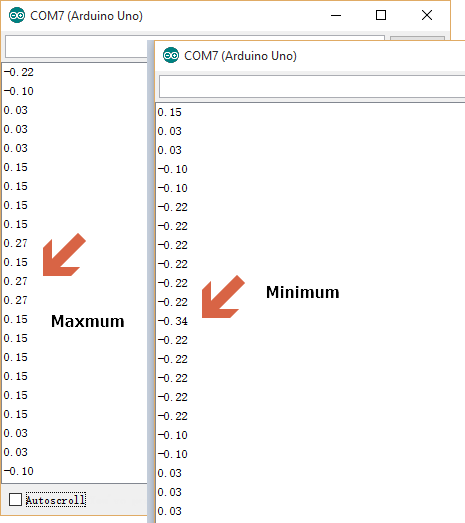
Since AC current here is a Sine wave, you want to focus on the amplitude of your waveform. You can read the extreme data which are the maxmum value 0.27 and the minimum value -0.34, and use the maxmum absolute value one as the ( Effective) AC current. In this case it is 0.34.
Additional Information
Signal Convert formula:

- I: Current, in A
- Uout: Voltage on the OUT pin, in V
Note: If I is calculated as a negative number, it means that the current flows from OUT to IN of the module.
Was this article helpful?