
Example Code for Arduino-Barometer Temperature Test
Last revision 2025/12/08
This example read the Temperature、Pressure and Altitude from BMP280, and then print them. Users can learn how to interface the BMP280 sensor and read environmental data.
Hardware Preparation
- 10 DOF Mems IMU Sensor V2.0, SKU:SEN0140, Quantity:1, Purchase Link: https://www.dfrobot.com/product-818.html
- Arduino controller (e.g., Arduino Uno), Quantity:1, Purchase Link: Please purchase a compatible Arduino controller
Software Preparation
- Development tool: Arduino IDE (Download link: https://www.arduino.cc/en/software)
- Library: BMP280
- Library loading tutorial for Arduino IDE: Please refer to How to Install an Arduino Library
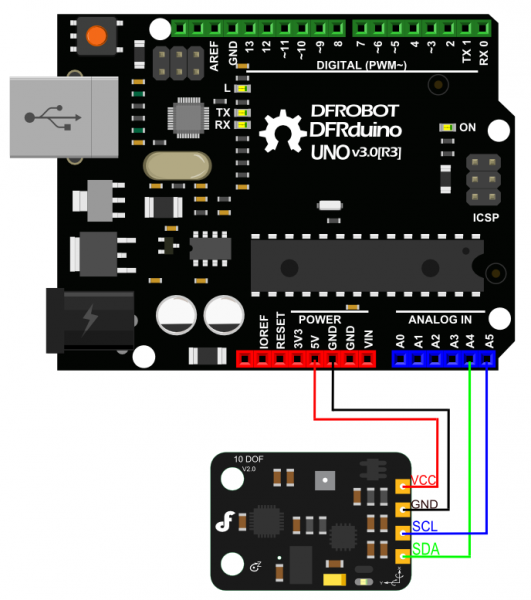
Wiring Diagram
Other Preparation Work
Please download the BMP280 library first.
Sample Code
/*!
 * @file bmp280test.ino
 * @brief DFRobot's Temperature、Pressure and Approx altitude
 * @n [Get the module here](等上架后添加商品购买链接)
 * @n This example read the Temperature、Pressure and Altitude from BMP280, and then print them
 * @n [Connection and Diagram](等上架后添加wiki链接)
 *
 * @copyright   [DFRobot](https://www.dfrobot.com), 2016
 * @copyright   GNU Lesser General Public License
 *
 * @author [yuxiang](1137717512@qq.com)
 * @version  V1.0
 * @date  2016-12-06
 */

#include <Wire.h>
#include "DFRobot_BMP280.h"

DFRobot_BMP280 bmp280;

void setup() {
  Serial.begin(9600);
  Serial.println("BMP280 demo");

  if (!bmp280.begin()) {
    Serial.println("Could not find a valid BMP280 sensor!");
    while (1);
  }
}

void loop() {
    Serial.print("Temperature = ");
    Serial.print(bmp280.readTemperatureValue());
    Serial.println(" *C");

    Serial.print("Pressure = ");
    Serial.print(bmp280.readPressureValue());
    Serial.println(" Pa");

    Serial.print("Altitude = ");
    Serial.print(bmp280.readAltitudeValue(1013.25)); // this should be adjusted to your local forcase
    Serial.println(" m");

    Serial.println();
    delay(2000);
}
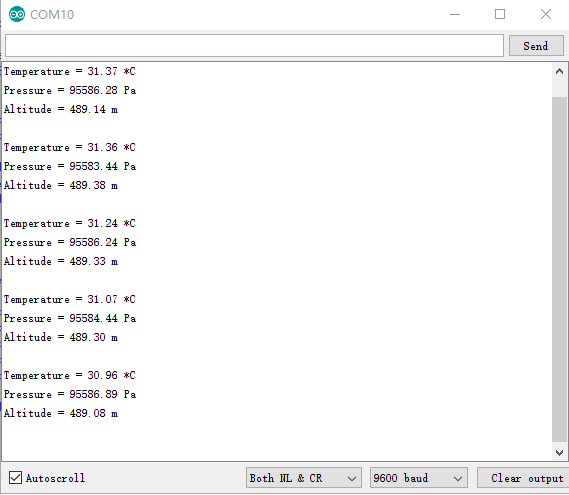
Result
Was this article helpful?