
Example Code for Arduino-Yaw Pitch Roll
Last revision 2025/12/08
This project demonstrates how to get Yaw, Pitch, Roll values from the 10 DOF Mems IMU Sensor V2.0 using Arduino. Users can learn how to interface the sensor and read orientation data.
Hardware Preparation
- 10 DOF Mems IMU Sensor V2.0, SKU:SEN0140, Quantity:1, Purchase Link: https://www.dfrobot.com/product-818.html
- Arduino controller (e.g., Arduino Uno), Quantity:1, Purchase Link: Please purchase a compatible Arduino controller
Software Preparation
- Development tool: Arduino IDE (Download link: https://www.arduino.cc/en/software)
- Libraries:
- Library loading tutorial for Arduino IDE: Please refer to How to Install an Arduino Library
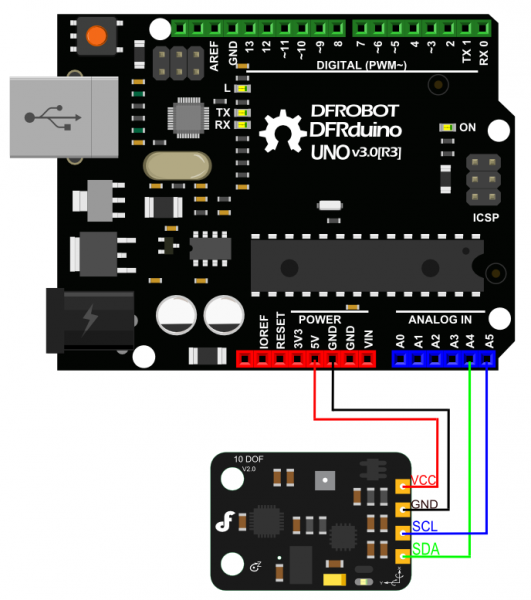
Wiring Diagram
Other Preparation Work
Please download following library first.
Sample Code
#include <FreeSixIMU.h>
#include <FIMU_ADXL345.h>
#include <FIMU_ITG3200.h>

#include <Wire.h>

float angles[3]; // yaw pitch roll

// Set the FreeSixIMU object
FreeSixIMU sixDOF = FreeSixIMU();

void setup() {
  Serial.begin(9600);
  Wire.begin();

  delay(5);
  sixDOF.init(); //begin the IMU
  delay(5);
}

void loop() {

  sixDOF.getEuler(angles);

  Serial.print(angles[0]);
  Serial.print(" | ");
  Serial.print(angles[1]);
  Serial.print(" | ");
  Serial.println(angles[2]);

  delay(100);
}
Result
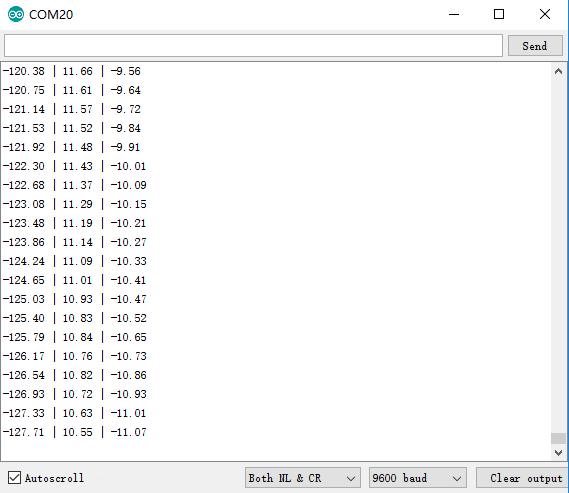
Open the arduino IDE serial monitor, you will get Yaw; Pitch; Roll value:
Was this article helpful?