
Example Code for Arduino-Analog Grayscale Reading
In analog mode, the brighter the Sensor detects, the brighter LED will be. You can connect the sensor to analog pin to read the Grayscale from the sensor, just as the normal grayscale sensor.
Hardware Preparation
- Smart Grayscale sensor V1.0, Quantity: 1, Purchase Link: https://www.dfrobot.com/product-1007.html
- Arduino controller, Quantity: 1
Software Preparation
- Development Tool: Arduino IDE, Download Link: https://www.arduino.cc/en/software
- Library Loading: No additional libraries required
Wiring Diagram
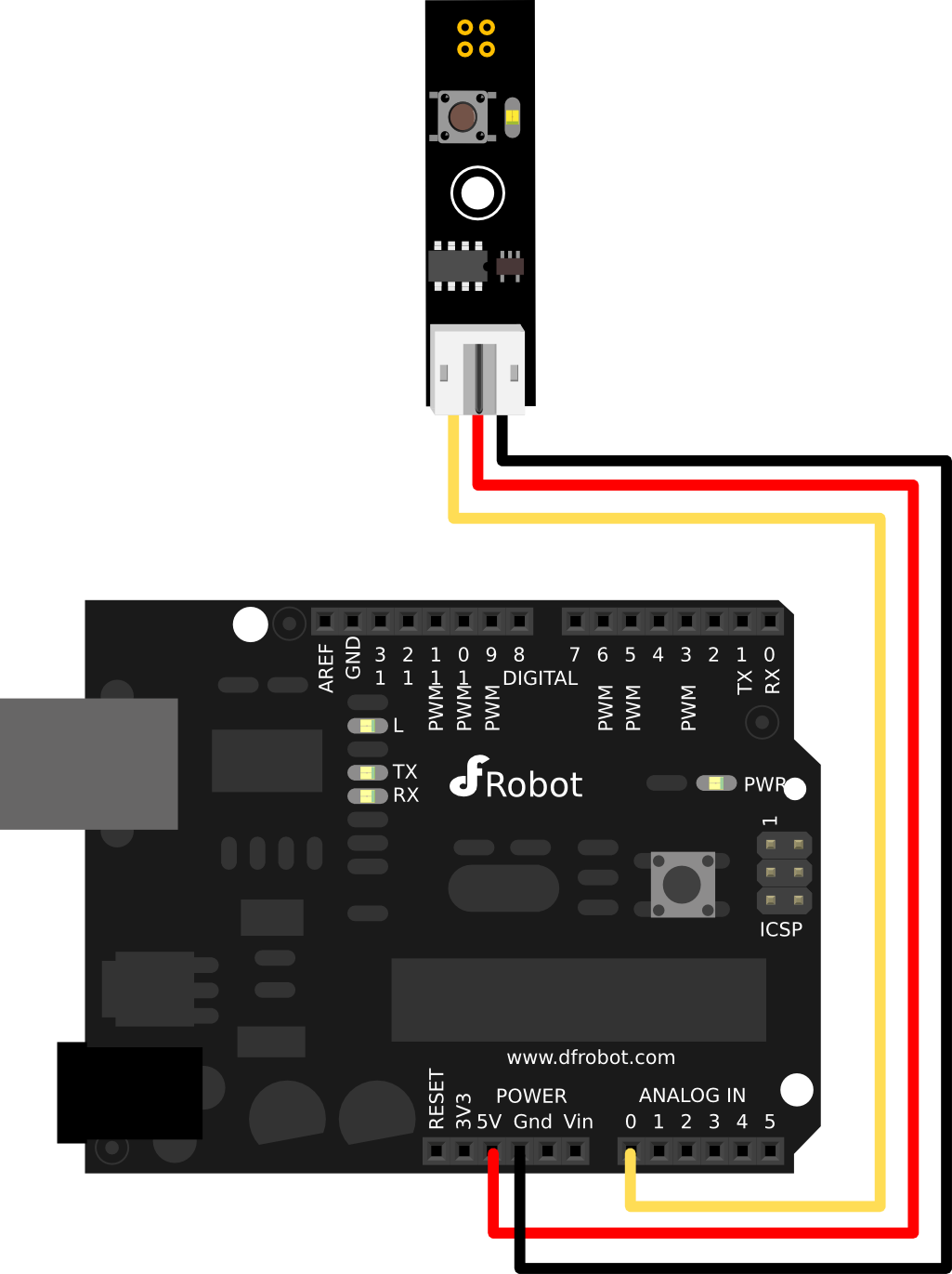
Other Preparation Work
Just short click the button and the mode will be changed between analog and digital.
Sample Code
int grayscalePin=0;
void setup()
{
 Serial.begin(9600);
 Serial.println("Smart Grayscale sensor:");
}
void loop()
{
  Serial.print("Grayscale:");
  Serial.println(analogRead(grayscalePin));
  delay(500);
}
Result
The brighter the Sensor detects, the brighter LED will be. The serial monitor outputs the grayscale value read from the analog pin.
Was this article helpful?