
Example Code for Arduino-Distance Measurement (Multiple Sensors)
Last revision 2026/01/15
This code tests the range finder function of multiple URM08-RS485 Waterproof Sonar Range Finders. Users can learn how to cascade multiple sensors and read distance data from each.
Hardware Preparation
- DFRobot Leonardo with Xbee Socket (Arduino Compatible) x 1
- RS485 Shield for Arduino x1
- 7.4V Lithium Battery(6~12V external power supply is needed) x1
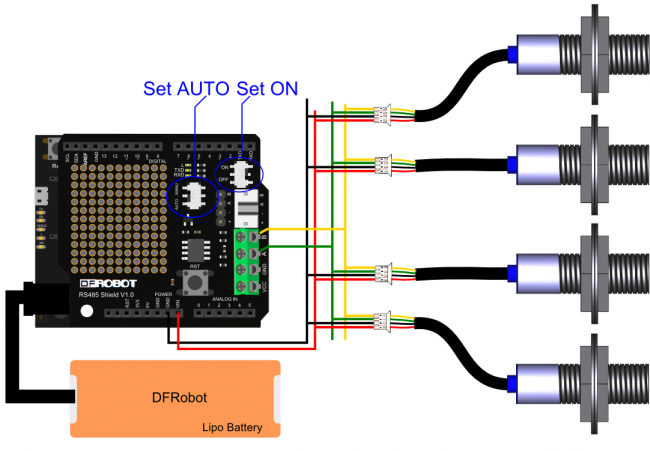
- URM08-RS485 Waterproof Sonar Range Finder x4 (set addresses to 0x11, 0x22, 0x33, 0x44 before use)
Software Preparation
- Arduino IDE (Version requirements: V1.6.+), Click to Download Arduino IDE from Arduino®
Wiring Diagram
Other Preparation Work
- Connect the multiple URM08-RS485 modules to the serial bus (RS485-A to RS485-A, RS485-B to RS485-B).
- Set different addresses for each URM08 module (e.g., 0x11, 0x22, 0x33, 0x44) using the "Set the Address of the Ultrasonic Module" command.
Sample Code
/**************************************************************************************************************
*This code tests the range finder function of multiple URM08-RS485 Waterproof Sonar Range Finder
*@ author : roker.wang@dfrobot.com
*@ data   : 11.09.2017
*@ version: 1.0
*RX(TTL-RS485 converter) -> TX1/D1 (Arduino Leonardo)  TX(TTL-RS485 converter)-> RX1/D0 (Arduino Leonardo)
**************************************************************************************************************/

unsigned char i=0,j=0;
unsigned int  Distance=0;
unsigned char Rx_DATA[8];
unsigned char CMD[4][6]={
                         {0x55,0xAA,0x11,0x00,0x02,0x12},
                         {0x55,0xAA,0x22,0x00,0x02,0x23},
                         {0x55,0xAA,0x33,0x00,0x02,0x34},
                         {0x55,0xAA,0x44,0x00,0x02,0x45},
                        }; //Distance measurement command packet

void setup() {
  Serial1.begin(19200);  //Communicate with module via Serial1, set baud rate to 19200
  Serial.begin(19200);   //Set Serial to serial port of data output
}

void loop() {
  for(j=0;j<4;j++)
  {
 for(i=0;i<6;i++){
    Serial1.write(CMD[j][i]);
    }
 delay(150);  //Wait for the end of distance measurement
 i=0;
 while (Serial1.available()){  //Read return data package (NOTE: Demo is just for your reference, the data package haven't be calibrated yet)
    Rx_DATA[i++]=(Serial1.read());
    }
 Distance=((Rx_DATA[5]<<8)|Rx_DATA[6]); //Get the distance data
 Serial.print("URM08-RS485[");   //Print distance
 Serial.print(j);
 Serial.print("]get_Dis= ");
 Serial.print(Distance);
 Serial.println("cm");
 Rx_DATA[5] = 0;
 Rx_DATA[6] = 0;
  }
 Serial.print("\r\n\r\n");    //Print (\r\n\r\n);(\r\n\r\n) are new line characters to get better format

 delay(300);  //Wait for the end of distance measurement
}
Result
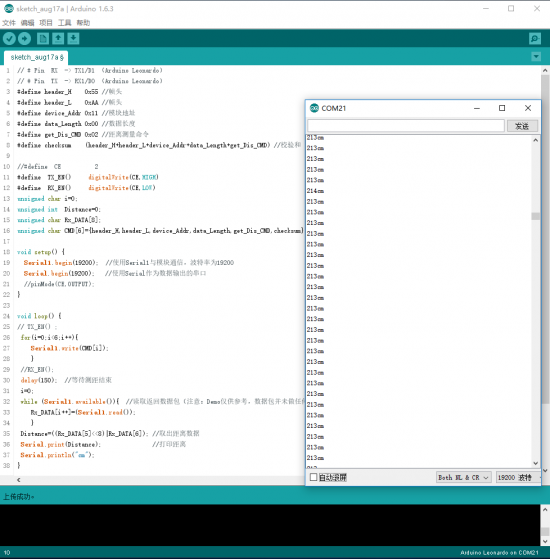
The Serial Monitor (set to 19200 bps) will display the measured distance for each sensor, e.g.,:
URM08-RS485[0]get_Dis= 202 cm
URM08-RS485[1]get_Dis= 150 cm
URM08-RS485[2]get_Dis= 300 cm
URM08-RS485[3]get_Dis= 250 cm
Additional Information
Connect the mutiple RUM08-RS485 modules to serial bus, then set different addresses for each URM08 mdoule before using.(There are four URM08 sensor in this sample, set their address to: 0x11, 0x22, 0x33, 0x44)
Was this article helpful?