
Example Code for Arduino-Distance Measurement (Single Sensor)
Last revision 2026/01/15
This code tests the range finder function of the URM08-RS485 Waterproof Sonar Range Finder. Users can learn how to communicate with the sensor via RS485 and read distance data.
Hardware Preparation
- DFRobot Leonardo with Xbee Socket (Arduino Compatible) x 1 (RS485 transfer to TTL will occupy 1 serial port, therefore devices with more than 2 serial ports are recommended, e.g. Leonardo)
- RS485 Shield for Arduino x1
- 7.4V Lithium Battery(6~12V external power supply is needed) x1
- URM08-RS485 Waterproof Sonar Range Finder x1
Software Preparation
- Arduino IDE (Version requirements: V1.6.+), Click to Download Arduino IDE from Arduino®
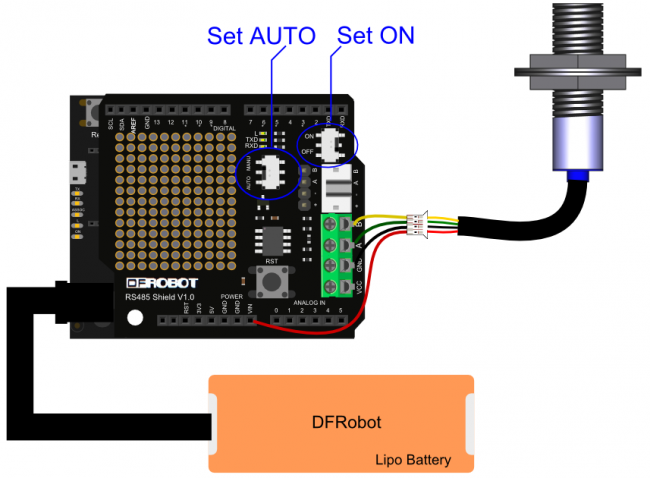
Wiring Diagram
Other Preparation Work
- Mount the RS485 Shield on the Arduino Leonardo.
- Connect the URM08-RS485 sensor to the RS485 Shield following the wiring order: Red-VCC, Black-GND, Green-RS485-A, Yellow-RS485-B.
- Ensure the external power supply (6-12V) is properly connected.
Sample Code
/**************************************************************************************************************
*This code tests the range finder function of the URM08-RS485 Waterproof Sonar Range Finder
*@ author : roker.wang@dfrobot.com
*@ data   : 11.09.2017
*@ version: 1.0
*RX(TTL-RS485 converter) -> TX1/D1 (Arduino Leonardo)  TX(TTL-RS485 converter)-> RX1/D0 (Arduino Leonardo)
**************************************************************************************************************/
#define header_H    0x55 //Frame header
#define header_L    0xAA //Frame header
#define device_Addr 0x11 //Module address
#define data_Length 0x00 //Data length
#define get_Dis_CMD 0x02 //Distance measurement commands
#define checksum    (header_H+header_L+device_Addr+data_Length+get_Dis_CMD) //Checksum

//#define  CE          2
#define  TX_EN()     digitalWrite(CE,HIGH)
#define  RX_EN()     digitalWrite(CE,LOW)
unsigned char i=0;
unsigned int  Distance=0;
unsigned char Rx_DATA[8];
unsigned char CMD[6]={header_H,header_L,device_Addr,data_Length,get_Dis_CMD,checksum}; //Distance measurement command packet

void setup() {
  Serial1.begin(19200);  //Communicate with module via Serial1, set baud rate to 19200
  Serial.begin(19200);   //Set Serial as a serial port of data output
  //pinMode(CE,OUTPUT);
}


void loop() {
 //TX_EN() ;
 for(i=0;i<6;i++){
    Serial1.write(CMD[i]);
    }
 // RX_EN() ;
 delay(150);  //Wait for the end of distance measurement
 i=0;
 while (Serial1.available()){  //Read return data package (NOTE: Demo is just for your reference, the data package haven't be calibrated yet)
    Rx_DATA[i++]=(Serial1.read());
    }
 Distance=((Rx_DATA[5]<<8)|Rx_DATA[6]); //Get the distance data
 Serial.print(Distance);               //Print distance
 Serial.println("cm");
}
Result
The Serial Monitor (set to 19200 bps) will display the measured distance in centimeters, e.g., "202 cm".
Because Leonardo UART communication needs converted to RS485, here we used RS485 expansion board.
Was this article helpful?