
Example Code for Arduino-Step Count
The project uses the BMI160's built-in intelligent step-counting algorithm to count steps. Users can learn how to configure interrupts to read step count data from the sensor.
Hardware Preparation
- 1 x BMI160 6-axis IMU
- 1 x Arduino Uno
Software Preparation
Wiring Diagram
- Connect the BMI160 6-axis IMU to Arduino board by I2C (" "can connect "3V3" or "5V")
- Connect the INT1 or INT2 to the corresponding pins on the Arduino board, as shown in the following table
| Arduino board | Corresponding Pins |
|---|---|
| Arduino UNO | D2 |
| FireBeetle-ESP32 | D13 |
| FireBeetle-ESP8266 | D13 |
| FireBeetle-Board328P | D2 |
| Leonardo | D3 |
Connection Diagram 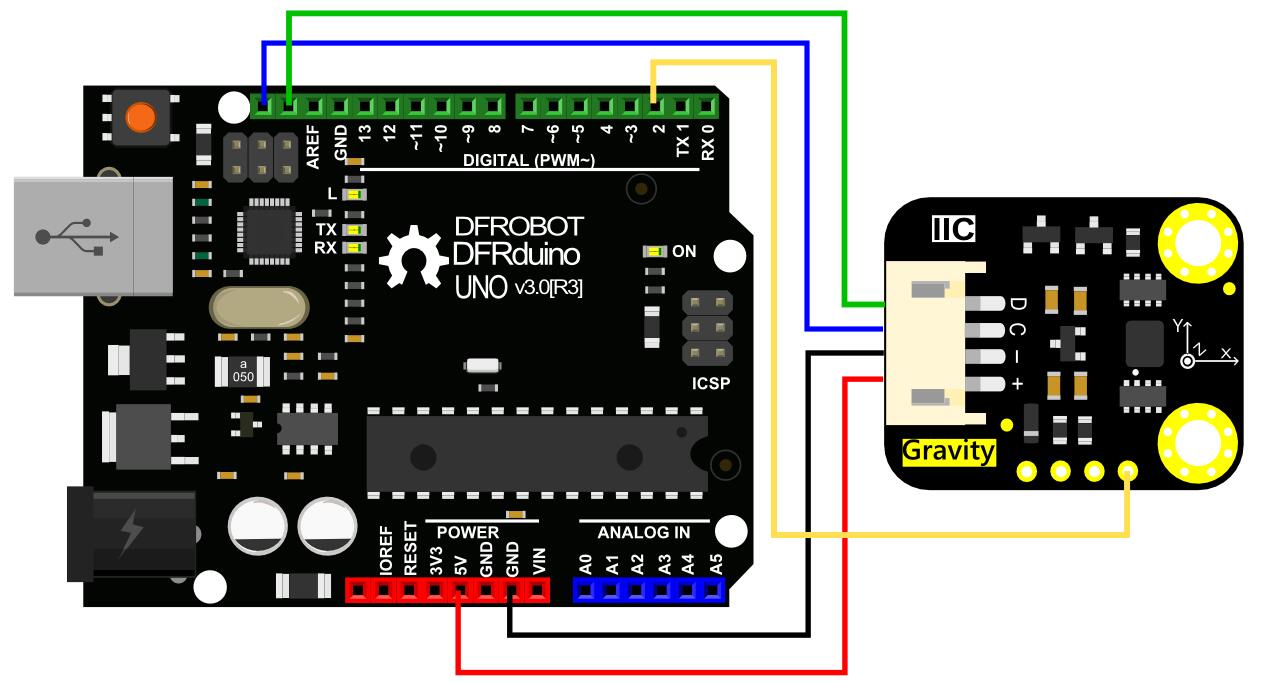
Other Preparation Work
| Note:I2C has two addresses: 0x69 (Default, Vacant); 0x68 (Connect SDO to GND). |
|---|
Tip: The pedometer algorithm does not recognize steps until after seven consecutive steps, and then if you stop walking at a certain time for too long, the counter will reset,it is also applies to INT1, INT2.
At some point there is a discrepancy between the number of steps and the actual number of steps, due to the problem of the BMI chip itself."
Sample Code
#include <DFRobot_BMI160.h>

DFRobot_BMI160 bmi160;
const int8_t i2c_addr = 0x69;
bool readStep = false;

#if defined ARDUINO_AVR_UNO || defined ARDUINO_AVR_MEGA2560 || defined ARDUINO_AVR_PRO
  //interrupt number of uno and mega2560 is 0
  int pbIn = 2;
#elif ARDUINO_AVR_LEONARDO
  //interrupt number of uno and leonardo is 0
  int pbIn = 3;
#else
  int pbIn = 13;
#endif
/*the bmi160 have two interrput interfaces*/
int int1 = 1;
int int2 = 2;

void stepChange()
{
  //once the step conter is changed, the value can be read
  readStep = true;
}

void setup(){
  Serial.begin(115200);
  delay(100);

  //set and init the bmi160 i2c address
  while (bmi160.I2cInit(i2c_addr) != BMI160_OK){
    Serial.println("i2c init fail");
    delay(1000);
  }

  //set interrput number to int1 or int2
  if (bmi160.setInt(int1) != BMI160_OK){
    Serial.println("set interrput fail");
    while(1);
  }

  //set the bmi160 mode to step counter
  if (bmi160.setStepCounter() != BMI160_OK){
    Serial.println("set step fail");
    while(1);
  }
#if defined ARDUINO_AVR_UNO || defined ARDUINO_AVR_MEGA2560 || defined ARDUINO_AVR_LEONARDO || defined ARDUINO_AVR_PRO
  //set the pin in the board to connect to int1 or int2 of bmi160
  attachInterrupt(digitalPinToInterrupt(pbIn), stepChange, FALLING);
#else
  attachInterrupt(pbIn, stepChange, FALLING);
#endif
}

void loop(){
  if (readStep){
    uint16_t stepCounter = 0;
    //read step counter from hardware bmi160
    if (bmi160.readStepCounter(&stepCounter)==BMI160_OK){
      Serial.print("step counter = ");Serial.println(stepCounter);
    }
    readStep = false;
  }
}
Result
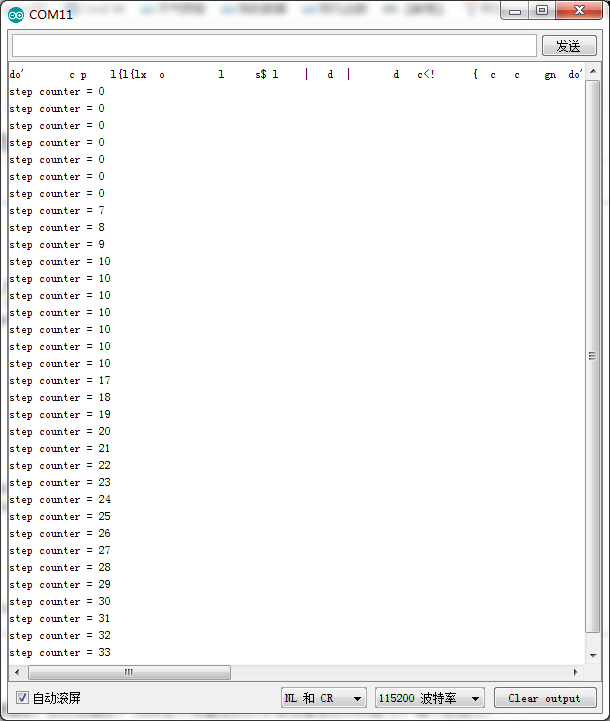
The serial port will output the step counter value. The pedometer algorithm does not recognize steps until after seven consecutive steps, and the counter will reset if you stop walking for too long. There may be discrepancies between the step count and actual steps due to the BMI chip itself.
Was this article helpful?