
Example Code for Arduino-Detect Gas Leakage
The MEMS chip MiCS-2714 reacts to the NO2, H2 and NO gas, but the linearity of some gas concentration feedback value is poor. Therefore, the concentration value does not have a reference value, but can be used as the determination basis of the gas leakage. If you need a leak detection of the relevant gas, you can download the sample program to the Arduino UNO, open Serial Port monitor to see if the set gas is leaking.
Hardware Preparation
- DFRduino UNO R3 (or similar) x 1
- SEN0441 Fermion: MEMS Gas Sensor - MiCS-2714 x1
- M-M/F-M/F-F Jumper wires
Software Preparation
- Arduino IDE
- Download and install the DFRobot MICS Library. (About how to install the library?)
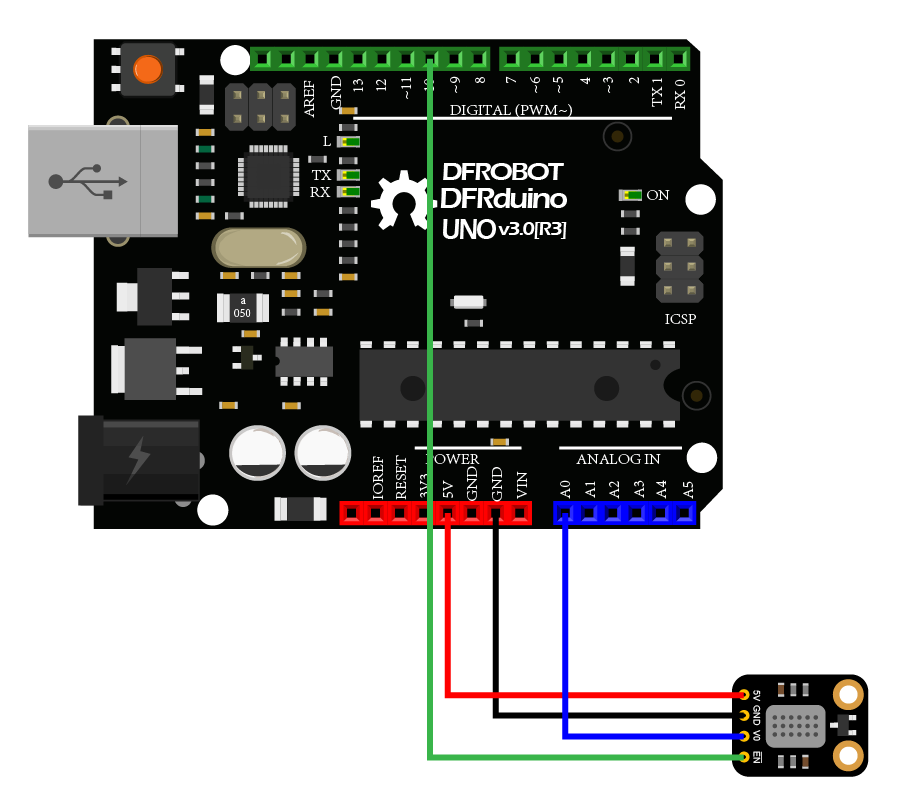
Wiring Diagram
Other Preparation Work
- Connect the module with Arduino according to the connection diagram above.
- Download and install the DFRobot MICS Library. (About how to install the library?)
- Open Arduino IDE
- Upload the following sample code to the Arduino UNO
- Or open the getGasExist.inocode in the library file sample, revise the configuration in the code (comment part of the I2C link code, uncomment the codes for breakout version), and change the gas type to NO2, then burn the modified code to the Arduino UNO
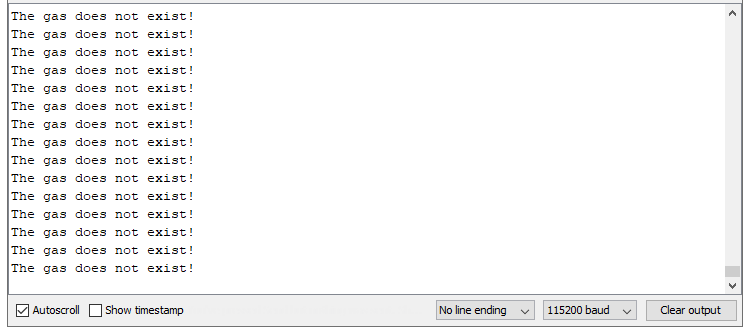
- Open the serial port monitor of the Arduino IDE, adjust the baud rate to 115200, and observe the print results.
Sample Code
/*!
  * @file  getGasExist.ino
  * @brief Reading Gas concentration, A concentration of one part per million (PPM).
  * @n When using IIC device, select I2C address, set the dialing switch A0, A1 (Address_0 is [0 0]), (Address_1 is [1 0]), (Address_2 is [0 1]), (Address_3 is [1 1]).
  * @n When using the Breakout version, connect the adcPin and PowerPin
  * @copyright   Copyright (c) 2010 DFRobot Co.Ltd (http://www.dfrobot.com)
  * @licence     The MIT License (MIT)
  * @author      ZhixinLiu(zhixin.liu@dfrobot.com)
  * @version     V1.1
  * @date        2021-04-19
  * @get         from https://www.dfrobot.com
  * @url         https://github.com/dfrobot/DFRobot_MICS
  */

#include "DFRobot_MICS.h"

#define CALIBRATION_TIME   3                      // Default calibration time is three minutes

// When using the Breakout version, use the following program to construct an object from DFRobot_MICS_ADC
/**!
  adcPin is A0~A5
  powerPin is General IO
*/
#define ADC_PIN   A0
#define POWER_PIN 10
DFRobot_MICS_ADC mics(/*adcPin*/ADC_PIN, /*powerPin*/POWER_PIN);

void setup()
{
  Serial.begin(115200);
  while(!Serial);
  while(!mics.begin()){
    Serial.println("NO Deivces !");
    delay(1000);
  } Serial.println("Device connected successfully !");

  /**!
    Gets the power mode of the sensor
    The sensor is in sleep mode when power is on,so it needs to wake up the sensor.
    The data obtained in sleep mode is wrong
   */
  uint8_t mode = mics.getPowerState();
  if(mode == SLEEP_MODE){
    mics.wakeUpMode();
    Serial.println("wake up sensor success!");
  }else{
    Serial.println("The sensor is wake up mode");
  }

  /**!
     Do not touch the sensor probe when preheating the sensor.
     Place the sensor in clean air.
     The default calibration time is 3 minutes.
  */
  while(!mics.warmUpTime(CALIBRATION_TIME)){
    Serial.println("Please wait until the warm-up time is over!");
    delay(1000);
  }
}

void loop()
{
  /**!
    Type of detection gas
    MICS-4514 You can get all gas state
    MICS-5524 You can get the state of CO, CH4, C2H5OH, C3H8, C4H10, H2, H2S, NH3
    MICS-2714 You can get the state of NO2, H2 ,NO
      CO       = 0x01  (Carbon Monoxide)
      CH4      = 0x02  (Methane)
      C2H5OH   = 0x03  (Ethanol)
      C3H8     = 0x04  (Propane)
      C4H10    = 0x05  (Iso Butane)
      H2       = 0x06  (Hydrogen)
      H2S      = 0x07  (Hydrothion)
      NH3      = 0x08  (Ammonia)
      NO       = 0x09  (Nitric Oxide)
      NO2      = 0x0A  (Nitrogen Dioxide)
  */
  int8_t gasFlag = mics.getGasExist(H2);
  if(gasFlag == EXIST){
    Serial.println("The gas exists!");
  }else{
    Serial.println("The gas does not exist!");
  }
  delay(1000);
  //mics.sleepMode();
}
Result
Open the serial port monitor and warm up for approximately 3 minutes to obtain the NO2 gas concentration data.
Note:
- If you need to detect other gases, modify the detected gas settings in the sample code yourself.
- The sensor takes 3 minutes to warm up.
Was this article helpful?