
Reference
This article offers a comprehensive guide to the ModBus-RTU communication protocol, covering fundamental parameters, data frame formats, and practical examples for reading sensor data.
Communication Protocol Description
1. Basic communication parameters
| Interface | Encoding | Data bits | Parity bits | Stop bits | Error checking | Baud rate |
|---|---|---|---|---|---|---|
| RS485 | 8-bit binary | 8 | None | 1 | CRC | 2400bit/s, 4800bit/s, 9600 bit/s configurable, default 9600bit/s |
2. Data frame format definition
Using ModBus-RTU communication protocol, the format is as follows:
- Time for initial structure ≥4 bytes
- Address code = 1 byte (unique, factory default 0x01)
- Function code = 1 byte (read: 0x03, write: 0x06)
- Data area = N bytes (high byte first for 16-bit data)
- Error checking = 16-bit CRC code
- Time to end structure ≥4 bytes
Host query frame structure:
| Address code | Function code | Register starting address | Register length | Check code low bit | Check code high bit |
|---|---|---|---|---|---|
| 1byte | 1byte | 2byte | 2byte | 1byte | 1byte |
Slave response frame structure:
| Address code | Function code | Number of valid bytes | Data area 1 | Data area 2 | Nth data area | Check code |
|---|---|---|---|---|---|---|
| 1byte | 1byte | 1byte | 2byte | 2byte | 2byte | 2byte |
3. Communication protocol examples and explanations
Example: Read parameters from sensor (address 0x01)
Inquiry frame (hexadecimal):
| Address code | Function code | Register starting address | Register length | Check code low bit | Check code high bit |
|---|---|---|---|---|---|
| 0x01 | 0x03 | 0x00 0x00 | 0x00 0x04 | 0x44 | 0x09 |
Response frame (hexadecimal):
| Address code | Function code | Return the number of valid bytes | Humidity value | Temperature value | EC value | PH value | Low bit of check code | High bit of check code |
|---|---|---|---|---|---|---|---|---|
| 0x01 | 0x03 | 0x08 | 0x02 0x92 | 0xFF 0x9B | 0x03 0xE8 | 0x00 0x38 | 0x57 | 0xB6 |
Calculations:
- Humidity: 0x0292 = 658 → 65.8%RH
- Temperature: 0xFF9B = -101 → -10.1°C (complement for negative values)
- EC: 0x03E8 = 1000 → 1000 us/cm
- PH: 0x0038 = 56 → 5.6
4. Register address
| Register address | PLC or configuration address | Content | Operation | Definition description |
|---|---|---|---|---|
| 0000H | 40001(decimal) | Moisture content | Read only | Moisture content real-time value (expanded 10 times) |
| 0001H | 40002(decimal) | Temperature value | Read only | Temperature real-time value (expanded 10 times) |
| 0002H | 40003(decimal) | Conductivity | Read only | Conductivity real-time value |
| 0003H | 40004(decimal) | PH value | Read only | PH real-time value (expanded 10 times) |
| 0007H | 40008(decimal) | Salinity | Read only | Salinity real-time value (for reference only) |
| 0008H | 40009(decimal) | Total dissolved solids TDS | Read only | TDS real-time value (for reference only) |
| 0022H | 40035(decimal) | Conductivity temperature coefficient | Read and write | 0-100 corresponds to 0.0%-10.0% Default 0.0% |
| 0023H | 40036(decimal) | Salinity coefficient | Read and write | 0-100 corresponds to 0.00-1.00 Default 55 (0.55) |
| 0024H | 40037(decimal) | TDS coefficient | Read and write | 0-100 corresponds to 0.00-1.00 Default 50 (0.5) |
| 0050H | 40081(decimal) | Temperature calibration value | Read and write | Integer (expanded 10 times) |
| 0051H | 40082(decimal) | Water content calibration value | Read and write | Integer (expanded 10 times) |
| 0052H | 40083(decimal) | conductivity calibration value | read and write | integer |
| 0053H | 40084(decimal) | pH calibration value | read and write | integer |
| 07D0H | 42001(decimal) | device address | read and write | 1-254 (factory default 1) |
| 07D1H | 42002(decimal) | device baud rate | read and write | 0 represents 2400 1 represents 4800 2 represents 9600 |
Other Supplementary Information
How to install and use
-
Quick test method
Select a stone-free location, remove topsoil, insert the sensor vertically into soil (avoid moving left/right). Average multiple measurements for accuracy.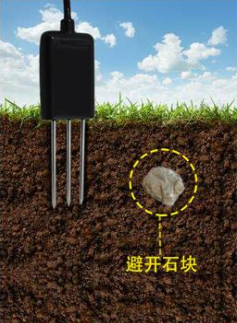
-
Buried measurement method
Dig a vertical pit (diameter >20cm), insert the sensor horizontally into the pit wall at the target depth, fill and compact the pit. Wait for stabilization before long-term monitoring.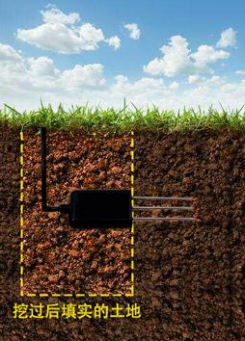
-
Things to note
- Fully insert the steel needle into soil during measurement.
- Avoid direct sunlight or lightning strikes in outdoor use.
- Do not bend the steel needle, pull wires forcefully, or drop the sensor.
- IP68 protection: The entire sensor can be immersed in water.
- Do not leave the sensor powered on in air for long periods (RF interference).
Was this article helpful?