
Example Code for Unihiker-Python
Last revision 2025/12/19
Write a Python sample program, burn it to the unihiker controller, and observe the display results on the unihiker.
Hardware Preparation
- 1 x Unihiker
- 1 x Thin-film pressure sensor
- 1 x Two ends PH2.0-3P white silicone stranded wire
Software Preparation
Wiring Diagram
Connect the sensor to the P22 pin of the unihiker.

Other Preparation Work
Sample Code
#  -*- coding: UTF-8 -*-
# MindPlus
# Python
import time
from unihiker import GUI
from pinpong.board import Board,Pin
from pinpong.extension.unihiker import *
u_gui=GUI()
Board().begin()
p_p22_analog=Pin(Pin.P22, Pin.ANALOG)
Analog values=u_gui.draw_text(text="",x=90,y=30,font_size=20, color="#0000FF")
while True:
Analog values.config(text=p_p22_analog.read_analog())
time.sleep(0.5)
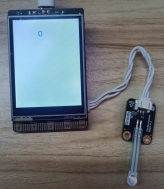
Result
| When pressure is detected | When no pressure is detected |
|---|---|
 |
 |
Was this article helpful?