
Example Code for Arduino-Reading data with IAQ values
Reads sensor data and prints the results through the serial port. (with IAQ)
Hardware Preparation
- FireBeetle ESP8266 x1
- Gravity: BME688 environmental sensor x1
- Gravity IO Expansion shield x1
- Jumper Wire(F/F) for SPI connection x1
Currently, only FireBeetle ESP8266 can read the IAQ value, other dev board are not supported at this time.
Software Preparation
- Arduino IDE (1.8.x)
- Download the DFRobot_BME68x library
- For FireBeetle ESP8266 WiFi IoT development board, you need to upgrade the SDK to 2.3.1 and above. Upgrade method reference FireBeetle ESP8266 wiki
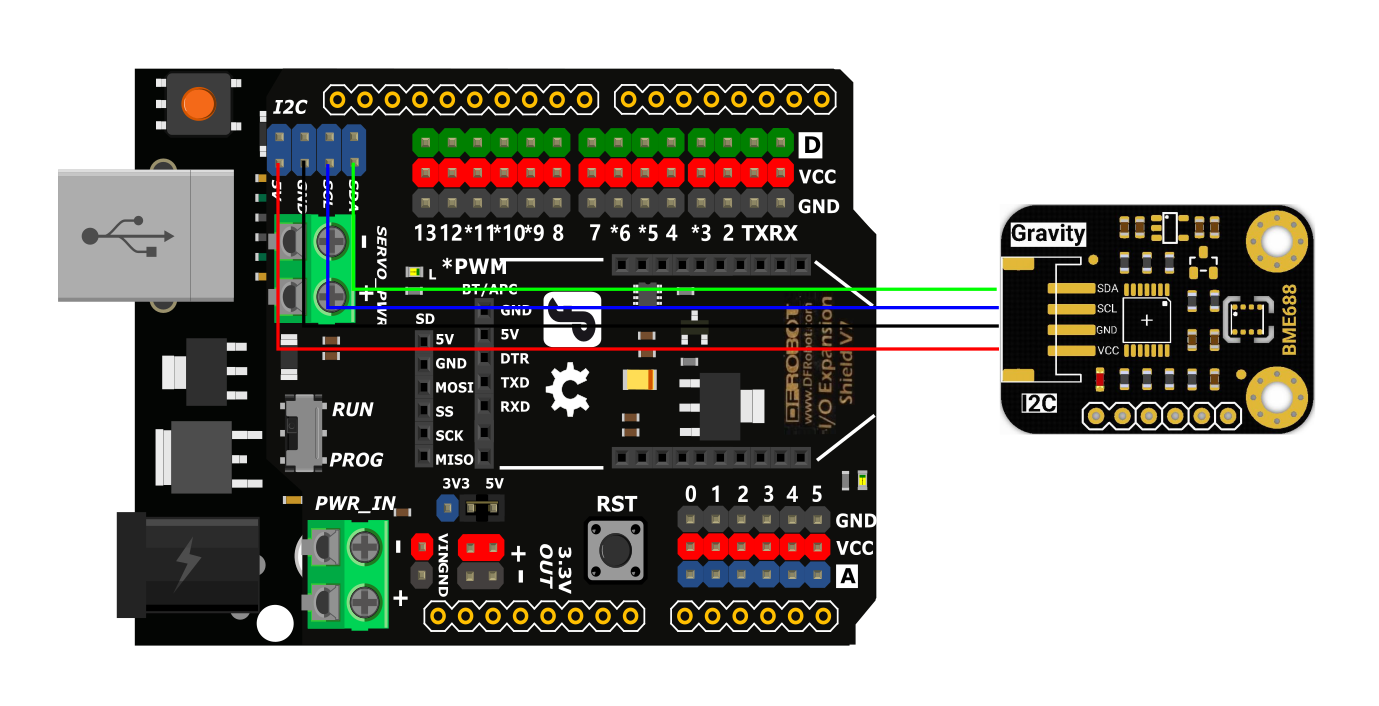
Wiring Diagram
- This product supports both I2C and SPI interfaces. Select the appropriate wiring method based on your chosen communication interface.
- The I2C interface is recommended for plug-and-play usage and easier integration.
- When using the SPI interface, the module must be powered by 3.3V.
I2C Diagram
Make sure to follow the correct wiring sequence: connect VCC to 5V and GND to ground.
Other Preparation Work
Calibration is required for accurate altitude measurement. Before uploading the code, enter the altitude of your region into the following statement in the sample code:
seaLevel = bme.readSeaLevel(<altitude_in_meters>);
Sample Code
This sample code uses the I2C interface. For SPI examples, see the reference files.
/*!
 * @file IAQ_I2C.ino
 * @brief connect bme68x I2C interface with your board (please reference board compatibility)
 * @n Temprature, Humidity, pressure, altitude, calibrated altitude, gas resistance and IAQ data will be printed via serial.
 * @note This demo only support ESP8266 MCU
 *
 * @copyright   Copyright (c) 2010 DFRobot Co.Ltd (http://www.dfrobot.com)
 * @license     The MIT License (MIT)
 * @author [Frank](jiehan.guo@dfrobot.com)
 * @maintainer [GDuang](yonglei.ren@dfrobot.com)
 * @version  V2.0
 * @date  2024-04-25
 * @url https://github.com/DFRobot/DFRobot_BME68x
 */

#include "DFRobot_BME68x_I2C.h"
#include "Wire.h"

/*use an accurate altitude to calibrate sea level air pressure*/
#define CALIBRATE_PRESSURE

DFRobot_BME68x_I2C bme(0x77);  //0x77 I2C address


float seaLevel;
void setup()
{
  uint8_t       rslt = 1;
  Serial.begin(115200);
  while(!Serial);
  delay(5000);
  Serial.println();
  while(rslt != 0) {
    rslt = bme.begin();
    if(rslt != 0) {
      Serial.println("bme begin failure");
      delay(2000);
    }
  }
  Serial.println("bme begin successful");
  bme.supportIAQ();

  // At initialization, the default heating layer target temperature is 320 and the duration is 150ms
  bool res = bme.setGasHeater(360, 100);

  Serial.print("Set the target temperature of the heating layer and the heating time: ");
  if(res == true){
    Serial.println("set successful!");
  }else{
    Serial.println("set failure!");
  }
}

void loop()
{
  static uint8_t       calibrated = 0;

  #ifdef CALIBRATE_PRESSURE
  if(calibrated == 0) {
    if(bme.iaqUpdate() == 0) {
      /*You can use an accurate altitude to calibrate sea level air pressure.
       *And then use this calibrated sea level pressure as a reference to obtain the calibrated altitude.
       *In this case,525.0m is chendu accurate altitude.
       */
      seaLevel = bme.readSeaLevel(525.0);
      Serial.print("seaLevel :");
      Serial.println(seaLevel);
      calibrated = 1;
    }
  }
  #else
    calibrated = 1;
  #endif

  if(calibrated) {
    uint8_t rslt = bme.iaqUpdate();
    if(rslt == 0) {
      Serial.println();
      Serial.print("timestamp(ms) :");
      Serial.println(millis());
      Serial.print("temperature(C) :");
      Serial.println(bme.readTemperature(), 2);
      Serial.print("pressure(Pa) :");
      Serial.println(bme.readPressure());
      Serial.print("humidity(%rh) :");
      Serial.println(bme.readHumidity(), 2);
      Serial.print("altitude(m) :");
      Serial.println(bme.readAltitude());
#ifdef CALIBRATE_PRESSURE
      Serial.print("calibrated altitude(m) :");
      Serial.println(bme.readCalibratedAltitude(seaLevel));
#endif
      Serial.print("gas resistance :");
      Serial.println(bme.readGasResistance());
      if(bme.isIAQReady()) {
        Serial.print("IAQ :");
        float iaq = bme.readIAQ();
        Serial.print(iaq);
        if(iaq < 50) Serial.println(" good");
        else if(iaq < 100) Serial.println(" average");
        else if(iaq < 150) Serial.println(" little bad");
        else if(iaq < 200) Serial.println(" bad");
        else if(iaq < 300) Serial.println(" worse");
        else Serial.println(" very bad");
      } else {
        Serial.println("IAQ not ready, please wait about 5 minutes");
        Serial.print("IAQ not ready, You will have to wait ");
        Serial.print((int)(305000-millis())/1000);
        Serial.println(" seconds");
      }
    }
  }
}
Result

Was this article helpful?