
Example Code for Arduino-Player
Last revision 2025/12/09
The article offers detailed example code for Arduino-Player, showcasing hardware and software preparation, wiring diagrams, and sample code to execute audio control functions such as play, pause, and volume settings through serial communication.
Hardware Preparation
- DF_UNO *1
- Speaker *2
- ADKeyboard *1
- This module *1
- Micro SD card reader-writer
- Jumper wires
Software Preparation
Wiring Diagram
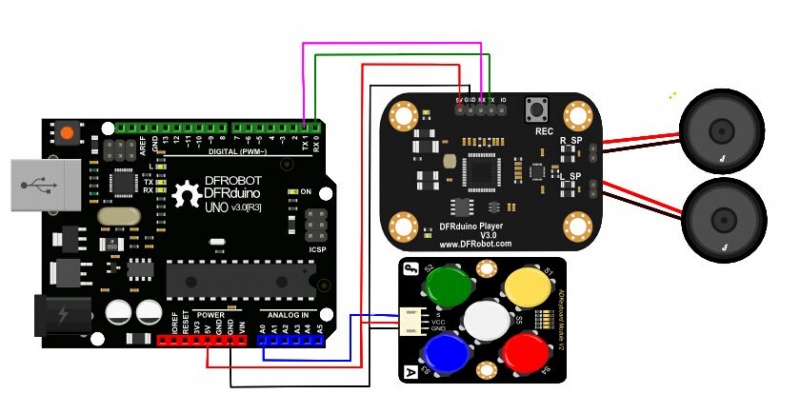
Other Preparation Work
- Format the SD card as FAT32 and store your audio files on the root directory
- Insert the SD card into the module
- Open Arduino IDE
- Upload the following code to the UNO (note: the UNO only has one serial port so you cannot upload a program and use the DFRduino Player module at the same time)
- Wire according to the connection diagram. We recommend using an external power supply for the microcontroller.
Sample Code
 /////////////////////////////////////////////////////////////////////////////////
/ / put audio files in the root directory, support. WAV, .MP3 this two kinds of file formats
/ / 5V voltage and current guarantee 1000 mA, if current is not enough, need to turn volume down, or play with a single horn
/ / the function of the lamp:
/ / after the success of initialization will long bright, if SD card is not inserted or it is bad, will keep flashing, at the same time,
/ / serial port output Please check micro SD card \\ r \\ n
/ / / / / / / / / / / / / / / / / / / / / / / serial port communication / / / / / / / / / / / / / / / / / / / / / / / / / / / / / / / / / / / / / / / / / / / / /
/ / Play audio: voice file name \\ r \\ n Play songs of the corresponding name, if found songs played right will return to Play ok \\ r \\ n
/ / return if failure  Not found \\ r \\ n.  return If play end  over \\ r \\ n \\ r \\ n said carriage returns)
/ /voice file name no more than eight English alphabets  , four Chinese.
// pause \\ : p \\ r \\ n successfully return pause \\ r \\ n
/ / continue to play \\ \\ : s successfully return to start \\ r \\ r \\ n \\ n
/ / play next song  \\ \\ : n \\ r \\ n successfully return next \\ r \\ n, or  failure return false\\ r \\ n
/ / play previous song  \\ \\ :u \\ r \\ n successfully return key up \\ r \\ n
/ / volume Settings \\ \\ : v 255\\ r \\ n, set the volume, Numbers 0-255, the greater the number, the greater the volume, successfully return play end \\ r \\ n
 /////////////////////////////////////////////////////////////////////////////////

 //Serial port connection mode
 //Arduino    MP3
 //TX         RX
 //RX         TX
 //5V          5V
 //GND        GND

 int adc_key_val[5] ={600, 650, 700, 800, 950 };
 int NUM_KEYS = 5;
 int adc_key_in;
 int key=-1;
 int oldkey=-1;

 void setup()
 {
   Serial.begin(19200);
   delay(2000);                   //Wait for initialization
   Serial.println("\\:v 200");    //Set the volume, from 0 (minimum)-255 (maximum)
   delay(50);
 }


 void loop()
 {
   adc_key_in = analogRead(0);    // read the value from the sensor

   key = get_key(adc_key_in);    // convert into key press

   if (key != oldkey)     // if keypress is detected
    {
     delay(50);     // wait for debounce time
     adc_key_in = analogRead(0);    // read the value from the sensor
     key = get_key(adc_key_in);    // convert into key press
     if (key != oldkey)
     {
       oldkey = key;
       if (key >=0){
         switch(key)
         {
            case 0:
                   Serial.println("\\:p"); // Pause
                   break;
            case 1:
                   Serial.println("\\:s");// Continoue to play
                   break;
            case 2:
                   Serial.println("\\:n");  // Play next
                   break;
            case 3:
                   Serial.println("\\:u"); // Play previous
                   break;
            case 4:                        //Play specified song
                   Serial.println("\\YOURS.mp3");
                   break;
         }
       }
     }
   }
  delay(100);
 }

 // Convert ADC value to key number
 int get_key(unsigned int input)
 {
     int k;

     for (k = 0; k < NUM_KEYS; k  )
     {
       if (input < adc_key_val[k])
      {
             return k;
       }
    }
     if (k >= NUM_KEYS)k = -1;  // No valid key pressed
     return k;
 }
Result
- S1 - pause
- S2 - continue to play
- S3 - play the previous song
- S4 - play the next song
- S5 - play the specified songs (designated by the program)
Was this article helpful?