
Example Code for Arduino-Recorder
Last revision 2025/12/09
achieve recording mp3 files to the SD card
Key Recorder
Insert SD card into the SD card slot
Power supply for the module
Press and hold the REC button and speak into the microphone, release the REC button after finish.
The recording file will be stored in a file called RECxxx. Mp3
Hardware Preparation
- DF_UNO *1
- ADKeyboard *1
- This module *1
- Micro SD card reader and writer
- Jumper wires
Software Preparation
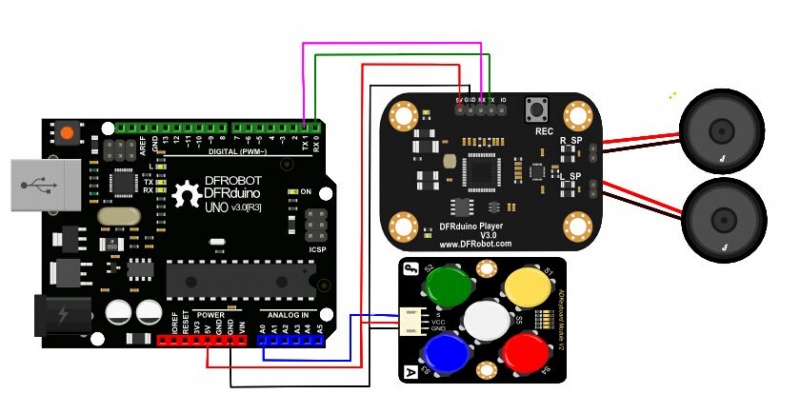
Wiring Diagram
Other Preparation Work
- Format the SD card as FAT32 on your PC, store audio files on the root directory.
- Insert SD card into the module
- Open Arduino IDE
- Upload the following code to UNO (note: UNO only has one serial port, and the program downloaded to the DFRduino Player module cannot be used at the same time)
- Wire according to the connection diagram, We recommend using external power supply to power the microcontroller.
Sample Code
 /////////////////////////////////////////////////////////////////////////////////
 //Use the command finished recording
 //\:r\r\n start recording command
 //\:e\r\n end of record command
 /////////////////////////////////////////////////////////////////////////////////

 //serial port connection mode
 //Arduino    MP3
 //TX         RX
 //RX         TX
 //5V          5V
 //GND        GND

int adc_key_val[5] ={600, 650, 700, 800, 950 };
 int NUM_KEYS = 5;
 int adc_key_in;
 int key=-1;
 int oldkey=-1;

 void setup()
 {
   Serial.begin(19200);
   delay(2000);                   //Wait for initialization
   Serial.println("\\:v 200");    //Set the volume, from 0 (minimum)-255 (maximum)
   delay(50);
 }


 void loop()
 {
   adc_key_in = analogRead(0);    // read the value from the sensor

   key = get_key(adc_key_in);    // convert into key press

   if (key != oldkey)     // if keypress is detected
    {
     delay(50);     // wait for debounce time
     adc_key_in = analogRead(0);    // read the value from the sensor
     key = get_key(adc_key_in);    // convert into key press
     if (key != oldkey)
     {
       oldkey = key;
       if (key >=0){
         switch(key)
         {
            case 0:
                   Serial.println("\\:r"); // start record
                   break;
            case 1:
                   Serial.println("\\:e");// exit record
                   break;
            default:
                   break;
         }
       }
     }
   }
  delay(100);
 }

 // Convert ADC value to key number
 int get_key(unsigned int input)
 {
     int k;

     for (k = 0; k < NUM_KEYS; k  )
     {
       if (input < adc_key_val[k])
      {
             return k;
       }
    }
     if (k >= NUM_KEYS)k = -1;  // No valid key pressed
     return k;
 }
Result
- S1 - start recording
- S2 - end of recording
Was this article helpful?