
Example Code for Arduino-Control Backlight
Control the backlight of the I2C LCD1602 Module to toggle on and off every second.
Hardware Preparation
Software Preparation
Development Tools: Arduino IDE 1.0 or higher; Library: LiquidCrystal_I2C v1.1; Download Link: Sample code and library
Wiring Diagram
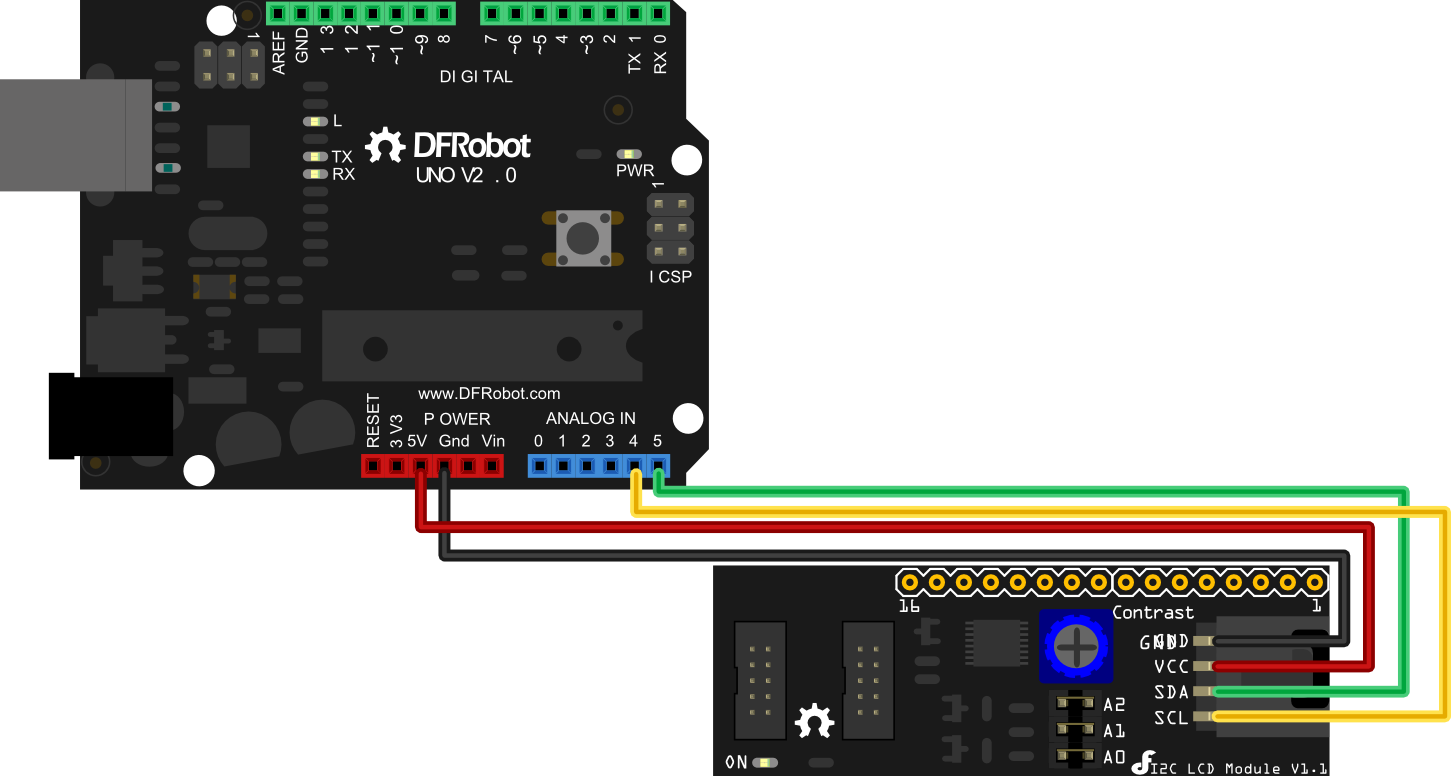
Arduino UNO: connect SDA to Analog pin 5 and SCL to Analog pin 4 on your Arduino.
Arduino Leonardo: connect SDA to digital pin 2 and SCL to digital pin 3 on your Arduino.
Other Preparation Work
- Set the I2C address of the LCD module according to the Address Setting table (default is 0x27).
- Install the LiquidCrystal_I2C library in the Arduino IDE.
Sample Code
#include <Wire.h>
#include <LiquidCrystal_I2C.h>

#if defined(ARDUINO) && ARDUINO >= 100
#define printByte(args)  write(args);
#else
#define printByte(args)  print(args,BYTE);
#endif

LiquidCrystal_I2C lcd(0x27,16,2);  // set the LCD address to 0x27 for a 16 chars and 2 line display

void setup(){

  lcd.init();                      // initialize the lcd
  lcd.backlight();

  lcd.home();

  lcd.print("Hello world...");
  lcd.setCursor(0, 1);
  lcd.print("dfrobot.com");

}

int backlightState = LOW;
long previousMillis = 0;
long interval = 1000;

void loop(){

  unsigned long currentMillis = millis();

  if(currentMillis - previousMillis > interval) {
    previousMillis = currentMillis;

    if (backlightState == LOW)
      backlightState = HIGH;
    else
      backlightState = LOW;

    if(backlightState == HIGH)  lcd.backlight();
    else lcd.noBacklight();
  }
}
Result
The LCD displays "Hello world..." on the first line and "dfrobot.com" on the second line. The backlight toggles on and off every second.
If you want to use the library's own sample code, pay attention to modify the initialization statement: change
LiquidCrystal_I2C lcd(0x27,16,2); // set the LCD address to 0x27 for a 16 chars and 2 line displaytoLiquidCrystal_I2C lcd(0x20,16,2); // set the LCD address to 0x20 for a 16 chars and 2 line display(All jumpers should be connected!).
Because the default initialization statement is for LCD1602!
Additional Information
Refer to the project DYP-ME007 Ultrasound range finder - display distance on a I2C 2x16 LCD for more usage examples.
Was this article helpful?