Self-powered Wireless BLE Beacon Module

SKU: TEL0173

DFRobot’s self-powered wireless BLE beacon module needs no battery. It uses a micro generator (converts press kinetic energy to electricity via electromagnetic induction) and a BLE RF circuit (rectifies/stores energy to broadcast signals). With a 100,000-press lifespan, it’s maintenance-free, ideal for wireless doorbells, call buttons, and state-monitoring applications.

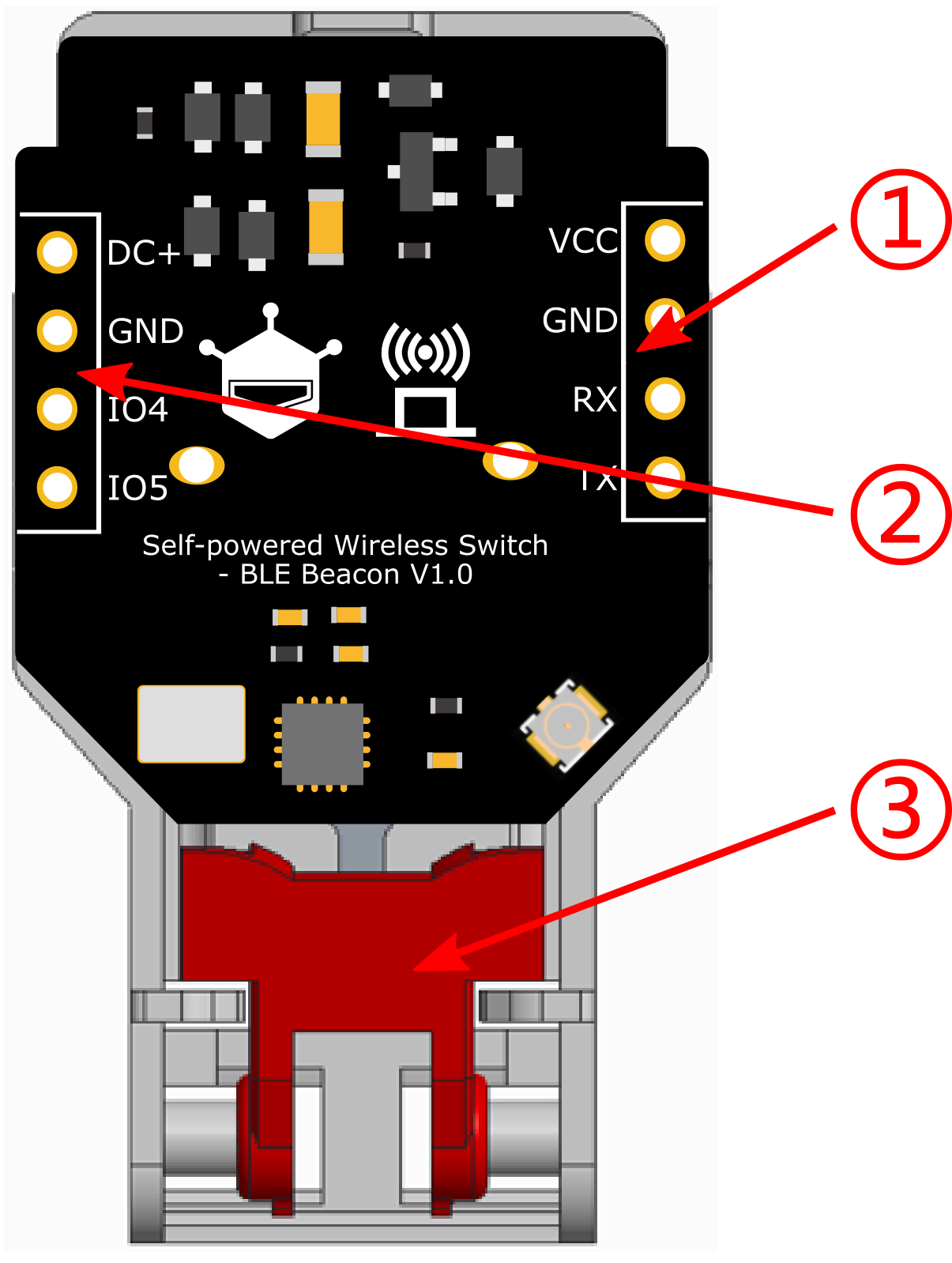
Board Overview of Self-powered Wireless Switch (BLE Beacon)

Downloadable Resources

  • Docs
  • Tech Specs
  • Specification

    Parameter Details
    Frequency 2.4GHz
    Advertising channels 37 + 38 + 39 (2402MHz, 2426MHz, 2480MHz)
    Advertising data format Supplier-customized Beacon
    Generated energy 250µJ
    Actuation force typical value 1300g
    Module weight 14g ± 2.5g (excluding antenna)
    Module dimensions 44 x 22 x 11mm
    Press frequency up to 2 presses per second (pressing too quickly may trigger a protection state, requiring approximately 10 seconds to reset)
    Communication distance >40m (with a smartphone as the receiver, in open outdoor conditions)

    Pinout

    Name Function
    1. Programming port Reserved for custom functions
    2. Expansion port Reserved for custom functions
    3. Power generation button Generates energy when pressed

    FAQ

    • After pressing the button, sometimes the mobile app cannot scan BLE information?

      1. Please close other background processes on your phone, disconnect from WiFi and mobile networks, and only enable Bluetooth. When your phone is busy processing tasks from other apps, it can cause the NanoBeacon BLE Scanner app to miss some BLE broadcasts during scanning.

      2. When there are many obstacles between the receiver and transmitter, it significantly reduces the communication distance.

      3. Pressing the button too quickly can lead to excessive power generation, causing the module to enter a protection state. Stop pressing the button and wait for about 10 seconds for it to recover on its own.

      4. When the mobile app hasn't received BLE advertisements for a long time, it automatically enters sleep mode and stops scanning. Click the start button in the bottom right corner or pull down the interface to refresh.

    • After pressing the button, sometimes the ESP32 cannot scan BLE information?

      Please avoid testing in environments with too many electronic devices. In surroundings where there are numerous BLE devices, the ESP32's processing speed may be insufficient, leading to missed BLE advertisement scans.

    Explore More Related Questions >

    Was this article helpful?

    TOP