Romeo Robot Control Board

SKU: DFR0004

The Romeo Robot Control Board is an all-in-one robotics solution from DFRobot, designed for ease of use with the Arduino platform. It features integrated 2x2A DC motor drivers, a wireless communication socket, and extra power for servos, making it ideal for building custom robots. Compatible with Gravity series sensors and actuators, the board offers plug-and-play capabilities for hundreds of sensors. As the first Arduino-derived board, Romeo has a rich history of supporting robotics applications since its inception in 2009. With its current version based on Arduino Uno, Romeo continues to be a powerful tool for robotics enthusiasts, offering seamless integration and expansion possibilities.

Angled shot of Romeo motor driver board with Arduino interface-DFRobot product sku:DFR0004 image.

Downloadable Resources

  • Docs
  • Tech Specs
  • 1. Getting Started

    This article offers comprehensive guidance on installing drivers and setting up Arduino boards, detailing procedures for Windows, OSX, and Linux operating systems. It highlights essential steps such as connecting the Romeo controller, applying power correctly, and programming with Arduino IDE, ensuring users can efficiently start their projects.

    2. Example Code for Arduino-Button Press

    This article presents an example code for implementing button press functionality using DFRobot RoMeo with Arduino IDE. It covers hardware and software setup, wiring diagrams, and provides sample code for detecting button presses and displaying key messages on the serial monitor.

    3. Example Code for Arduino-Dual DC Motor PWM Control

    This article offers a detailed guide on using Arduino to control dual DC motors via PWM, covering hardware and software setup, wiring, and providing sample code for effective motor speed and direction management.

    4. Example Code for Arduino-Dual DC Motor PLL Control

    This article provides a comprehensive guide on using Arduino to control dual DC motors with PLL mode, including hardware and software preparation, wiring instructions, and a sample code for efficient motor operation via serial commands.

    Specification

    Parameter Details
    Microcontroller Atmega 168/328
    Digital I/O 14 Channels
    PWM Channels 6 (Pin11, Pin10, Pin9, Pin6, Pin5, Pin3)
    Analog I/O 8 Channels 10-bit
    Interface USB interface
    Power Input Auto sensing/switching power input
    Programming ICSP header for direct program download
    Serial Interface TTL Level
    Special Features Support AREF; Support Male and Female Pin Header
    Integrated Sockets APC220 RF Module and DF-Bluetooth Module
    I2C Interface Five Pin Sets
    Motor Drive Two way, 2A maximum current
    Key Inputs 5
    DC Supply USB Powered or External 7V~12V DC
    DC Output 5V /3.3V DC and External Power Output
    Dimension 90x80mm

    Pinout

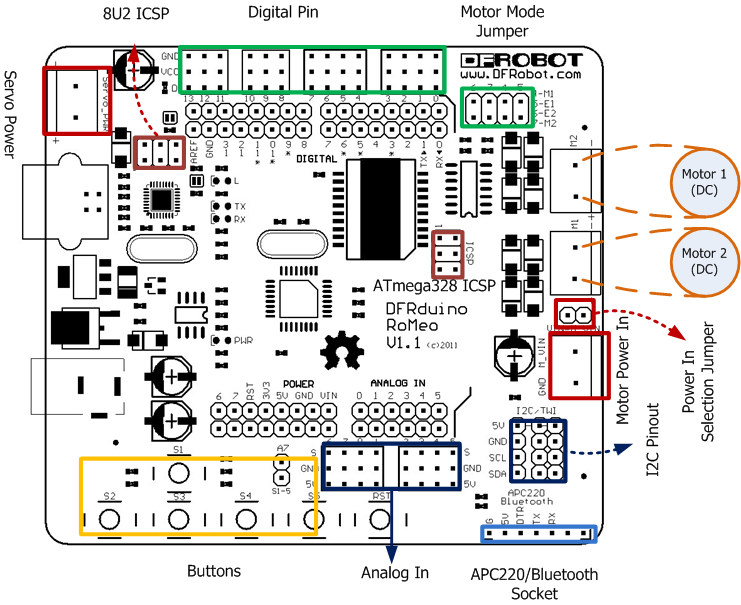
    Fig1: Romeo Pin Out
    The picture above shows all of the I/O lines and Connectors on the Romeo, which includes:

    • One Regulated Motor Power Input Terminal (6v to12v)
    • One Unregulated Servo Power Input Terminal (you supply regulated 4v to 7.2v)
    • One Servo input power selection jumper
    • One Serial Interface Module Header for APC220/Bluetooth Module
    • Two DC Motor Terminals – Handles motor current draw up to 2A, each terminal
    • One I2C/TWI Port – SDA, SCL, 5V, GND
    • One Analog Port with 8 analog inputs – Analog input 7 will be occupied when connecting "A7" jumper
    • One General Purpose I/O Port with 13 I/O lines – 4,5,6,7 can be used to control motors
    • One Reset Button
    • Jumper bank to Enable/Disable Motor Control

    Was this article helpful?

    TOP