
Example Code for Arduino-I2C Communication Control
Last revision 2025/12/09
This article provides example code for controlling the Rainbow Ring V3 via I2C using Arduino.
Hardware Preparation
Software Preparation
Download the library Rar file (New RAR file with additional sample code)
This library has yet to be upgraded to be compatible with IDE V1.0 Please use Arduino 0023
Wiring Diagram
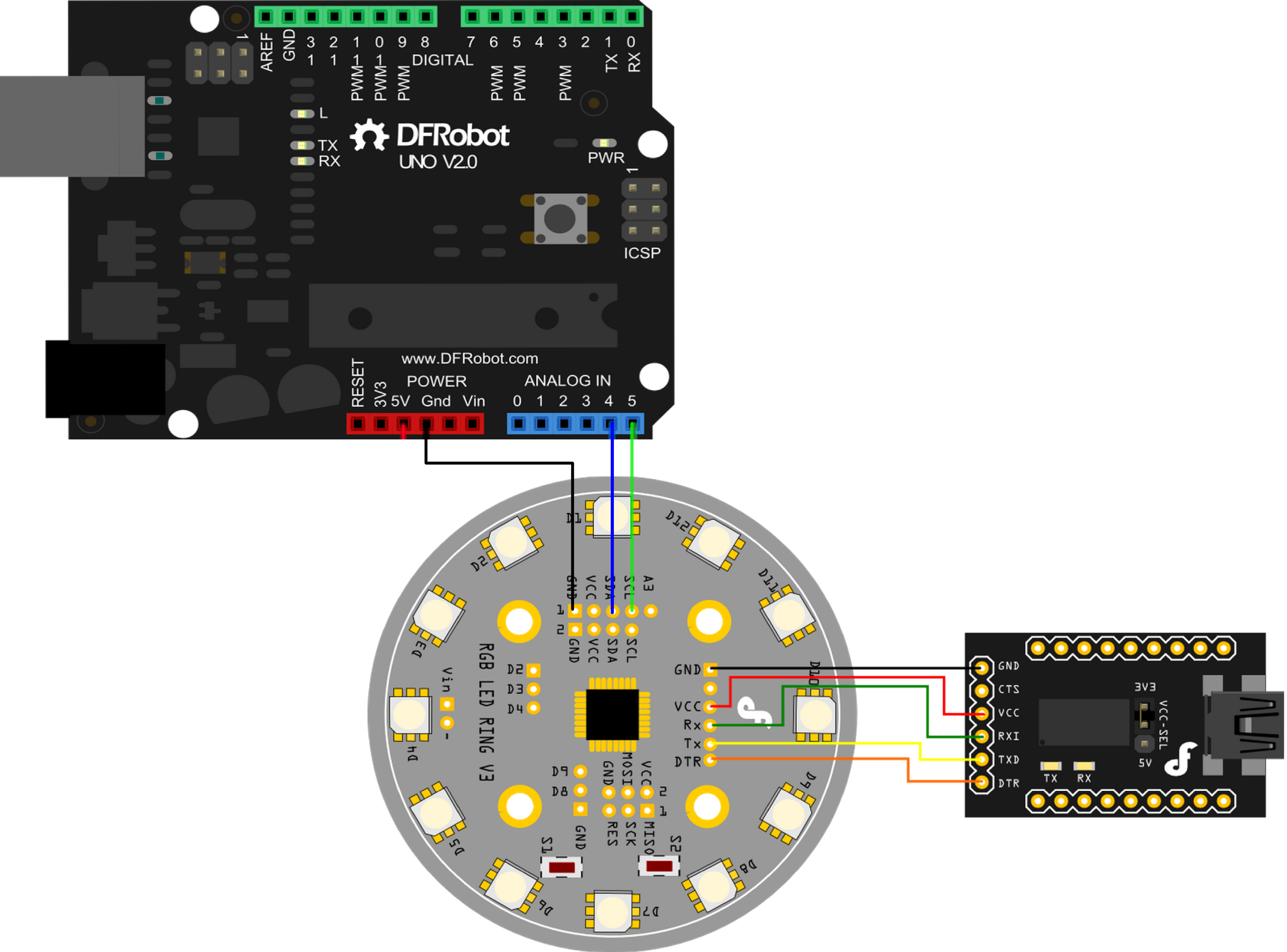
Other Preparation Work
-
The Rainbow Ring ships with no pin headers. This gives you the option to solder the pins according to your project needs. Before starting to program the LED Ring you should solder the pin headers on to the board.
- CAUTION: Only supply power to 1 of the 3 power pins provided at any one time.
-
Download the library Rar file (New RAR file with additional sample code)
-
How to change board
- step1: Once it's downloaded, unzip the files as normal.You will see the following list.
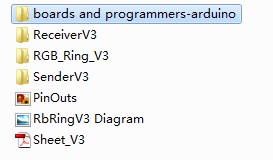
- step2: Open boards and programmers-arduino / boards.

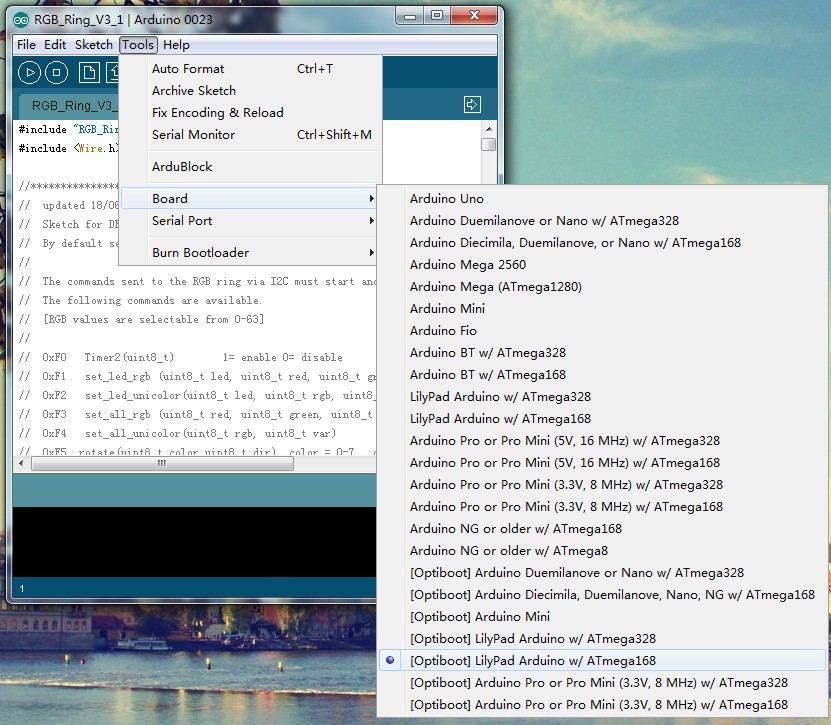
- step3: Meanwhile,open Arduino 0023 Arduino 0023 / hardware / arduino.

- step4: Put the file boards of step2 instead of the one boards of step3. Then re-open Arduino 0023 and select: [Optiboot] Lilypad Arduino w/Atmega 168
Sample Code
UNO as the Sender
//Code for arduino IDE 1.0.5
// for DFROBOT RGB LED RING

#include <Wire.h>


//  Commands must start and end with same number if F1,1,60,0,0,F1 will set led 1 to red
//  The commands sent to the RGB ring via I2C must start and end with the same byte to work.
//  The following commands are available.
//  [RGB values are selectable from 0-63]
//
//  0xF0   Timer2(uint8_t)        1= enable 0= disable       ie F0,01,F0   will enable timers
//  0xF1   set_led_rgb (uint8_t led, uint8_t red, uint8_t green, uint8_t blue);  i.e. F1,01,3f,3f,3f,F1 will set LED1 to white
//  0xF2   set_led_unicolor(uint8_t led, uint8_t rgb, uint8_t var);
//  0xF3   set_all_rgb (uint8_t red, uint8_t green, uint8_t blue) ;
//  0xF4   set_all_unicolor(uint8_t rgb, uint8_t var)
//  0xF5  rotate(uint8_t color,uint8_t dir)  color = 0-7,  dir 0=none, 1=cw, 2=ccw
//          colour determines the component to rotate, i.e.
//                 colour =1 is red and will just rotate the red component.
//                 color 7 is white and will rotate all the LEDs.


//  0xF7  set wobble pattern 3      ?
//  0xFA swaywobble (uint8_t _delay,uint8_t dir)
//  0xFB ?
//  0xF8  serialOn(uint8_t)   1= turn serial on, anything else = serial off.
//        Serial output is at 38400 but causes lots of flickering so better to turn off.

byte buffer[20];
byte i;
byte counter;
byte c;

void setup() {


   Wire.begin(); // join i2c bus (address optional for master)


 Wire.beginTransmission(4);
//Set allRGB to Blue for 1/2 second
  SetAllRGB(0,0,0x3F);
  delay(500);
  //Set allRGB to Red for 1/2 second
  SetAllRGB(0x3F,0,0);
  delay(500);
  //Set allRGB to Green for 1/2 second
  SetAllRGB(0,0x3F,0);
  delay(500);


  buffer[0]=0xF8;  //turn serial off to eliminate flicker
  buffer[1]=0xF8;
  RGBringSend(2);

  delay(250);
  SetAllRGB(0,0,0);   //turn all LED off.

  delay(500);

}


void loop()
{
 delay (1000);

 //turn a red led on and
 for (counter=0; counter <72;counter++){


   SetRGB_led(counter%12,63,63,63);

   SetRGB_led(11+counter%12,63,0,0);

   SetRGB_led(10+counter%12,0,63,0);
   SetRGB_led(9+counter%12,0,0,63);
   SetRGB_led(8+counter%12,0,0,10);
   SetRGB_led(7+counter%12,0,0,0);


   delay(40);
 }
 //slowly turn all LED on and increase brightness
 for (c=0; c <63;c++){
    SetRGB_led(0,c,0,0);
    SetRGB_led(1,0,c,0);
    SetRGB_led(2,0,0,c);
    SetRGB_led(3,c,c,0);
    SetRGB_led(4,c,0,c);
    SetRGB_led(5,0,c,c);
    SetRGB_led(6,c,c,c);
    SetRGB_led(7,0,0,c);
    SetRGB_led(8,0,c,0);
    SetRGB_led(9,c,0,0);
    SetRGB_led(10,c,0,c);
    SetRGB_led(11,c,c,0);
   delay(3);
 }
 //slowly dim LED
  for (c=63; c >0;c--){
    SetRGB_led(0,c,0,0);
    SetRGB_led(1,0,c,0);
    SetRGB_led(2,0,0,c);
    SetRGB_led(3,c,c,0);
    SetRGB_led(4,c,0,c);
    SetRGB_led(5,0,c,c);
    SetRGB_led(6,c,c,c);
    SetRGB_led(7,0,0,c);
    SetRGB_led(8,0,c,0);
    SetRGB_led(9,c,0,0);
    SetRGB_led(10,c,0,c);
    SetRGB_led(11,c,c,0);
   delay(3);
 }
 //turn 4 LED on and then rotate all of them
     SetAllRGB(0,0,0);   //turn all LED off.
     SetRGB_led(0,63,0,0);
     SetRGB_led(3,0,63,0);
     SetRGB_led(6,0,0,63);
     SetRGB_led(9,63,63,0);
     for (c=50 ; c>10 ; c--){\n       LEDrotate(7,1);  //clockwise rotate all colours
       delay(c*10);
     }
     for (c=10 ; c<50 ; c++){\n       LEDrotate(7,2);  //anticlockwise
       delay(c*10);
     }
}

void SetRGB_led(int led,int rr,int gg,int bb)
{
  buffer[0]=0xF1;
  buffer[1]=led%12;
  buffer[2]=rr;
  buffer[3]=gg;
  buffer[4]=bb;
  buffer[5]=0xF1;
  RGBringSend(6);
}

void SetAllRGB(int rr,int gg, int bb)
{
  buffer[0]=0xF3;
  buffer[1]=rr;
  buffer[2]=gg;
  buffer[3]=bb;
  buffer[4]=0xF3;
  RGBringSend(5);
}
void LEDrotate(int colormask,int dir)
{
  buffer[0]=0xF5;
  buffer[1]=colormask;
  buffer[2]=dir;
  buffer[3]=0xF5;
  RGBringSend(4);
}

void RGBringSend(int commandLength)
{
  Wire.beginTransmission(4);
  for(i=0;i<commandLength;i++){
    Wire.write(buffer[i]);
  }
  Wire.endTransmission();
}
Rainbow Ring as the receiver
#include "RGB_Ring_V3.h"
#include <Wire.h>

//****************************************
//  updated 18/06/2013
//  Sketch for DFrobot DFR0141
//  By default serial is turned on so RGB ring will send serial out  at 38400
//
//  The commands sent to the RGB ring via I2C must start and end with the same byte to work.
//  The following commands are available.
//  [RGB values are selectable from 0-63]
//
//  0xF0   Timer2(uint8_t)        1= enable 0= disable       ie F0,01,F0   will enable timers
//  0xF1   set_led_rgb (uint8_t led, uint8_t red, uint8_t green, uint8_t blue);  i.e. F1,01,3f,3f,3f,F1 will set LED1 to white
//  0xF2   set_led_unicolor(uint8_t led, uint8_t rgb, uint8_t var);
//  0xF3   set_all_rgb (uint8_t red, uint8_t green, uint8_t blue) ;
//  0xF4   set_all_unicolor(uint8_t rgb, uint8_t var)
//  0xF5  rotate(uint8_t color,uint8_t dir)  color = 0-7,  dir 0=none, 1=cw, 2=ccw
//          colour determines the component to rotate, i.e.
//                 colour =1 is red and will just rotate the red component.
//                 color 7 is white and will rotate all the LEDs.


//  0xF7  set wobble pattern 3      ?
//  0xFA swaywobble (uint8_t _delay,uint8_t dir)
//  0xFB ?
//  0xF8  serialOn(uint8_t)   1= turn serial on, anything else = serial off.
//        Serial output is at 38400 but causes lots of flickering so better to turn off.


int S1 = 3;
int S2 = 4;
int val1 = 0;     // variable to store the read value
int val2 = 0;
int turn = 0;

int serialOn = 1;

void setup() {
#ifdef UART
    InitUART();
#else
    Serial.begin(38400);           // start serial for output
#endif
    InitIO();

    Wire.begin(4);                // join i2c bus with address #4
    Wire.onReceive(receiveEvent); // register event

    pinMode(S1, INPUT);
    pinMode(S2, INPUT);
    digitalWrite(S1, HIGH);
    digitalWrite(S2, HIGH);
}

void loop() {
    uint8_t led;
    val1 =digitalRead(S1);
    val2 =digitalRead(S2);
    if(val1==LOW){  //Button S1 pushed
        if (serialOn ==1){
            Serial.println("Button 1 Pushed ");
        }

        uint16_t ctr;
        ALLLEDRED();
        delay(300);
        ALLLEDYELLO();
        delay(300);
        ALLLEDGREEN();
        delay(300);
        ALLLEDTURQUOISE();
        delay(300);
        ALLLEDBLUE();
        delay(300);
        ALLLEDFUCHSIA();
        delay(300);
        ALLLEDWHITE();
        delay(300);
        ALLLEDBLACK();
        delay(300);

        for (ctr = 0; ctr < 3; ctr++)    {
            sequence ();
        }
        ALLLEDBLACK();  // test specific LED
        set_led_rgb(0, 64, 0, 0);
        delay(100);
        set_led_rgb(1, 64, 32, 0);
        delay(100);
        set_led_rgb(2, 64, 64, 0);
        delay(100);
        set_led_rgb(3, 32, 64, 0);
        delay(100);
        set_led_rgb(4, 0, 64, 0);
        delay(100);
        set_led_rgb(5, 0, 64, 32);
        delay(100);
        set_led_rgb(6, 0, 64, 64);
        delay(100);
        set_led_rgb(7, 0, 32, 64);
        delay(100);
        set_led_rgb(8, 0, 0, 64);
        delay(100);
        set_led_rgb(9, 34, 0, 64);
        delay(100);
        set_led_rgb(10, 64, 0, 64);
        delay(100);
        set_led_rgb(11, 64, 0, 32);
        delay(100);
        for (ctr = 0; ctr < 24; ctr++)    {
            rotate(7,CW);
            delay(50);
        }

        ALLLEDBLACK();  //test rotate led
        set_led_rgb(3, 64, 0, 64);
        for (ctr = 0; ctr < 60; ctr++)    {
            rotate(1,CW);
            rotate(3,CCW);
            delay(50);
        }
        ALLLEDBLACK();
        ALLLEDYELLO();
        delay(50);
        for (ctr = 0; ctr < 5; ctr++)    {
            swaywobble(50,CW);
        }
        ALLLEDBLACK();
        setwobble(0xFFFF);

        ALLLEDBLACK();
        for (ctr = 0; ctr < 3; ctr++)    {
            fader();
        }
        ALLLEDBLACK();
        for (ctr = 0; ctr < 3; ctr++)    {
            fader_hue ();
        }
        ALLLEDBLACK();
        for (ctr = 0; ctr < 400; ctr++) {
            color_wave (45);
        }
        for(ctr = 0; ctr < 5; ctr++) {
            disable_timer2_ovf();
            delay(100);
            enable_timer2_ovf();
            delay(100);
        }


    }else if(val2==LOW){
        if (serialOn ==1){
            Serial.println("Button 2 Pushed ");
        }
        switch (turn){
        case 1:
            ALLLEDRED();
            break;
        case 2:
            ALLLEDYELLO();
            break;
        case 3:
            ALLLEDGREEN();
            break;
        case 4:
            ALLLEDTURQUOISE();
            break;
        case 5:
            ALLLEDBLUE();
            break;
        case 6:
            ALLLEDFUCHSIA();
            break;
        case 7:
            ALLLEDWHITE();
            break;
        default:
            ALLLEDBLACK();
            break;
        }
        delay(200);
        turn++;
        if(turn==8) turn=0;

    }else{      // command code
        if(Command[0]>0XEF){
            if(Command[0]<0XFA){
                setwobble(0X0FFF);
                switch (Command[0]){
                case 0xF0:
                    if(Command[1]==1){
                        enable_timer2_ovf();
                    }else{
                        disable_timer2_ovf();
                    }
                    Command[0]=0;
                    break;

                case 0xF1:  // sets the RGB color for 1 specific LED
                    set_led_rgb(Command[1], Command[2], Command[3], Command[4]);
                    Command[0]=0;
                    break;

                case 0xF2:  // set 1 specific color for 1 specific LED
                    set_led_unicolor(Command[1], Command[2], Command[3]);
                    Command[0]=0;
                    break;

                case 0xF3:  // set the RGB value for all LEDs
                    set_all_rgb(Command[1], Command[2], Command[3]);
                    Command[0]=0;
                    break;

                case 0xF4:      // set 1 specific color for 1 specific LED
                    set_all_unicolor(Command[1], Command[2]);
                    Command[0]=0;
                    break;

                case 0xF5:  // set rotate 1 specific color for the LED ring
                    rotate(Command[1], Command[2]);
                    Command[0]=0;
                    break;

                case 0xF6:

                    Command[0]=0;
                    break;

                case 0xF7:  // set array
                    uint8_t w;
                    for(w=0;w<__leds;w++)
                        wobble_pattern_3[w]=(uint16_t)(Command[w*2+1]<<8|Command[w*2+2]);
                    Command[0]=0;
                    break;
                case 0XF8:     //turn serial on or off
                    Command[0]=0;
                    if (Command[1]==1){
                        serialOn =1;
                    }else{
                        serialOn = 0;
                    }
                    break;


                default:
                    Command[0]=0;
                    break;
                }
            }else{
                switch (Command[0]){
                case 0xFA:  //array
                    if(Command[1]>0){
                        swaywobble(Command[1],Command[2]);
                    }else{
                        setwobble(0X0FFF);
                        Command[1]=0;
                        Command[0]=0;
                    }
                    break;

                case 0xFB:  // Flash mob
                    if(Command[1]>0){
                        disable_timer2_ovf();
                        delay(Command[1]);
                        enable_timer2_ovf();
                        delay(Command[1]);
                    }else{
                        enable_timer2_ovf();
                        Command[1]=0;
                        Command[0]=0;
                    }
                    break;

                case 0xFC:  // rotate
                    if(Command[1]>0){
                        rotate(RED, Command[2]);
                        rotate(GREEN, Command[3]);
                        rotate(BLUE, Command[4]);
                        delay(Command[1]);
                    }else{
                        Command[1]=0;
                        Command[0]=0;
                    }
                    break;

                default:
                    Command[1]=0;
                    Command[0]=0;
                    break;
                }
            }
        }
    }
}

void receiveEvent(int howMany)
{
    uint8_t data;
    if (serialOn ==1){
        Serial.println("I received: ");
    }
    ReceivePtr=0;
    while(1 < Wire.available()) // loop through all but the last
    {
        data = Wire.receive();
        if(serialOn ==1){
            Serial.println(data, HEX);
        }
        rx_buf[ReceivePtr]=data; // receive byte as a character
        ReceivePtr++;
        if(ReceivePtr==RX_MASK)  ReceivePtr=0;
    }
    data = Wire.receive();
    if(serialOn ==1){
        Serial.println(data, HEX);
    }
    if(rx_buf[0]==0xF8){
        uint8_t l=rx_buf[1];
        Wire.send(brightness[0][l]);
        Wire.send(brightness[1][l]);
        Wire.send(brightness[2][l]);
    }
    if((ReceivePtr<=COMMAND_SIZE) && (rx_buf[0]==data)) savebuff();

}
Result
You can use UNO's serial to control the Rainbow Ring by different commands. The Rainbow Ring will display various LED patterns such as rotating colors, fading, etc.
Do not connect 5V if already connected from the FTDI board.Connect your Arduino to the Rainbow Ring. Since we are providing power from the FTDI board do not plug in the 5V Vcc to the I2C side of the Rainbow Ring. The only 3 wires you need to connect are the SDA to pin 4, SCL to pin 5, and GND.
Was this article helpful?