
Example Code for Arduino-English Font Display
Last revision 2025/12/18
This article guides you through displaying English fonts on a 1.47" LCD using Arduino and FireBeetle ESP32-E, covering hardware and software setup, wiring options, and sample coding for efficient display configuration.
Hardware Preparation
- FireBeetle ESP32-E IoT Microcontroller(SKU: DFR0654) (or similar) × 1
- 1.47" 172×320 IPS LCD Display Module(SKU: DFR0995) × 1
- FPC Cable (included with DFR0995) × 1
- Type-C Cable x1
- M-M/F-M/F-F Jumper wires
Software Preparation
- Download Arduino IDE: Click to download Arduino IDE
- Install SDK: click to enter FireBeetle ESP32-E IoT Microcontroller Wiki for SDK installation tutorial
- Download the DFRobot GDL Library: DFRobot GDL Library.
- For Arduino IDE V1.8.19 (or earlier), install the library manually: How to Add a Library?
- For Arduino IDE V2.0.0 (or later), directly search for the "DFRobot GDL Library" in the Library Manager and install it.
Wiring Diagram
The following provides two ways to connect 1.47" display to the FireBeetle ESP32-E:
- Directly connect to GDI via FPC.
- Connect to SPI function pin.
Connection 1:

Wire Sequence for GDI connection:
| FPC PINS | FireBeetle ESP32 PINS | Description |
|---|---|---|
| VCC | 3V3 | 3.3V |
| BLK | 12/D13 | Backlit |
| GND | GND | GND |
| SCLK | 18/SCK | SPI Clock |
| MOSI | 23/MOSI | Master output, slave input |
| MISO | 19/MISO | Master input, slave output |
| DC | 25/D2 | Data/Command |
| RES | 26/D3 | Reset |
| CS | 14/D6 | TFT Chip-select |
| SDCS | 13/D7 | SD chip-select |
| FCS | 0/D5 | Font library |
| TCS | 4/D12 | Touch |
| SCL | 22/SCL | I2C clock |
| SDA | 21/SDA | I2C data |
| INT | 16/D11 | INT |
| BUSY-TE | 17/D10 | Anti-tear pin |
| X1 | NC | User-defined pin 1 |
| X2 | NC | User-defined pin 2 |
Connection 2:
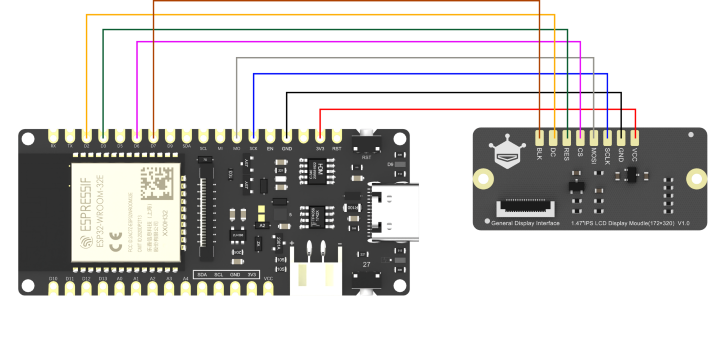
Wire sequence for SPI connection:
| LCD Display | ESP32-E |
|---|---|
| VCC | 3V3 |
| GND | GND |
| SCLK | 18/SCK |
| MOSI | 23/MOSI |
| CS | 14/D6 |
| RES | 26/D3 |
| DC | 25/D2 |
| BLK | 13/D7 |
Sample Code
Initialize ST7789 screen, loop display light gray "DF" English chars.
#include "DFRobot_GDL.h"
#define TFT_DC  D2
#define TFT_CS  D6
#define TFT_RST D3
#define TFT_BL  D7

DFRobot_ST7789_172x320_HW_SPI screen(/*dc=*/TFT_DC,/*cs=*/TFT_CS,/*rst=*/TFT_RST,/*bl=*/TFT_BL);
/* M0 mainboard DMA transfer */
//DFRobot_ST7789_172x320_DMA_SPI screen(/*dc=*/TFT_DC,/*cs=*/TFT_CS,/*rst=*/TFT_RST,/*bl=*/TFT_BL);
void setup() {
  screen.begin();
}
void loop() {
  screen.setTextSize(2);
  screen.fillScreen(COLOR_RGB565_BLACK);//Background color
  screen.setFont(&FreeMono24pt7b);//Font size(9 12 18 24)
  screen.setCursor(/*x=*/32,/*y=*/200);//Text position
  screen.setTextColor(COLOR_RGB565_LGRAY);//Text color
  screen.setTextWrap(true);
  screen.print("DF");//English char
  delay(1000);
}
Result
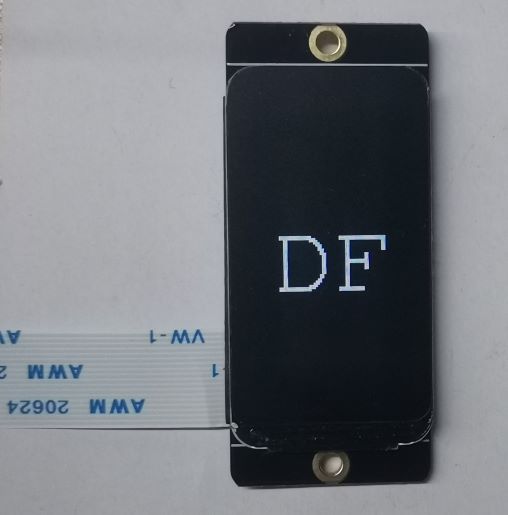
Burn the codes into the ESP32-E, then the screen shows "DF" in grey.
Was this article helpful?