
Example Code for Arduino-Calibrate RTC with GNSS
Last revision 2026/01/06
A step-by-step guide on calibrating an Arduino's RTC using GNSS, including necessary hardware and software, wiring diagrams, and example code for accurate time synchronization. Enhance your projects with precise timing capabilities.
Hardware Preparation
Software Preparation
- Arduino IDE
- Download and install DFRobot_GNSS and RTC library
Wiring Diagram

Sample Code
/*!
 * @file gnssCalibRTC.ino
 * @brief Run this routine, calibration internal clock first, and then circularly get clock
 * @copyright    Copyright (c) 2010 DFRobot Co.Ltd (http://www.dfrobot.com)
 * @license      The MIT License (MIT)
 * @author [qsjhyy](yihuan.huang@dfrobot.com)
 * @version V1.0
 * @date 2022-08-30
 * @url https://github.com/DFRobot/DFRobot_GNSSAndRTC
 */
#include "DFRobot_GNSSAndRTC.h"

#define I2C_COMMUNICATION  //use I2C for communication, but use the serial port for communication if the line of codes were masked

#ifdef  I2C_COMMUNICATION
DFRobot_GNSSAndRTC_I2C rtc(&Wire, MODULE_I2C_ADDRESS);
#else
/* ---------------------------------------------------------------------------------------------------------------------
      *    board   |             MCU                | Leonardo/Mega2560/M0 |    UNO    | ESP8266 | ESP32 |  microbit  |   m0  |
      *     VCC    |            3.3V/5V             |        VCC           |    VCC    |   VCC   |  VCC  |     X      |  vcc  |
      *     GND    |              GND               |        GND           |    GND    |   GND   |  GND  |     X      |  gnd  |
      *     RX     |              TX                |     Serial1 TX1      |     5     |   5/D6  |  D2   |     X      |  tx1  |
      *     TX     |              RX                |     Serial1 RX1      |     4     |   4/D7  |  D3   |     X      |  rx1  |
* ----------------------------------------------------------------------------------------------------------------------*/
/* Baud rate cannot be changed  */
#if defined(ARDUINO_AVR_UNO) || defined(ESP8266)
SoftwareSerial mySerial(4, 5);
DFRobot_GNSSAndRTC_UART rtc(&mySerial, UART_BAUDRATE);
#elif defined(ESP32)
DFRobot_GNSSAndRTC_UART rtc(&Serial1, UART_BAUDRATE,/*rx*/D2,/*tx*/D3);
#else
DFRobot_GNSSAndRTC_UART rtc(&Serial1, UART_BAUDRATE);
#endif
#endif

void setup()
{
	Serial.begin(115200);
	/*Wait for the chip to be initialized completely, and then exit*/
	while (!rtc.begin()) {
		Serial.println("Failed to init chip, please check if the chip connection is fine. ");
		delay(1000);
	}
	rtc.setHourSystem(rtc.e24hours);//Set display format

	/**
	 * @brief Calibrate RTC immediately with GNSS
	 * @note This is a single calibration;
	 * @n If the GNSS module signal is weak, time calibration may encounter issues.
	 * @return None
	 */
	// rtc.calibRTC();

	/**
	* @brief The loop automatically performs GNSS timing based on the set interval
	* @param hour Automatic calibration of the time interval. range: 0~255, unit: hour.
	* @note When set to zero, automatic time calibration is disabled.
	* @n Enabling it will trigger an immediate calibration.
	* @n If the GNSS module signal is weak, time calibration may encounter issues.
	* @return None
	*/
	rtc.calibRTC(1);
}
	uint8_t underCalibCount = 0;

void loop()
{
	/**
	* @brief Current clock calibration status
	* @param mode By default, it is set to true, indicating access to the calibration status only.
	* @n  If continuous calibration for one minute does not return a successful calibration,
	* @n  you can pass in false to manually terminate this calibration session.
	* @return uint8_t type, indicates current clock calibration status
	* @retval 0 Not calibrated
	* @retval 1 Calibration complete
	* @retval 2 Under calibration
	* @note Note: To avoid affecting subsequent calibration status,
	* @n    "Calibration completed Status (1)" is automatically zeroed after a successful read
	*/
	uint8_t status = rtc.calibStatus();
	if (DFRobot_GNSSAndRTC::eCalibComplete == status) {
		underCalibCount = 0;
		Serial.println("Calibration success!");
	} else if (DFRobot_GNSSAndRTC::eUnderCalib == status) {
		underCalibCount += 1;
		if (60 <= underCalibCount) {   // If the calibration fails for a long time, manually terminate the calibration
			rtc.calibStatus(false);
			underCalibCount = 0;
			Serial.println("Calibration failed!");
			Serial.println("It may be due to weak satellite signals.");
			Serial.println("Please proceed to an open outdoor area for time synchronization.");
		}
	}
	DFRobot_GNSSAndRTC::sTimeData_t sTime;
	sTime = rtc.getRTCTime();
	Serial.print(sTime.year, DEC);//year
	Serial.print('/');
	Serial.print(sTime.month, DEC);//month
	Serial.print('/');
	Serial.print(sTime.day, DEC);//day
	Serial.print(" (");
	Serial.print(sTime.week);//week
	Serial.print(") ");
	Serial.print(sTime.hour, DEC);//hour
	Serial.print(':');
	Serial.print(sTime.minute, DEC);//minute
	Serial.print(':');
	Serial.print(sTime.second, DEC);//second
	Serial.println(' ');
	/*Enable 12-hour time format*/
	// Serial.print(rtc.getAMorPM());
	// Serial.println();

	// In addition to data acquisition and other time consuming, the delay of 900ms makes each loop closer to 1 second
	delay(900);
}
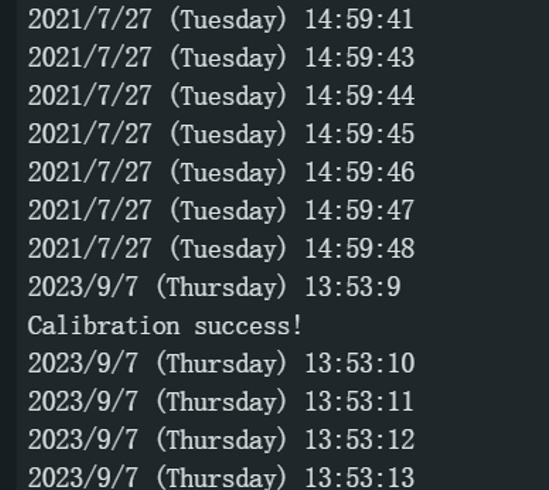
Result
Was this article helpful?