
Example Code for Arduino-Get GNSS Position
A detailed tutorial on obtaining GNSS positioning using Arduino, including hardware setup, software requirements, and a sample code walkthrough for accurate location data retrieval.
Hardware Preparation
Software Preparation
- Arduino IDE
- Download and install DFRobot_GNSS and RTC library
Wiring Diagram

Sample Code
/*!
 * @file  getGNSS.ino
 * @brief Get gnss simple data
 * @copyright Copyright (c) 2010 DFRobot Co.Ltd (http://www.dfrobot.com)
 * @license The MIT License (MIT)
 * @author [qsjhyy](yihuan.huang@dfrobot.com)
 * @version V1.0
 * @date 2022-08-30
 * @url https://github.com/DFRobot/DFRobot_GNSSAndRTC
 */

#include "DFRobot_GNSSAndRTC.h"

#define I2C_COMMUNICATION  //use I2C for communication, but use the serial port for communication if the line of codes were masked

#ifdef  I2C_COMMUNICATION
DFRobot_GNSSAndRTC_I2C gnss(&Wire, MODULE_I2C_ADDRESS);
#else
 /* ---------------------------------------------------------------------------------------------------------------------
  *    board   |             MCU                | Leonardo/Mega2560/M0 |    UNO    | ESP8266 | ESP32 |  microbit  |   m0  |
  *     VCC    |            3.3V/5V             |        VCC           |    VCC    |   VCC   |  VCC  |     X      |  vcc  |
  *     GND    |              GND               |        GND           |    GND    |   GND   |  GND  |     X      |  gnd  |
  *     RX     |              TX                |     Serial1 TX1      |     5     |   5/D6  |  D2   |     X      |  tx1  |
  *     TX     |              RX                |     Serial1 RX1      |     4     |   4/D7  |  D3   |     X      |  rx1  |
  * ----------------------------------------------------------------------------------------------------------------------*/
  /* Baud rate cannot be changed */
#if defined(ARDUINO_AVR_UNO) || defined(ESP8266)
SoftwareSerial mySerial(4, 5);
DFRobot_GNSSAndRTC_UART gnss(&mySerial, UART_BAUDRATE);
#elif defined(ESP32)
DFRobot_GNSSAndRTC_UART gnss(&Serial1, UART_BAUDRATE,/*rx*/D2,/*tx*/D3);
#else
DFRobot_GNSSAndRTC_UART gnss(&Serial1, UART_BAUDRATE);
#endif
#endif

void setup()
{
	Serial.begin(115200);
	while (!gnss.begin()) {
		Serial.println("NO Deivces !");
		delay(1000);
}

	gnss.enablePower();      // Enable gnss power

	/** Set GNSS to be used
	 *   eGPS              use gps
	 *   eBeiDou           use beidou
	 *   eGPS_BeiDou       use gps + beidou
	 *   eGLONASS          use glonass
	 *   eGPS_GLONASS      use gps + glonass
	 *   eBeiDou_GLONASS   use beidou +glonass
	 *   eGPS_BeiDou_GLONASS use gps + beidou + glonass
	 */
	gnss.setGnss(gnss.eGPS_BeiDou_GLONASS);

	// gnss.disablePower();      // Disable GNSS, the data will not be refreshed after disabling
}

void loop()
{
	DFRobot_GNSSAndRTC::sTim_t utc = gnss.getUTC();
	DFRobot_GNSSAndRTC::sTim_t date = gnss.getDate();
	DFRobot_GNSSAndRTC::sLonLat_t lat = gnss.getLat();
	DFRobot_GNSSAndRTC::sLonLat_t lon = gnss.getLon();
	double high = gnss.getAlt();
	uint8_t starUserd = gnss.getNumSatUsed();
	double sog = gnss.getSog();
	double cog = gnss.getCog();

	Serial.println("");
	Serial.print(date.year);
	Serial.print("/");
	Serial.print(date.month);
	Serial.print("/");
	Serial.print(date.date);
	Serial.print("/");
	Serial.print(utc.hour);
	Serial.print(":");
	Serial.print(utc.minute);
	Serial.print(":");
	Serial.print(utc.second);
	Serial.println();
	Serial.println((char)lat.latDirection);
	Serial.println((char)lon.lonDirection);

	// Serial.print("lat DDMM.MMMMM = ");
	// Serial.println(lat.latitude, 5);
	// Serial.print("lon DDDMM.MMMMM = ");
	// Serial.println(lon.lonitude, 5);
	Serial.print("lat degree = ");
	Serial.println(lat.latitudeDegree, 6);
	Serial.print("lon degree = ");
	Serial.println(lon.lonitudeDegree, 6);

	Serial.print("star userd = ");
	Serial.println(starUserd);
	Serial.print("alt high = ");
	Serial.println(high);
	Serial.print("sog =  ");
	Serial.println(sog);
	Serial.print("cog = ");
	Serial.println(cog);
	Serial.print("gnss mode =  ");
	Serial.println(gnss.getGnssMode());
	delay(1000);
}
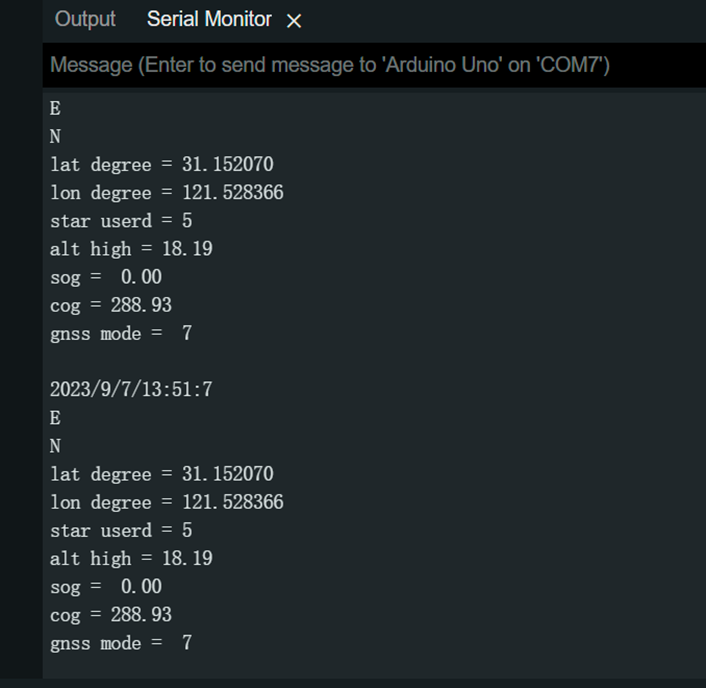
Result
Was this article helpful?