Gravity: IoT Expansion Board

SKU: MBT0012

With the development of IoT, there are so many mature IoT platforms emerging in both domestic and overseas, but most of them are mainly designed for the professional, which could be very hard for the non-experts to get started. Therefore, we specifically developed this Micro: IoT, a micro:bit-based IoT expansion board. Use the board together with DFRobot Easy IoT platform, lower the barrier of using IoT. Supports makecode and Mind+ graphical programming platforms.

Angled shot of black micro:bit IoT expansion board with motor and microcontroller, ideal for IoT projects.-DFRobot product sku:MBT0012 image.

Downloadable Resources

  • Docs
  • Tech Specs
  • Projects
  • 1. Getting Started

    This article provides a comprehensive guide for setting up the Easy IoT platform with Makecode and a micro:bit board, covering basic operations, device setup, real-time monitoring, and troubleshooting to create a complete IoT system.

    2. Example Code for micro:bit-MakeCode-Voting Machine

    voting machine utilizes the wireless communication function. The voting machine has hosting post and voting port. The voting port can have abundant devices. When the voter presses the related button, the number of the votes will be displayed on the screen. Meanwhile, the data will be sent to IoT platform.

    3. Example Code for micro:bit-MakeCode-Smart Emojis

    This article guides users through setting up and programming a micro:bit with IoT expansion to create smart emojis. It offers detailed instructions on hardware and software preparation, wiring diagrams, and sample code. Users can send commands through the Easy IoT platform to display various emoji patterns on the micro:bit, enhancing learning and creativity.

    4. Example Code for micro:bit-MakeCode-Light and Temperature Monitor (Easy IoT)

    The article provides a step-by-step guide for creating a light and temperature monitoring system using a micro:bit and the Easy IoT platform, including hardware and software setup and sample code.

    5. Example Code for micro:bit-MakeCode-Remote Watering System

    This article provides a step-by-step guide to using micro:bit with an Easy IoT expansion board to automate a remote watering system. It includes hardware and software preparation, wiring instructions, and sample code using the Makecode platform. Readers will learn how to control the watering system based on soil moisture levels and remote commands via Easy IoT, making plant care efficient and tech-savvy.

    6. Example Code for micro:bit-MakeCode-Automatic Clothes Hanger

    Explore the step-by-step guide to building and programming an automatic clothes hanger using micro:bit, servo, and soil moisture sensor, with instructions for controlling it via Easy IoT or manually.

    7. Example Code for micro:bit-MakeCode-Remote controlled RGB LEDs

    Explore how to use a micro:bit and Easy IoT platform to control RGB LEDs remotely, including step-by-step hardware and software preparations, wiring instructions, and sample code for creating interactive lighting effects that sync with music.

    8. Example Code for micro:bit-MakeCode-Remote Entrance Guard System

    This article demonstrates how to set up a remote entrance guard system using a micro:bit and IoT technology. It provides detailed guidance on hardware and software preparation, wiring, and programming with Makecode. By following the example code, users can automate door opening and closing through IoT commands, enhancing security and convenience.

    9. Example Code for micro:bit-MakeCode-Send note to Evernote (IFFTT)

    This article provides detailed instructions on how to send notes from a micro:bit device to Evernote using the IFTTT platform. It covers hardware and software requirements, wiring setup, and includes sample code for seamless integration, making it an ideal resource for those interested in IoT and automation.

    10. Example Code for micro:bit-MakeCode-Send data to email (IFFTT)

    This article offers a comprehensive tutorial on how to send data from a micro:bit to an email using the IFTTT platform, covering necessary hardware, software preparation, wiring setup, and providing sample programming code to facilitate the process.

    11. Example Code for micro:bit-MakeCode-Send Message to iPhone (IFFTT)

    the climate is changeable during the seasonal alterantion. Use the micro:bit to detect temperature. If temperature is more than 30 degree, send a message to iphone to notice the user to pay attention to heatstroke. If temperature is less than 20 degree, send a message to iphone to notice the user to protect themselves from the cold.

    12. Example Code for micro:bit-MakeCode-Send Message to Twitter (IFFTT)

    when you get up in the morning, press down button A and B, send the temperature and light intensity to Twitter.

    13. Example Code for micro:bit-MakeCode-Use an Android phone to Send Message (IFFTT)

    We often forget to water out plants, sometime, you have to be on business for a long time, but you want someone to take care of your plants. We can use the IoT expansion board to make an application to solve this problem. When the soil moisture is less than 350, the system automatically sends a message to your friend to water the plants. If it is over 520, send a message that the moisture is suitable.

    14. Example Code for micro:bit-MakeCode-Record the data of the Soil Moisture (Beebotte)

    Create a channel-humidity and time table. When connected with Internet, the moisture will be updated to Beebotte platform, and we will check the change of the moisture through the curve graph in Dashboards.

    15. Example Code for micro:bit-MakeCode-Drive a motor

    Drive a motor to rotate forward and backward.

    16. Example Code for micro:bit-MakeCode-Light and Temperature Monitor (Basic Tutorial)

    This tutorial provides a practical guide to creating a light and temperature monitor using a micro:bit board and IoT expansion board, including hardware setup, software tools, and sample code for displaying real-time data on an OLED screen. Ideal for beginners interested in IoT and microcontroller projects.

    Reference

    Specification

    Parameter Details
    Battery Type CR123A 3.6V Rechargeable Li-ion Battery (Note: do not use 3V CR123A battery and non-rechargeable. Recharging the non-rechargeable battery is dangerous.)
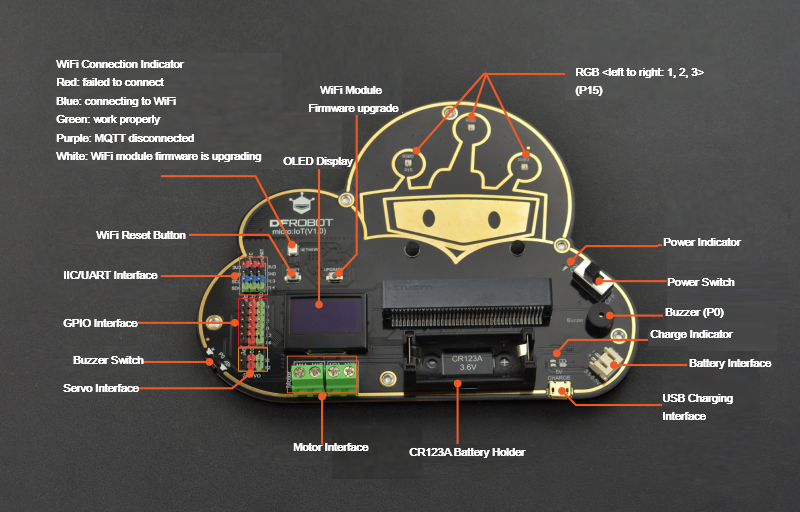
    Interface 2-way IIC, 1-way serial
    Micro:bit Interface P0 P1 P2 P8 P12 P16
    Other Interface two DC motor ports, two servo ports
    Dimension 148×112mm/5.83×4.41”
    Weight 104g
    Programming Platforms makecode, Mind+

    Pinout

    Pinout

    Color Indication
    Red failed to connect
    Blue connecting to WiFi
    Green Work properly
    Purple MQTT disconnected
    White WiFi module firmware upgrading

    Note: when the indicator turns purple, it means that MQTT is disconnected, and please check if the id account is correct.

    Was this article helpful?

    TOP