
Reference
Last revision 2026/01/15
Principle
Now, you could observe two sets of data, and you will find the value on X-axis & Y-axis are equal or differ very little, but the value on Z-axis are quite different. This is because there is no accelerated velocity on X-axis and Y-axis, when the sensor is resting horizontally. The module is only forced by gravity, and its direction is always downward. With different posture, the gravitational acceleration stays the same. In physics, we call it "g".
So, when the Z-axis upward, the value z should be "z=Z+g"; when the Z-axis downward, it will be "z=Z+g". You could calculate the initial value of "Z", and the corresponding value of "g".
Z=(1.157+0.688)/2=0.923 mV
g=(1.157-0.688)/2=0.235 mV/g
Similarly, you could get sensor initial value "X" & "Y" and corresponding value of "g" on X-axis and Y-axis.
| Note: The gravitational acceleration are always downward, and its value are only related to the local gravity. We regulate its direction as acceleration positive direction. For example: when the object is moving upward with the acceleration of "a", its acceleration will be "g+a". |
Other Supplementary Information
 |
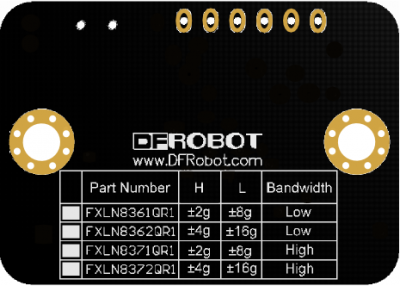 |
| SKU | Chip | H | L | Bandwidth |
|---|---|---|---|---|
| SEN0178 | FXLN8361 | ±2g | ±8g | Low |
| SEN0179 | FXLN8362 | ±4g | ±16g | Low |
| SEN0180 | FXLN8371 | ±2g | ±8g | High |
| SEN0181 | FXLN8372 | ±4g | ±16g | High |
| Note: "H" = High resolution, Low range; "L" = Low resolution, High range |
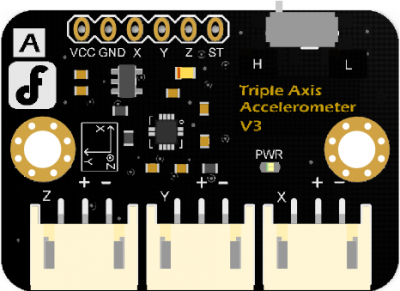
There is a sensor table on the back of the PCB, it will show your sensor chip type, measurement range and bandwidth. You could select the measurement range via the range switch.
E.g. If your sensor chip type is “FXLN8361QR1”; When the switch is "H", the measure range will be "±2g"; when the switch is "L", the range will be "±8g".
Was this article helpful?