
Example Code for Arduino-Distance Measurement Mode 3
This project demonstrates how to use the Waterproof Ultrasonic Sensor in Mode 3 (switch output).
Hardware Preparation
- Arduino UNO x1
- Waterproof Ultrasonic Ranging Module (SKU: SEN0207) x1
Software Preparation
- Arduino IDE V1.6.8. Click to Download Arduino IDE from Arduino
Wiring Diagram
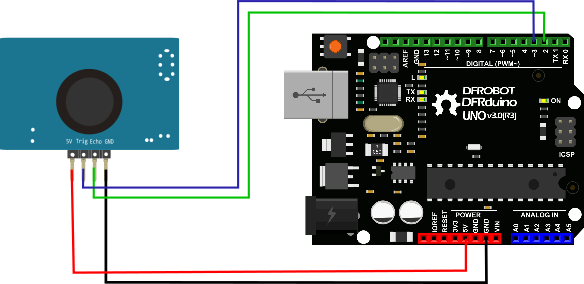
Other Preparation Work
1.Do not power the module incorrectly. If external power is applied, always connect the GND terminal first to ensure stable operation.
2.When measuring objects, ensure the target surface is at least 0.5 m² and as flat and smooth as possible; otherwise, measurement accuracy may be affected.
3.The inductor cannot be adjusted arbitrarily.
The module supports 6 operating modes. Users can select the suitable mode based on their application requirements.

This document focuses on Mode 3.
Mode 3: Mode=470K (or directly short M3) switch output
Working description The module will set a threshold value when it leaves the factory, and the default value is 1.5 meters. The module performs distance measurement every 200ms. When the distance value of the detected target is less than the set threshold value, the Echo pin outputs a high level. When the current detected distance value is greater than the set threshold value, the Echo pin outputs a low level. In order to improve stability, the factory default is that if the distance value of the target is less than the set threshold value for two consecutive times, it is judged that the detected target distance is less than the set threshold value; the module Echo pin only outputs high and low level signals and has no driving ability. When applied, a transistor drive relay should be added. If there are special requirements to modify the threshold value or other settings, special instructions are required when purchasing.
(1) Pin definition
| Serial number | Label | Pin description |
|---|---|---|
| 2 | Trig | Switching low and high level output pin |
| 3 | Echo | Switching high level output pin |
Sample Code
int ECHO = 7, Trig = 8;
int i = 0, q = 0;
void setup() {
  Serial.begin(9600);
  pinMode(ECHO, INPUT);
  pinMode(Trig, INPUT);
}
void loop() {
  i = digitalRead(ECHO);
  q = digitalRead(Trig);
  Serial.print("ECHO= ");
  Serial.print(i);
  Serial.print(" Trig= ");
  Serial.println(q);
  delay(1000);
}
Was this article helpful?