
Example Code for Arduino-Distance Measurement Mode 2
This project demonstrates how to use the Waterproof Ultrasonic Sensor in Mode 2 (UART controlled output) to measure distance.
Hardware Preparation
- Arduino UNO x1
- Waterproof Ultrasonic Ranging Module (SKU: SEN0207) x1
Software Preparation
- Arduino IDE V1.6.8. Click to Download Arduino IDE from Arduino
Wiring Diagram
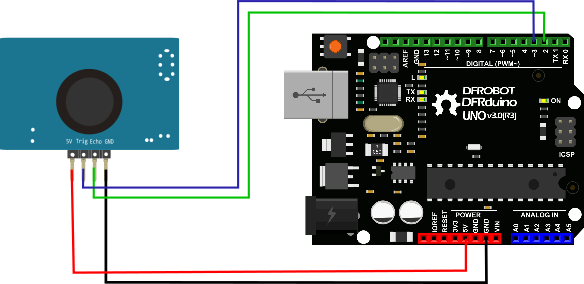
Other Preparation Work
1.Do not power the module incorrectly. If external power is applied, always connect the GND terminal first to ensure stable operation.
2.When measuring objects, ensure the target surface is at least 0.5 m² and as flat and smooth as possible; otherwise, measurement accuracy may be affected.
3.The inductor cannot be adjusted arbitrarily.
The module supports 6 operating modes. Users can select the suitable mode based on their application requirements.

This document focuses on Mode 2.
Mode 2: Mode=120K (or short M2 bit directly) UART controlled output
The UART controlled output method outputs the measured distance value (hexadecimal number) according to the UART communication format. In this method, the trigger command 0X55 signal needs to be added to the RX pin. The module measures once every time the command is received. The TX pin outputs the measured distance value. The command trigger cycle should be greater than 60ms.
(1) Pin Definition
| Label | Name | Function |
|---|---|---|
| 1 | TX | UART Output Pin |
| 2 | RX | UART Controlled RXD Pin(instruction 0X55) |
(2) Communication Protocol
| UART | Baud Rate | Check Bit | Data Bit | Stop Bit |
|---|---|---|---|---|
| TTL | 9600bps | N | 8 | 1 |
(3) Format Description
| Frame | Description | Byte |
|---|---|---|
| Header | Fixed to 0xff | 1 byte |
| H_DATA | The upper 8 bits of the distance data | 1 byte |
| L_DATA | The lower 8 bits of the distance data | 1 byte |
| SUM | Data Checksum | 1 byte |
Checksum only reserves the low 8 bits of the accumulated value.
For Example:
- Product Response FF 07 A1 A7
- Where the check code SUM = A7 = (0x07 + 0xA1 + 0Xff) & 0x00ff
- 0x07 is the high bit data of the distance
- 0xA1 is the low bit data of the distance
- Distance value is 0x07A1
- Equal to 1953 when converted into decimal
- Unit: mm
The module outputs the nearest distance value of 21cm in the dead zone, and outputs 0 if the module does not measure the data or is out of range. After the LED is powered on and in the working mode, the indicator will be on every time it is triggered, and the frequency is the same as the trigger cycle. The light will turn off every time it is triggered for two times.
Sample Code
/* ****************************************************
* @brief Water-proof Ultrasonic Sensor (ULS)

 * @copyright   [DFRobot](http://www.dfrobot.com), 2016
 * @copyright   GNU Lesser General Public License

* @author [huyujie](yujie.hu@dfrobot.com)
* @version  V1.0
* @date  2020-12-7

* GNU Lesser General Public License.
* All above must be included in any redistribution
* ****************************************************/

#include <SoftwareSerial.h>
unsigned char buffer_RTT[4] = {0};//  Used to store data read from the serial port
int Distance = 0;//Used to store the read distance value
uint8_t CS;//Save checksum
#define COM 0x55
SoftwareSerial mySerial(10, 11); // RX, TX
void setup() {
  Serial.begin(115200);
  mySerial.begin(9600);
}
void loop() {
  mySerial.write(COM , 1);
  delay(100);
  if(mySerial.available() > 0){
    delay(4);
    if(mySerial.read() == 0xff){    //Judge packet header
      buffer_RTT[0] = 0xff;
      for (int i=1; i<4; i++){
        buffer_RTT[i] = mySerial.read();    //Read data
      }
      CS = buffer_RTT[0] + buffer_RTT[1]+ buffer_RTT[2];  //Compute checksum
      if(buffer_RTT[3] == CS) {
        Distance = (buffer_RTT[1] << 8) + buffer_RTT[2];//Calculate distance
        Serial.print("Distance:");
        Serial.print(Distance);
        Serial.println("mm");
      }
    }
  }
}
Was this article helpful?