
Example Code for Arduino-Distance Measurement Mode 0
This project demonstrates how to use the Waterproof Ultrasonic Sensor in Mode 0 (PWM pulse-width output) to measure distance.
Hardware Preparation
- Arduino UNO x1
- Waterproof Ultrasonic Ranging Module (SKU: SEN0207) x1
Software Preparation
- Arduino IDE V1.6.8. Click to Download Arduino IDE from Arduino
Wiring Diagram
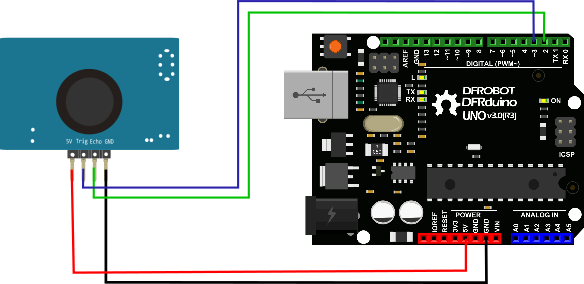
Other Preparation Work
1.Do not power the module incorrectly. If external power is applied, always connect the GND terminal first to ensure stable operation.
2.When measuring objects, ensure the target surface is at least 0.5 m² and as flat and smooth as possible; otherwise, measurement accuracy may be affected.
3.The inductor cannot be adjusted arbitrarily.
The module supports 6 operating modes. Users can select the suitable mode based on their application requirements.

This document focuses on Mode 0.
Mode 0: Mode=floating high level (PWM) pulse width output
(1) Pinout Definition
| Label | Name | Function |
|---|---|---|
| 1 | Trig | Trigger control pin |
| 2 | Echo | High level pulse width output |
(2) Fundamental Principles
- Adopt IO port TRIG to trigger ranging. Present a high level signal of at least 10us.
- The module automatically sends eight 40khz square waves and automatically detects whether a signal returns;
- When a signal returns, a high level is output through the IO port ECH0. The duration of the high level is the time from the transmission of the ultrasonic wave to the return. Test distance in normal temperature= (high level time * speed of sound (348M/S))/2.
- After the module is triggered for ranging, if the echo cannot be received (Reason: The ultrasonic wave exceeds the measured range or the probe doesn’t directly points at the measured object), the ECHO port will automatically become low after 40MS, marking the end of the measurement, regardless of success.
- The LED does not light up until there is a triggering signal to the TRIG pin. The frequency of light flashing is synchronized with the trigger cycle, indicating that the module receives the correct command and enters the working state at this time.
(3) Ultrasonic Timing diagram

The Timing diagram below shows that you only need to supply a short 10uS pulse to the trigger input to start the ranging, and then the module will send out an 8 cycle level at 40 kHz and raise its echo. Once an echo signal is detected, an echo signal is output. The pulse width of the echo signal is directly proportional to the measured distance. You can calculate the range through the time interval between sending trigger signal and receiving echo signal. Formula: uS / 57.5 = centimeters or uS / 148 =inch; or: the range = high level time * velocity (348M/S) / 2; we suggest to use over 50ms measurement cycle, in order to prevent effect caused by trigger signal to the echo signal.
Sample Code
#define ECHOPIN 7// Pin to receive echo pulse
#define TRIGPIN 8// Pin to send trigger pulse
int distance;
void setup(){
  Serial.begin(9600);
  pinMode(ECHOPIN, INPUT);
  pinMode(TRIGPIN, OUTPUT);
  //digitalWrite(ECHOPIN, HIGH);

}
void loop(){
  digitalWrite(TRIGPIN, LOW); // Set the trigger pin to low for 2uS
  delayMicroseconds(2);
  digitalWrite(TRIGPIN, HIGH); // Send a 10uS high to trigger ranging
  delayMicroseconds(20);
  digitalWrite(TRIGPIN, LOW); // Send pin low again
  distance = pulseIn(ECHOPIN, HIGH)/58; // Read in times pulse
  //Serial.println(distance);
  Serial.print(distance);
  Serial.println("   cm");
  delay(50);// Wait 50mS before next ranging
}
Was this article helpful?