
Example Code for Raspberry Pi-External Interrupt Function
Last revision 2025/12/17
This article details the setup and use of external interrupts on a Raspberry Pi using the H3LIS200DL accelerometer. It includes hardware and software preparation, wiring instructions, and sample code for triggering interrupts based on acceleration thresholds, allowing users to adapt threshold values for customized applications.
Hardware Preparation
- Raspberry Pi 4B(or similar) x 1
- H3LIS200DL Triple Axis Accelerometer (Breakout Version) x1
- Jumper wires x1
Software Preparation
- Raspberry Pi Official OS
- Download and install the LIS Series Python Library.
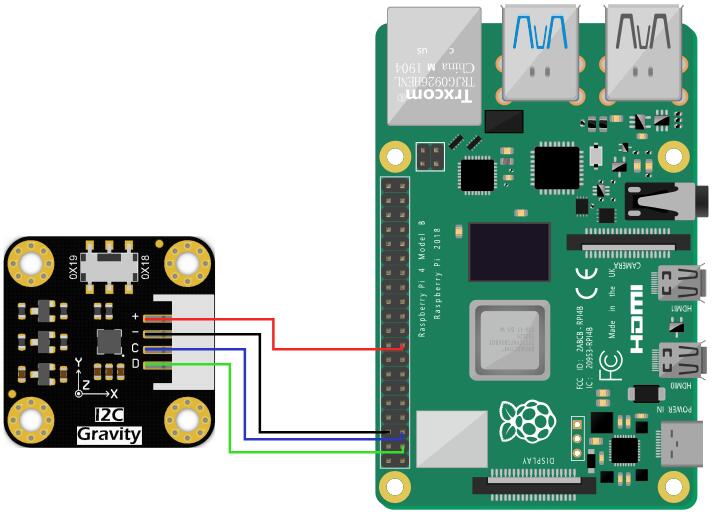
Wiring Diagram
- Connect the module to the Raspberry Pi according to the connection diagram. The default I2C address is 0x19. Connect the interrupt pin (INT1) to a GPIO pin of the Raspberry Pi.
Other Preparation Work
- Complete the I2C setup and library installation as described in the "Read Acceleration" example.
- Navigate to the sample code directory:
cd DFRobot_LIS/python/raspberrypi/examples/H3LIS200DL/interrupt
Sample Code
Run the sample code:
python interrupt.py
Result
When the acceleration exceeds the threshold, the interrupt is triggered, and a message is printed on the terminal indicating which direction's acceleration exceeded the threshold.
Adjust the threshold value in the code as needed.
Was this article helpful?