
Example Code for Raspberry Pi-Wakeup Function
Last revision 2025/12/17
This article guides you through setting up a wakeup function using a Raspberry Pi and H3LIS200DL accelerometer, covering hardware and software preparations, wiring connections, and executing the sample code to achieve the desired functionality.
Hardware Preparation
- Raspberry Pi 4B(or similar) x 1
- H3LIS200DL Triple Axis Accelerometer (Breakout Version) x1
- Jumper wires x1
Software Preparation
- Raspberry Pi Official OS
- Download and install the LIS Series Python Library.
Wiring Diagram
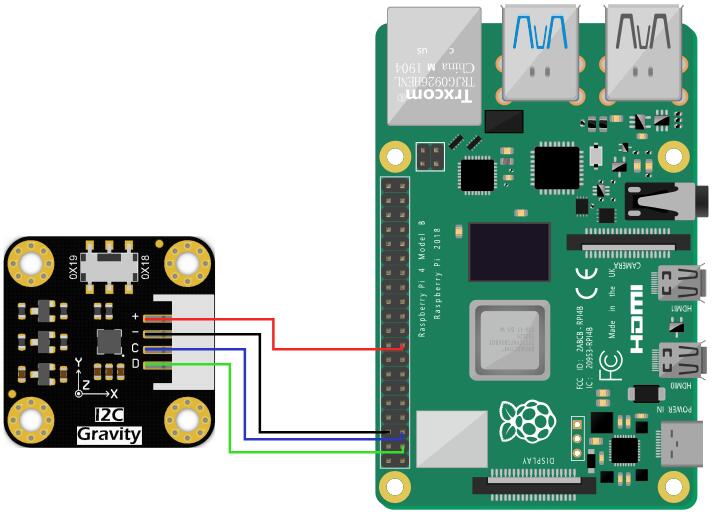
- Connect the module to the Raspberry Pi according to the connection diagram. The default I2C address is 0x19. Connect the interrupt pin (INT1) to a GPIO pin of the Raspberry Pi.
Other Preparation Work
- Complete the I2C setup and library installation as described in the "Read Acceleration" example.
- Navigate to the sample code directory:
cd DFRobot_LIS/python/raspberrypi/examples/H3LIS200DL/wake_up
Sample Code
Run the sample code:
python wake_up.py
Result
When the acceleration exceeds the threshold, the module wakes up from low-power mode, and "wake up" is printed on the terminal.
Ensure the interrupt pin is correctly connected to the Raspberry Pi's GPIO pin.
Was this article helpful?