
Example Code for Arduino-Get Geomagnetic Data
Get the geomagnetic data at 3 axis (x, y, z), get the compass degree. "Compass Degree", the angle formed when the needle rotates counterclockwise from the current position to the true north. Experimental phenomenon: serial print the geomagnetic data of x-axis, y-axis and z-axis and the compass degree.
Hardware Preparation
- FireBeetle 2 ESP32-E (SKU:DFR0654) ×1
- Gravity: BMM350 Triple Axis Magnetomete(SKU:SEN0529)×1
- Dupond wire
Software Preparation
- Arduino IDE: Click to download Arduino IDE
- Install the ESP32 SDK:FireBeetle 2 ESP32-E WIKI
- Arduino library:DFRobot_BMM350 Github repo,
Wiring Diagram
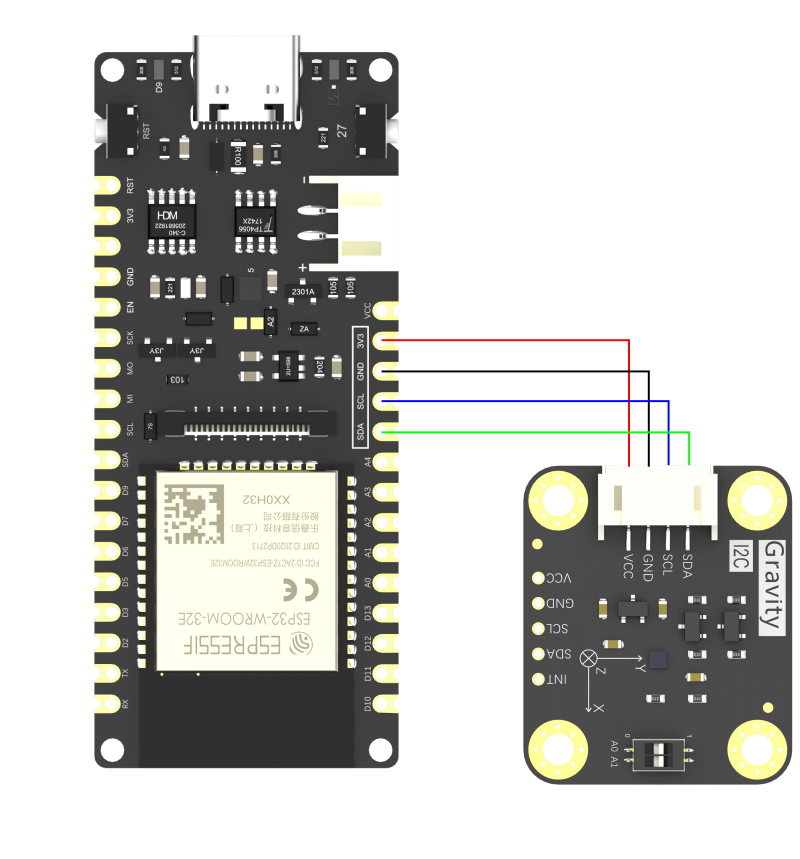
Gravity BMM350 :VCC---(to)---ESP32-E:3V3;
Gravity BMM350 :GND---(to)---ESP32-E:GND;
Gravity BMM350:SCL---(to)---ESP32-E:SCL;
Gravity BMM350:SDA---(to)---ESP32-E:SDA;
Other Preparation Work
- Upload the code
If you’re in an environment with a lot of electromagnetic interference—like strong interference on both the X and Y axes—even calibration will make it hard for the compass to get an accurate heading. We recommend doing the calibration and compass measurements in a place with less EM interference.
Sample Code
 /*!
  * @file  getGeomagneticData.ino
  * @brief Get the geomagnetic data at 3 axis (x, y, z), get the compass degree
  * @n "Compass Degree", the angle formed when the needle rotates counterclockwise from the current position to the true north
  * @n Experimental phenomenon: serial print the geomagnetic data of x-axis, y-axis and z-axis and the compass degree
  * @copyright   Copyright (c) 2010 DFRobot Co.Ltd (http://www.dfrobot.com)
  * @license     The MIT License (MIT)
  * @author      [GDuang](yonglei.ren@dfrobot.com)
  * @version     V1.0.0
  * @date        2024-05-06
  * @url         https://github.com/dfrobot/DFRobot_BMM350
  */
#include "DFRobot_BMM350.h"

DFRobot_BMM350_I2C bmm350(&Wire, 0x14);

void setup()
{
  Serial.begin(115200);
  while(!Serial);
  while(bmm350.begin()){
    Serial.println("bmm350 init failed, Please try again!");
    delay(1000);
  } Serial.println("bmm350 init success!");

  //Normal
  bmm350.setOperationMode(BMM350_NORMAL_MODE);

  /**!
   * Set preset mode, make it easier for users to configure sensor to get geomagnetic data (The default rate for obtaining geomagnetic data is 12.5Hz)
   * presetMode:
   *   BMM350_PRESETMODE_LOWPOWER      // Low power mode, get a fraction of data and take the mean value.
   *   BMM350_PRESETMODE_REGULAR       // Regular mode, get a number of data and take the mean value.
   *   BMM350_PRESETMODE_ENHANCED      // Enhanced mode, get a plenty of data and take the mean value.
   *   BMM350_PRESETMODE_HIGHACCURACY  // High accuracy mode, get a huge number of take and draw the mean value.
   */
  bmm350.setPresetMode(BMM350_PRESETMODE_HIGHACCURACY);

  /**!
   * Set the rate of obtaining geomagnetic data, the higher, the faster(without delay function)
   * rate:
   *   BMM350_DATA_RATE_1_5625HZ
   *   BMM350_DATA_RATE_3_125HZ
   *   BMM350_DATA_RATE_6_25HZ
   *   BMM350_DATA_RATE_12_5HZ   (default rate)
   *   BMM350_DATA_RATE_25HZ
   *   BMM350_DATA_RATE_50HZ
   *   BMM350_DATA_RATE_100HZ
   *   BMM350_DATA_RATE_200HZ
   *   BMM350_DATA_RATE_400HZ
   */
  bmm350.setRate(BMM350_DATA_RATE_25HZ);

  /**!
   * Enable the measurement at x-axis, y-axis and z-axis, default to be enabled, no config required, the geomagnetic data at x, y and z will be inaccurate when disabled.
   * Refer to setMeasurementXYZ() function in the .h file if you want to configure more parameters.
   */
  bmm350.setMeasurementXYZ();
}

void loop()
{
  sBmm350MagData_t magData = bmm350.getGeomagneticData();
  Serial.print("mag x = "); Serial.print(magData.x); Serial.println(" uT");
  Serial.print("mag y = "); Serial.print(magData.y); Serial.println(" uT");
  Serial.print("mag z = "); Serial.print(magData.z); Serial.println(" uT");

  // float type data
  //Serial.print("mag x = "); Serial.print(magData.float_x); Serial.println(" uT");
  //Serial.print("mag y = "); Serial.print(magData.float_y); Serial.println(" uT");
  //Serial.print("mag z = "); Serial.print(magData.float_z); Serial.println(" uT");

  float compassDegree = bmm350.getCompassDegree();
  Serial.print("the angle between the pointing direction and north (counterclockwise) is:");
  Serial.println(compassDegree);
  Serial.println("--------------------------------");
  delay(3000);
}
Result
Upload the sample code, the serial port prints out the geomagnetic data and compass angle data acquired by the sensor

Was this article helpful?