
Example Code for Arduino-Get All State
Last revision 2026/01/21
Get all the config status, self test status; the sensor turns to sleep mode from normal mode after reset. Experimental phenomenon: serial print the sensor config information and the self-test information.
Hardware Preparation
- FireBeetle 2 ESP32-E (SKU:DFR0654) ×1
- Gravity: BMM350 Triple Axis Magnetomete(SKU:SEN0529)×1
- Dupond wire
Software Preparation
- Arduino IDE: Click to download Arduino IDE
- Install the ESP32 SDK:FireBeetle 2 ESP32-E WIKI
- Arduino library:DFRobot_BMM350 Github repo,
Wiring Diagram
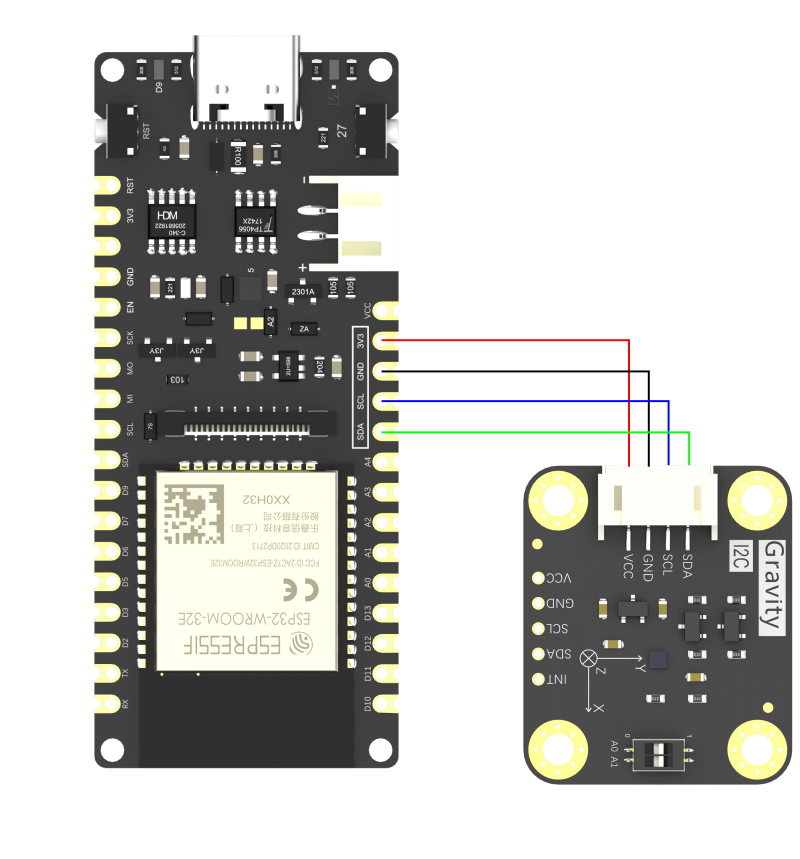
Gravity BMM350 :VCC---(to)---ESP32-E:3V3;
Gravity BMM350 :GND---(to)---ESP32-E:GND;
Gravity BMM350:SCL---(to)---ESP32-E:SCL;
Gravity BMM350:SDA---(to)---ESP32-E:SDA;
Sample Code
 /*!
  * @file  getAllState.ino
  * @brief Get all the config status, self test status; the sensor turns to sleep mode from normal mode after reset
  * @n Experimental phenomenon: serial print the sensor config information and the self-test information
  * @copyright   Copyright (c) 2010 DFRobot Co.Ltd (http://www.dfrobot.com)
  * @license     The MIT License (MIT)
  * @author      [GDuang](yonglei.ren@dfrobot.com)
  * @version     V1.0.0
  * @date        2024-05-06
  * @url         https://github.com/dfrobot/DFRobot_BMM350
  */
#include "DFRobot_BMM350.h"

DFRobot_BMM350_I2C bmm350(&Wire, 0x14);

void setup()
{
  Serial.begin(115200);
  while(!Serial);
  while(bmm350.begin()){
    Serial.println("bmm350 init failed, Please try again!");
    delay(1000);
  } Serial.println("bmm350 init success!");

  /**!
   * Sensor self-test, returns a string indicating the result of the self-test.
   */
  Serial.println(bmm350.selfTest());

  /**!
   * Setting the sensor operating mode
   * opMode:
   *   BMM350_SUSPEND_MODE      // suspend mode: Suspend mode is the default power mode of BMM350 after the chip is powered, Current consumption in suspend mode is minimal,
   *                               so, this mode is useful for periods when data conversion is not needed. Read and write of all registers is possible.
   *   BMM350_NORMAL_MODE       // normal mode  Get geomagnetic data normally.
   *   BMM350_FORCED_MODE       // forced mode  Single measurement, the sensor restores to suspend mode when the measurement is done.
   *   BMM350_FORCED_MODE_FAST  // To reach ODR = 200Hz is only possible by using FM_ FAST.
   */
  bmm350.setOperationMode(BMM350_NORMAL_MODE);

  /**!
   * Setting the preset mode allows the user to easily configure the sensor to acquire geomagnetic data (the default rate for acquiring geomagnetic data is 12.5 Hz).
   * presetMode:
   *   BMM350_PRESETMODE_LOWPOWER      // Low power mode, get a fraction of data and take the mean value.
   *   BMM350_PRESETMODE_REGULAR       // Regular mode, get a number of data and take the mean value.
   *   BMM350_PRESETMODE_ENHANCED      // Enhanced mode, get a plenty of data and take the mean value.
   *   BMM350_PRESETMODE_HIGHACCURACY  // High accuracy mode, get a huge number of take and draw the mean value.
   */
  bmm350.setPresetMode(BMM350_PRESETMODE_HIGHACCURACY);

  /**!
   * Set the rate at which geomagnetic data is acquired, the higher the rate, the faster the speed (no delay function)
   * rate:
   *   BMM350_DATA_RATE_1_5625HZ
   *   BMM350_DATA_RATE_3_125HZ
   *   BMM350_DATA_RATE_6_25HZ
   *   BMM350_DATA_RATE_12_5HZ   (default rate)
   *   BMM350_DATA_RATE_25HZ
   *   BMM350_DATA_RATE_50HZ
   *   BMM350_DATA_RATE_100HZ
   *   BMM350_DATA_RATE_200HZ
   *   BMM350_DATA_RATE_400HZ
   */
  bmm350.setRate(BMM350_DATA_RATE_25HZ);

  /**!
   * Enable x-, y-, and z-axis measurements, enabled by default, no configuration required, when disabled geomagnetic data for x, y, and z-axis will be inaccurate.
   * To configure more parameters, see the setMeasurementXYZ() function in the .h file.
   */
  bmm350.setMeasurementXYZ();

  /**!
   * Get configuration data rate. Unit: Hz
   */
  float rate = bmm350.getRate();
  Serial.print("rate is "); Serial.print(rate); Serial.println(" HZ");

  /**!
   * Gets the measurement status of the x-, y-, and z-axes and returns the measurement status as a string.
   */
  Serial.println(bmm350.getMeasurementStateXYZ());

  /**!
   * Get the sensor operation mode and return the sensor operation status as a string
   */
  Serial.println(bmm350.getOperationMode());

  /**!
   * After a software reset, enter suspend mode.
   */
  bmm350.softReset();
}

void loop()
{
  /**!
   * Get the sensor operation mode and return the sensor operation status as a string
   */
  Serial.println(bmm350.getOperationMode());
  delay(3000);
}
Result
Upload the sample program and the serial monitor prints out the current configuration status of the sensor

Was this article helpful?