
Example Code for Arduino-Delete face (UART)
Last revision 2025/12/17
This guide offers a step-by-step approach to setting up an Arduino with a 3D Face Recognition Module using UART for deleting stored face IDs, complete with hardware and software requirements, a wiring diagram, and sample code for implementation.
Hardware Preparation
- DFRduino UNO R3 (or similar) x 1
- Gravity: 3D Face Recognition Module - UART&I2C x1
Software Preparation
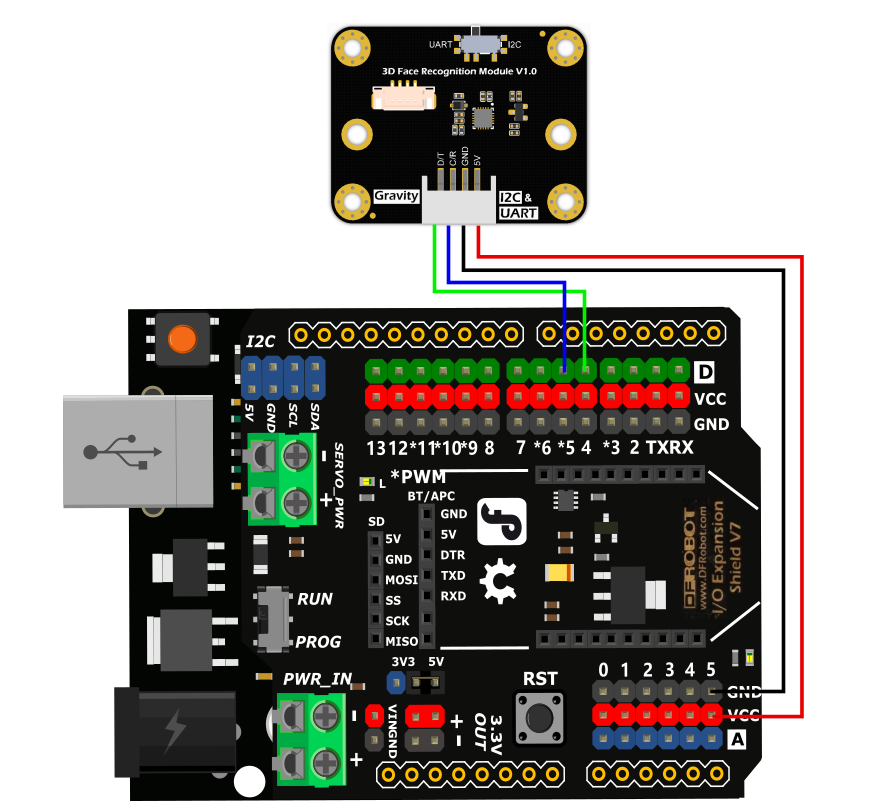
Wiring Diagram
Due to the high power consumption of the face recognition module, the working current is ≤400mA, and the maximum is about 2W. The VCC power supply of the Arduino digital interface cannot meet the demand. The VCC power supply of the analog port and IC2 interface can be used.
Switch the communication mode dial switch to the UART end
Other Preparation Work
Switch the communication mode dial switch to the UART end. Ensure the power supply meets the module's requirements (use Arduino's analog port or I2C interface VCC).
Sample Code
 /*!
  * @file  faceDelete.ino
  * @brief  face delete demo
  * @copyright Copyright (c) 2010 DFRobot Co.Ltd (http://www.dfrobot.com)
  * @license The MIT License (MIT)
  * @author ZhixinLiu(zhixin.liu@dfrobot.com)
  * @version V1.0
  * @date 2024-04-25
  * @url https://github.com/DFRobot/DFRobot_3DFace
  */

#include "DFRobot_3DFace.h"

//#define I2C_COMMUNICATION  //use I2C for communication, but use the serial port for communication if the line of codes were masked

#ifdef  I2C_COMMUNICATION
  DFRobot_3DFace_I2C face(&Wire ,DEVICE_ADDR);
#else
/* ---------------------------------------------------------------------------------------------------------------------
 *    board   |             MCU                | Leonardo/Mega2560/M0 |    UNO    | ESP8266 | ESP32 |  microbit  |   m0  |
 *     VCC    |            3.3V/5V             |        VCC           |    VCC    |   VCC   |  VCC  |     X      |  vcc  |
 *     GND    |              GND               |        GND           |    GND    |   GND   |  GND  |     X      |  gnd  |
 *     RX     |              TX                |     Serial1 TX1      |     5     |   5/D6  |  D2   |     X      |  tx1  |
 *     TX     |              RX                |     Serial1 RX1      |     4     |   4/D7  |  D3   |     X      |  rx1  |
 * ----------------------------------------------------------------------------------------------------------------------*/
/* Baud rate cannot be changed */
  #if defined(ARDUINO_AVR_UNO) || defined(ESP8266)
    SoftwareSerial mySerial(4, 5);
    DFRobot_3DFace_UART face(&mySerial ,57600);
  #elif defined(ESP32)
    DFRobot_3DFace_UART face(&Serial1 ,57600 ,/*rx*/D2 ,/*tx*/D3);
  #else
    DFRobot_3DFace_UART face(&Serial1 ,57600);
  #endif
#endif

void setup()
{
  Serial.begin(115200);
  while(!face.begin()){
    Serial.println("NO Deivces !");
    delay(1000);
  } Serial.println("Device connected!");

  sUserData_t data = face.getFaceMessage();
  if(data.result == true){
    Serial.print("user number = ");
    Serial.println(data.user_count);
  }
/*
  if(face.delAllFaceID()){
    Serial.println("delete all face success!");
  }
*/
  uint8_t number = 1;
  if(face.delFaceID(number)){
    Serial.print("success delete face id = ");
    Serial.println(number);
  }else{
    Serial.print("faild delete face id = ");
    Serial.println(number);
  }
}

void loop()
{
  sUserData_t data = face.getFaceMessage();
  if(data.result == true){
    Serial.print("user number = ");
    Serial.println(data.user_count);
  }
  delay(1000);
}
Result
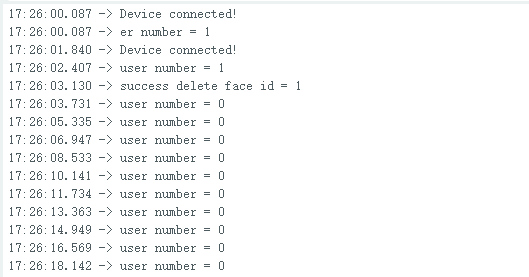
Delete the specified ID face or all faces, and the serial port prints the corresponding data.
Due to the high power consumption of the face recognition module, the working current is ≤400mA, and the maximum is about 2W. The VCC power supply of the Arduino digital interface cannot meet the demand. The VCC power supply of the analog port and IC2 interface can be used.
Was this article helpful?