
Example Code for Arduino-User Statistics & Deletion
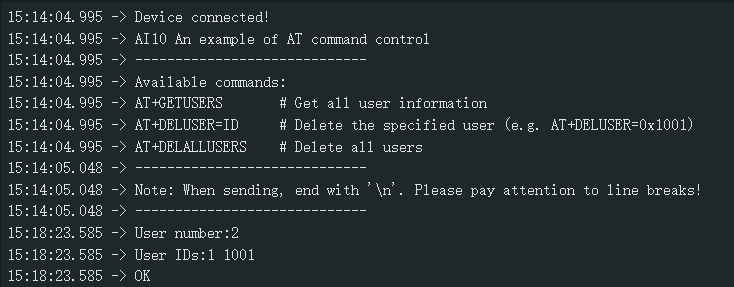
Input command: AT+GETUSERS, query all user numbers and IDs; AT+DELUSER=1, delete the specified user ID1, 1 can be replaced by other user IDs; AT+DELALLUSERS, delete all registered users.
Hardware Preparation
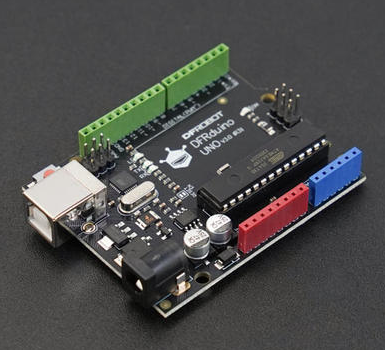
- DFRduino UNO R3 x 1
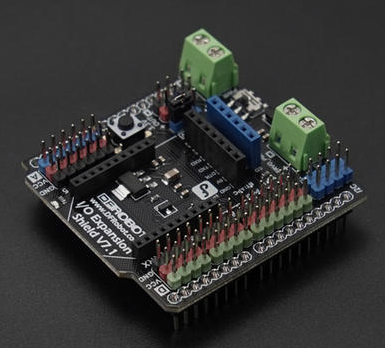
- Gravity: IO Expansion Shield for Arduino V7.1 x 1
- AI Binocular Vision Recognition Sensor(Face & Palm Vein & QR Code) x 1
- 1.25mm 4-pin to Dupont female connector cable ×1
- USB data cable ×1
Software Preparation
- Arduino IDE
- Download DFRobot_AI10 library
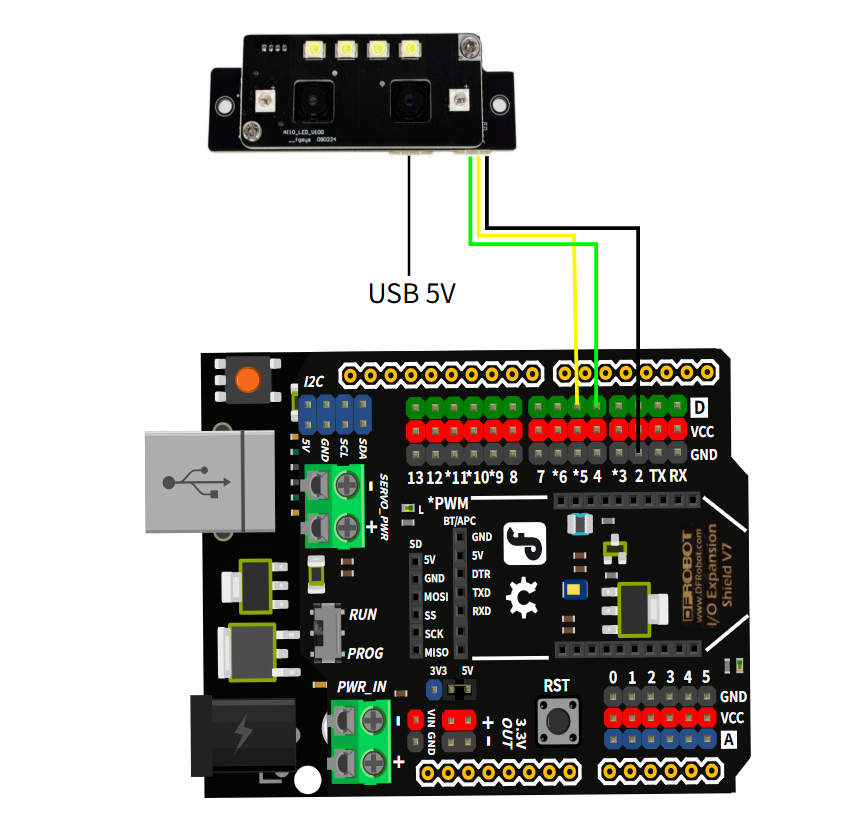
Wiring Diagram
The PC USB interface has low power, so it is recommended to use a 5V USB adapter for power supply, which will make the recognition more sensitive.
Other Preparation Work
Note: When sending, end with '\n'. Please pay attention to line breaks!
Sample Code
/*!
 * @file operateUserData.ino
 * @brief This is an example of how to use the DFRobot_AI10 library to operate user data
 * @copyright	Copyright (c) 2025 DFRobot Co.Ltd (http://www.dfrobot.com)
 * @license The MIT License (MIT)
 * @author [jiali](zhixinliu@dfrobot.com)
 * @version V1.0
 * @date 2025-07-14
 * @url https://github.com/DFRobot/DFRobot_AI10
 */
#include "DFRobot_AI10.h"

/* ---------------------------------------------------------------------------------------------------------------------
  *    board   |             MCU                | Leonardo/Mega2560/M0 |    UNO    | ESP8266 | ESP32 |  microbit  |   m0  |
  *     VCC    |            3.3V/5V             |        VCC           |    VCC    |   VCC   |  VCC  |     X      |  vcc  |
  *     GND    |              GND               |        GND           |    GND    |   GND   |  GND  |     X      |  gnd  |
  *     RX     |              TX                |     Serial1 TX1      |     5     |   5/D6  | 25/D2 |     X      |  tx1  |
  *     TX     |              RX                |     Serial1 RX1      |     4     |   4/D7  | 26/D3 |     X      |  rx1  |
  * ----------------------------------------------------------------------------------------------------------------------*/
/* Baud rate cannot be changed , it is 115200 */

  #if defined(ARDUINO_AVR_UNO) || defined(ESP8266)
    SoftwareSerial mySerial(4, 5);
    DFRobot_AI10_UART recognize(&mySerial ,115200);
  #elif defined(ESP32)
    DFRobot_AI10_UART recognize(&Serial1,115200,/*rxD2*/25,/*txD3*/26);
  #else
    DFRobot_AI10_UART recognize(&Serial1 ,115200);
  #endif


void setup() {
  Serial.begin(115200);
  while (!Serial);
  while(!recognize.begin()){
    Serial.println("NO Deivces !");
    delay(1000);
  }
  Serial.println("Device connected!");

  Serial.println("AI10 An example of AT command control");
  Serial.println("-----------------------------");
  Serial.println("Available commands:");
  Serial.println("AT+GETUSERS       # Get all user information");
  Serial.println("AT+DELUSER=ID     # Delete the specified user (e.g. AT+DELUSER=0x1001)");
  Serial.println("AT+DELALLUSERS    # Delete all users");
  Serial.println("-----------------------------");
  Serial.println("Note: When sending, end with \'\\n\'. Please pay attention to line breaks!");
  Serial.println("-----------------------------");
}

void loop() {
  sAllUserID_t alluser;
  int i;

  if (Serial.available()) {
    // Read the command from the serial port
    String command = Serial.readStringUntil('\n');
    command.trim();

    if (command.startsWith("AT+GETUSERS")){
        /* Get all user information*/
        alluser = recognize.getAllUserIDs();
        if(alluser.result == eSuccess){
          Serial.print("User number:");
          Serial.println(alluser.userNum);
          if(alluser.userNum != 0){
            Serial.print("User IDs:");
            for(i=0;i<alluser.userNum;i++){
              Serial.print(alluser.UIDS[i]);
              Serial.print(" ");
            }
            Serial.println();
          }
        }
      Serial.println("OK");

    } else if (command.startsWith("AT+DELUSER=")) {
      uint16_t ID = command.substring(11).toInt();
      /* Delete the user with the specified ID*/
      if(recognize.deleteUser(ID)){
        Serial.println("successfully deleted!");
      }
      Serial.println("OK");

    } else if (command.endsWith("AT+DELALLUSERS")) {
      /* Delete all users */
      if(recognize.deleteAllUser()){
        Serial.println("successfully deleted!");
      }
      Serial.println("OK");

    } else {
      Serial.println("The command is incorrect!");
    }
  }
}
Result
Enter the corresponding command to query the number of users, delete users, etc.
Was this article helpful?