
Example Code for Arduino - Continuous Measurement
Last revision 2026/03/06
Explore continuous CO2 measurement using Gravity STCC4 with Arduino UNO. This guide covers hardware setup, software requirements, and example code for reading sensor data via the I2C interface. The setup outputs CO2, temperature, and humidity data to the serial monitor. Follow the tutorial for a seamless project experience. Ideal for learning environmental sensing and data acquisition.
Hardware
- DFRduino UNO + IO Expansion Board (SKU: DFR0216-2) ×1
- Gravity: STCC4 CO2 Sensor (SKU: SEN0678) ×1
Software
- Download Arduino IDE: Download Arduino IDE
- DFRobot_STCC4 library: DFRobot_STCC4 library
- For Arduino IDE V1.8.19 (or earlier) install libraries: How to load libraries
- For Arduino IDE V2.0.0 (or above), please directly search and install "DFRobot_STCC4" library in the library manager.
Wiring Diagram
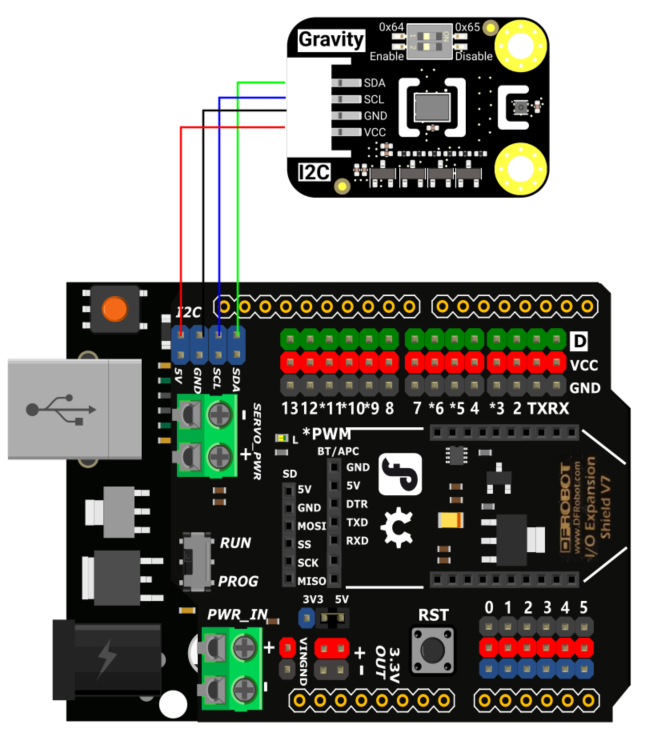
| Sensor Side | Pin Name | Controller Side | Pin Name |
|---|---|---|---|
| Gravity STCC4 CO2 Sensor | VCC | DFRduino UNO | 5V |
| Gravity STCC4 CO2 Sensor | GND | DFRduino UNO | GND |
| Gravity STCC4 CO2 Sensor | SCL | DFRduino UNO | SCL |
| Gravity STCC4 CO2 Sensor | SDA | DFRduino UNO | SDA |
Sample Code
Make sure the onboard jumpers are set to address 0x64 and the SHT40 compensation is enabled. After uploading the sketch, open the serial monitor and wait for ~20 seconds.
/*!
 * @file continueRead.ino
 * @brief This routine continuously reads sensor data via the IIC interface and can obtain one piece of data per second.
 * @n If you connect the humidity and temperature sensor, you can obtain the concentration of carbon dioxide and temperature and humidity.
 * @n If the temperature and humidity sensors are not connected, the obtained temperature and humidity values is the default values.
 * @n The demo supports FireBeetle-ESP32, and FireBeetle-ESP8266, Arduino Uno, Leonardo, Mega2560, FireBeetle-M0
 * @details Experimental phenomenon: The read data will be output in the serial port monitor.
 *
 * @copyright Copyright (c) 2025 DFRobot Co.Ltd (http://www.dfrobot.com)
 * @license The MIT License (MIT)
 * @author [lbx](liubx8023@gmail.com)
 * @version V1.0
 * @date 2025-08-14
 * @url https://github.com/DFRobot/DFRobot_STCC4
 */

#include "DFRobot_STCC4.h"

/**
 * Set temperature compensation.
 * The range is 10 - 40℃.
 * The unit is degrees Celsius.
 * It only takes effect when the temperature and humidity sensor is disconnected from the STCC4.
 */
const uint16_t tCompensation = 26;

/**
 * Set humidity compensation.
 * The range is 20 - 80%RH.
 * It only takes effect when the temperature and humidity sensor is disconnected from the STCC4.
 */
const uint16_t hCompensation = 55;

/**
 * Set pressure compensation.
 * The range is 400 - 1100 hPa.
 * Unit is hPa.
 */
const uint16_t pCompensation = 950;

/**
 * The environmental temperature obtained from STCC4.
 * If no temperature and humidity sensor is connected, this value will be the default value or the set value.
 */
float temperature;

/**
 * The environmental humidity obtained from STCC4.
 * If no temperature and humidity sensor is connected, this value will be the default value or the set value.
 */
float humidity;

/* The CO2 concentration obtained from STCC4. */
uint16_t co2Concentration;

/* The status of the sensor. */
uint16_t sensorStatus;

/**
 * The sensor can communicate via two specific addresses (0x64 and 0x65).
 * "Dip switch" (for Gravity version): A small switch on the board that you can toggle by hand.
 */
const uint8_t ADDR = 0x64;

DFRobot_STCC4_I2C sensor(&Wire, ADDR); // Create an instance of the DFRobot_STCC4_I2C class with the I2C address ADDR.

void setup() {
  Serial.begin(115200);
  while(!Serial) delay(100); // Wait for the serial port to be ready.
  Serial.println("This is a demo of continuous reading sensor data.\n");

  /* Initialize the sensor */
  while(!sensor.begin()){
    Serial.println("Init error!");
    delay(500);
  }

  /* Wake up the sensor */
  sensor.wakeup();
  delay(10);

  /**
   * Get the ID of the sensor.
   */
  Serial.print("ID: 0x");
  Serial.println(sensor.getID(), HEX);

  /**
    * @brief Set temperature and humidity compensation
    * @param temperature Temperature compensation value
    * @param humidity Humidity compensation value
    * @return true if successful, false otherwise
    */
  if(sensor.setRHTcompensation(tCompensation, hCompensation)){
    Serial.println("Set RHT compensation successful.");
  }else{
    Serial.println("Set RHT compensation error!");
  }

  /**
    * @brief Set pressure compensation
    * @param pressure Pressure compensation value
    * @return true if successful, false otherwise
    */
  if(sensor.setPressureCompensation(pCompensation)){
    Serial.println("Set pressure compensation successful.");
  }else{
    Serial.println("Set pressure compensation error!");
  }

  sensor.startMeasurement(); // Start measurement
}

void loop() {
  delay(2000);
  /**
    * @brief Read measurement data
    * @param co2Concentration Pointer to store CO2 concentration
    * @param temperature Pointer to store temperature
    * @param humidity Pointer to store humidity
    * @param sensorStatus Pointer to store sensor status, 0 means normal, otherwise error.
    * @return true if successful, false otherwise
    */
  if(sensor.measurement(&co2Concentration,&temperature,&humidity,&sensorStatus)){
    Serial.print("CO2:");
    Serial.print(co2Concentration);
    Serial.print(" ppm ");
    Serial.print(" temperature:");
    Serial.print(temperature);
    Serial.print(" ℃ ");
    Serial.print(" humidity:");
    Serial.print(humidity);
    Serial.print(" % ");
    Serial.print(" status:");
    Serial.println(sensorStatus);
  }
}
Result
The serial monitor displays CO2 concentration and temperature/humidity readings. Blowing on the sensor will cause the CO2 reading to rise noticeably.

Was this article helpful?