
Example Code for Arduino-Registering Face & Palm Print
Arduino FP02 example lets you enroll face and palm vein users with DFRduino UNO R3 and Gravity IO Expansion Shield. After wiring the FP02 and installing Arduino IDE plus DFRobot_Biometric, open Serial Monitor at 115200, send 1 for face or 2 for palm, keep the target at the recommended distance, and the sketch saves the user with ID, name, type and role for secure biometric access projects.
Hardware Preparation
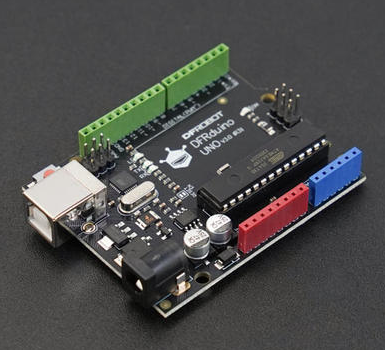
- DFRduino UNO R3 x 1
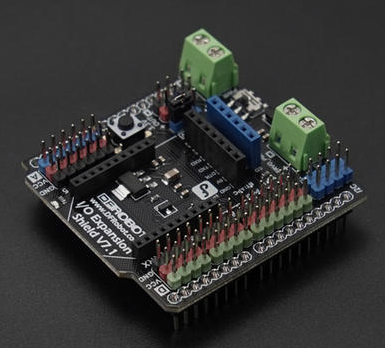
- Gravity: IO Expansion Shield for Arduino V7.1 x 1
- FP02 Offline AI Vision Recognition Sensor (Face & Palm Vein) x 1
- MX1.25mm to 2.54mm DuPont cable x1
Software Preparation
- Arduino IDE
- Download DFRobot_Biometric library
Wiring Diagram

Other Preparation Work
When registering a face or palm print, the AI vision sensor needs to be fixed in place, and attention should be paid to the recognition distance: 20-90cm for faces and 15-20cm for vein and palm prints.
Instruction 1: Register a face user. The same face can only be registered once.
Instruction 2: Register a vein and palm print user. The same palm print can be registered repeatedly, but only once.
Sample Code
/*!
 * @file enrollUser.ino
 * @brief Example of face or palm user enrollment for SEN0736 and SEN0737
 * @details This example performs user enrollment every time you input the command:1 (enroll face),2 (enroll palm)
 * @n and prints the enrollment result through the serial port
 * @n Enrollment should work normally as long as the connection is correct
 * @copyright Copyright (c) 2026 DFRobot Co.Ltd (http://www.dfrobot.com)
 * @license The MIT License (MIT)
 * @author [Olive](feng.yang@dfrobot.com)
 * @version V1.0.0
 * @date 2026-06-02
 * @url https://github.com/DFRobot/DFRobot_Biometric
 */

#include "DFRobot_Biometric.h"

/* -----------------------------------------------------------------------------------------------------
  *    board   |             MCU                |   Leonardo/Mega2560/M0  |   ESP8266  |     ESP32     |
  *     VCC    |            3.3V/5V             |          VCC            |    VCC     |      VCC      |
  *     GND    |              GND               |          GND            |    GND     |      GND      |
  *     RX     |              TX                |      Serial1 TX1        |    5/D6    |  Serial2 TX1  |
  *     TX     |              RX                |      Serial1 RX1        |    4/D7    |  Serial2 RX1  |
  * ----------------------------------------------------------------------------------------------------*/
/* Baud rate cannot be changed , it is 115200 */

#if defined(ESP8266) || defined(ARDUINO_AVR_UNO)
#define SOFT_RX_PIN 4
#define SOFT_TX_PIN 5
#include <SoftwareSerial.h>
SoftwareSerial ModuleSerial(SOFT_RX_PIN, SOFT_TX_PIN);
#elif defined(ESP32)
#define RX_PIN       16
#define TX_PIN       17
#define ModuleSerial Serial2
#else
#define ModuleSerial Serial1
#endif

DFRobot_Biometric face(ModuleSerial);

void setup()
{
#if defined(ESP32)
  ModuleSerial.begin(115200, SERIAL_8N1, RX_PIN, TX_PIN);
#else
  ModuleSerial.begin(115200);
#endif

  Serial.begin(115200);                   //Start serial 1, for information printing
  delay(2000);                            //Wait for module to start
  while (face.checkState() == false) {    //Determine whether the module is ready
    Serial.println("Module not ready!");
    delay(200);
  }
  Serial.println("Module ready!");

  Serial.println("----------------------------------------------------");
  Serial.println("Enter the command below through the serial port:");
  Serial.println("1     # enroll face user");
  Serial.println("2     # enroll palm user");
  Serial.println("----------------------------------------------------");
}

uint16_t                       id;
char                           faceName[]   = "face";
char                           palmName[]   = "palm";
char                           fullName[20] = { 0 };
DFRobot_Biometric::eIsAdmin_t  userclass    = face.eRoleNormal;
DFRobot_Biometric::eUserKind_t userKind     = face.eFaceUser;
uint16_t                       i = 1, j = 1;
void                           loop()
{
  char   data[11] = { 0 };
  int8_t result   = 0;

  while (!Serial.available()) {
    ;
  }
  String input = Serial.readStringUntil('\n');
  input.trim();
  input.toCharArray(data, 10);
  Serial.println("-----------------------------------------------------------------------------------------------");
  if (strcmp(data, "1") == 0 || strcmp(data, "2") == 0) {
    if (strcmp(data, "1") == 0) {
      Serial.println("Start face enrollment. Please keep your face directly facing the camera, 30cm~60cm away");
      snprintf(fullName, sizeof(fullName), "%s%d", faceName, i);
      userKind = face.eFaceUser;
      result   = face.enrollUser(userKind, fullName, &id, userclass);
    } else {
      Serial.println("Start palm enrollment. Please keep your palm directly facing the camera, 15cm~20cm away");
      snprintf(fullName, sizeof(fullName), "%s%d", palmName, j);
      userKind = face.ePalmUser;
      result   = face.enrollUser(userKind, fullName, &id, userclass);
    }
    //Determine the execution result
    if (result == 1) {
      if (strcmp(data, "1") == 0) {
        Serial.println("Face enrollment successful!");
      } else {
        Serial.println("Palm enrollment successful!");
      }
      Serial.print("the user id is:");
      Serial.println(id);
      Serial.print("the user name is:");
      Serial.println(fullName);
      Serial.print("the user kind is:");
      if (userKind == face.eFaceUser) {
        Serial.println("face user");
      } else if (userKind == face.ePalmUser) {
        Serial.println("palm user");
      }
      Serial.print("the userClass is:");
      if (userclass == face.eRoleNormal) {
        Serial.println("Normal user");
      } else if (userclass == face.eRoleAdmin) {
        Serial.println("Administrator");
      }
      if (strcmp(data, "1") == 0) {
        i++;
      } else {
        j++;
      }
    } else if (result == 2) {
      Serial.println("User already exists");
    } else if (result == 3) {
      Serial.println("Enrollment timeout");
    } else if (result == NO_ACK) {
      Serial.println("No response from module");
    } else if (result == ERROR) {
      Serial.println("Parameter range error");
    }
  } else {
    Serial.println("Error command!");
  }
  Serial.println("-----------------------------------------------------------------------------------------------");
  Serial.println("");
  Serial.println("please input next command:");
  Serial.println("");
  delay(2000);
}
Result
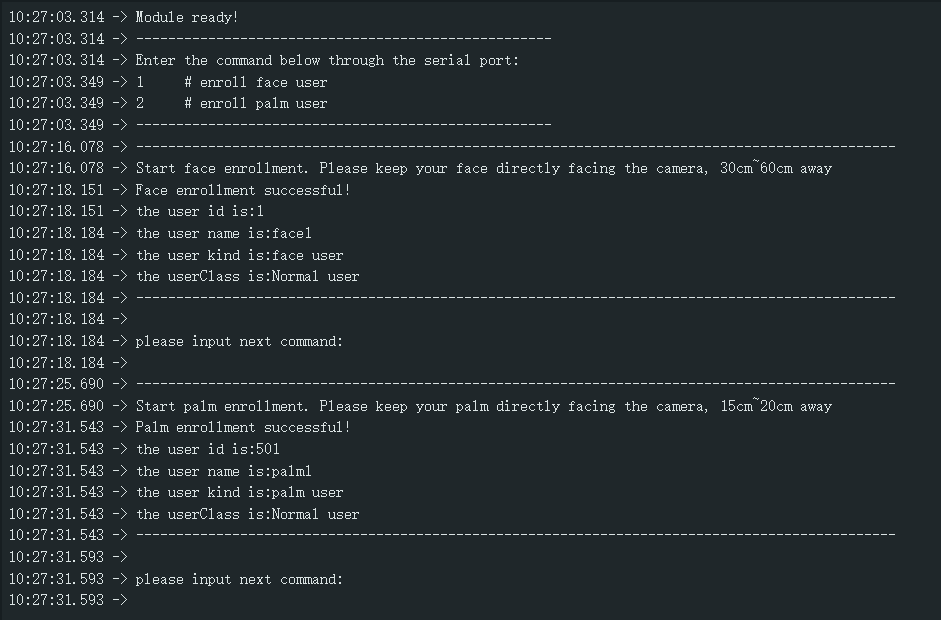
Each registration takes 10 seconds. After successful registration, the corresponding information will be printed. If the registration times out, you can re-register by entering the command. IDs 1-500 are for faces, and IDs 501-800 are for veins and palm prints.
Was this article helpful?