
Example Code for Arduino-User Statistics & Deletion
Arduino example for FP02 biometric user management on DFRduino UNO R3, using Gravity IO Expansion Shield and DFRobot_Biometric library to query and delete face users via simple serial commands.
Hardware Preparation
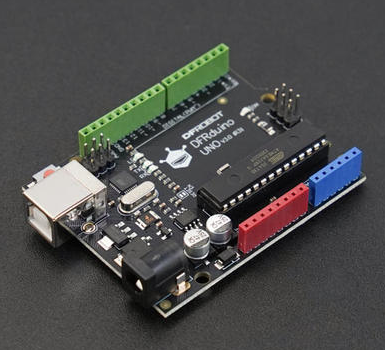
- DFRduino UNO R3 x 1
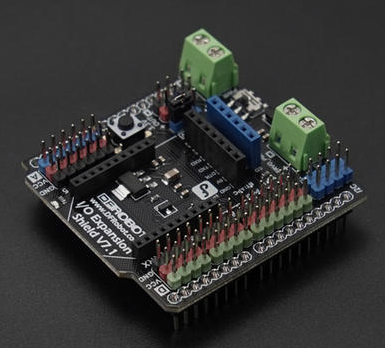
- Gravity: IO Expansion Shield for Arduino V7.1 x 1
- FP02 Offline AI Vision Recognition Sensor (Face & Palm Vein) x 1
- MX1.25-8Pin to 2.54mm DuPont cable x1
Software Preparation
- Arduino IDE
- Download DFRobot_Biometric library
Wiring Diagram

Other Preparation Work
Input command 1: Query the number of face recognition users, their IDs, and the number of palm print users.
Input command 2: Access the delete specified user function, then enter any ID number again to delete the specified ID.
Input command 3: Delete all registered users.
Sample Code
/*!
 * @file getDeleteId.ino
 * @brief This routine implements user lookup and deletion for SEN0736 and SEN0737
 * @details This routine sends string commands over serial to the host controller
 * @n which parses and executes the corresponding actions on the module.
 * @n Supported commands: 1 (get number of users), 2 (delete user by ID), and 3 (delete all users)
 * @copyright Copyright (c) 2026 DFRobot Co.Ltd (http://www.dfrobot.com)
 * @license The MIT License (MIT)
 * @author [Olive](feng.yang@dfrobot.com)
 * @version V1.0.0
 * @date 2026-06-02
 * @url https://github.com/DFRobot/DFRobot_Biometric
 */

#include "DFRobot_Biometric.h"
#include "string.h"
/* -----------------------------------------------------------------------------------------------------
  *    board   |             MCU                |   Leonardo/Mega2560/M0  |   ESP8266  |     ESP32     |
  *     VCC    |            3.3V/5V             |          VCC            |    VCC     |      VCC      |
  *     GND    |              GND               |          GND            |    GND     |      GND      |
  *     RX     |              TX                |      Serial1 TX1        |    5/D6    |  Serial2 TX1  |
  *     TX     |              RX                |      Serial1 RX1        |    4/D7    |  Serial2 RX1  |
  * ----------------------------------------------------------------------------------------------------*/
/* Baud rate cannot be changed , it is 115200 */

#if defined(ESP8266) || defined(ARDUINO_AVR_UNO)
#define SOFT_RX_PIN 4
#define SOFT_TX_PIN 5
#include <SoftwareSerial.h>
SoftwareSerial ModuleSerial(SOFT_RX_PIN, SOFT_TX_PIN);
#elif defined(ESP32)
#define RX_PIN       16
#define TX_PIN       17
#define ModuleSerial Serial2
#else
#define ModuleSerial Serial1
#endif

DFRobot_Biometric face(ModuleSerial);

void setup()
{
#if defined(ESP32)
  ModuleSerial.begin(115200, SERIAL_8N1, RX_PIN, TX_PIN);
#else
  ModuleSerial.begin(115200);
#endif

  Serial.begin(115200);    //Start serial 1, for information printing
  delay(1500);             //Wait for module to start,
}
uint8_t j = 0;
void    loop()
{
  // put your main code here, to run repeatedly:
  while (face.checkState() == false) {    //Determine whether the module is ready
    Serial.println(" Module not ready !");
    delay(200);
  }
  //Print once on the first loop iteration
  if (j++ < 1) {
    Serial.println(" Module ready !");
    //Command Introduction
    Serial.println("-----------------------------");
    Serial.println("Enter the command below through the serial port:");
    Serial.println("1          # Get all user information");
    Serial.println("2          # Delete the specified user");
    Serial.println("3          # Delete all users");
    Serial.println("-----------------------------");
  }
  char     data[31] = { 0 };
  int16_t  nums     = 0;
  uint16_t userId   = 0;
  int8_t   result   = 0;
  while (!Serial.available()) {
    ;
  }
  //Read the user's command
  String input = Serial.readStringUntil('\n');
  input.trim();
  input.toCharArray(data, 30);
  //Match the command of user
  if (strcmp(data, "1") == 0) {
    nums = face.getAllNumsFaceUserIDs();
    Serial.print("face user nums:");
    Serial.println(nums);
    delay(100);
    uint16_t id[50];
    face.getAllFaceUserIDs(id, 50);
    if (nums > 0) {
      Serial.print("face user ids:");
      for (int16_t i = 0; i < nums; i++) {
        Serial.print(id[i]);
        Serial.print(" ");
      }
      Serial.println("");
      delay(100);
    }
    nums = face.getAllNumsPalmUserIDs();
    Serial.print("palm user nums:");
    Serial.println(nums);
  } else if (strcmp(data, "2") == 0) {
    Serial.println("input the id that you delete:");
    while (!Serial.available()) {
      ;
    }
    String inputString = Serial.readStringUntil('\n');
    inputString.trim();
    // Validate that the input is a pure integer
    bool validInput = (inputString.length() > 0);
    for (size_t k = 0; k < inputString.length(); k++) {
      if (!isdigit(inputString.charAt(k))) {
        validInput = false;
        break;
      }
    }
    if (!validInput) {
      Serial.println("Invalid ID");
    } else {
      userId = inputString.toInt();
      if (userId <= 500) {
        nums = face.getAllNumsFaceUserIDs();
        uint16_t id[50];
        face.getAllFaceUserIDs(id, 50);
        bool idExists = false;
        for (int16_t i = 0; i < nums; i++) {
          if (userId == id[i]) {
            idExists = true;
          }
        }
        if (idExists == true) {
          result = face.deleteUser(userId);
          if (result == 1) {
            Serial.print("Successful delete user:");
            Serial.println(userId);
          } else {
            Serial.println("Failed to delete user");
          }
        } else {
          Serial.println("The user with this ID does not exist");
        }
      } else if (userId > 500 && userId <= 800) {
        result = face.deleteUser(userId);
        if (result == 1) {
          Serial.print("Successful delete user:");
          Serial.println(userId);
        } else {
          Serial.println("Failed to delete user");
        }
      } else {
        Serial.println("The user with this ID does not exist");
      }
    }
  } else if (strcmp(data, "3") == 0) {
    result = face.deleteAllUser();
    if (result == 1) {
      Serial.println("Successful delete all user");
    } else {
      Serial.println("Failed to delete all user");
    }
  } else {
    Serial.println("ERROR command");
  }
  Serial.println("");
  Serial.println("please input next command:");
  delay(1000);
}
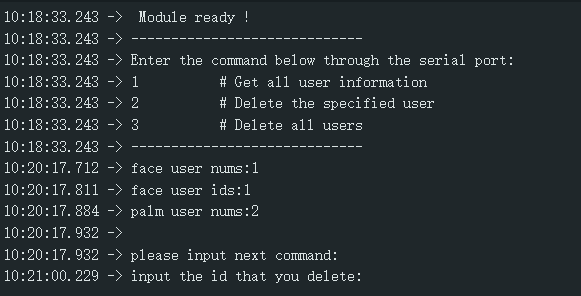
Result
Enter the corresponding command to perform operations such as querying the number of users and deleting users.
Was this article helpful?