I have tried restarting the shield multiple times, each time the shield initiate normally with Stat and Net LED turned on. The moment I **connect to the shield via serial**, both green light would **turn off**. I had tried diagnosing the problem with Module Tester(Serial monitor). On the rare occasion a connection was establish, it would display a response like **normal power off**. What's the problem with it?
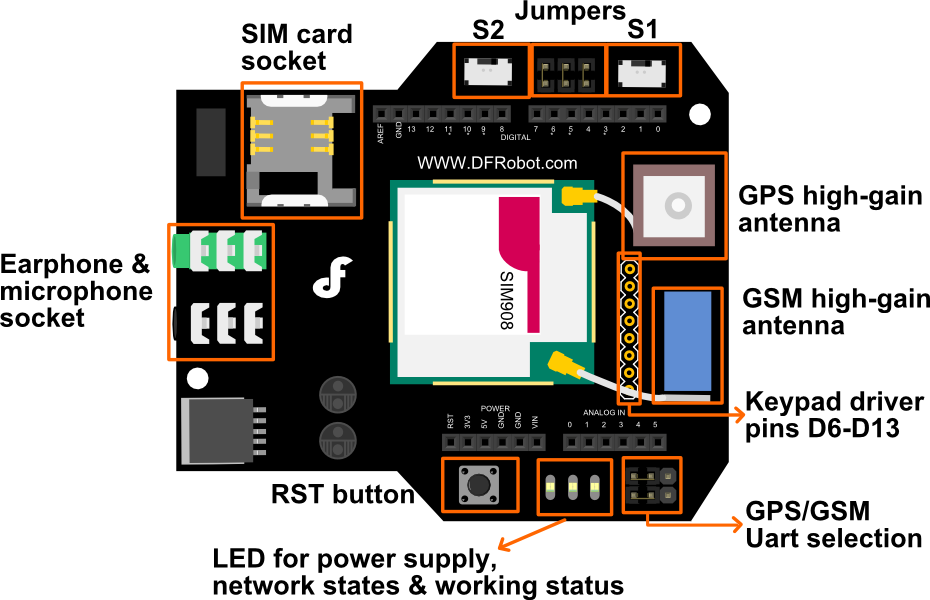
Once the module detect the serial signal_Reset, it will reset, then the module would power down, namely the State and NET LED would turn off. And the the Reset signal can be triggered by any one of these operation
① hit the botton_RST(reset) on the shield/ Arduino card
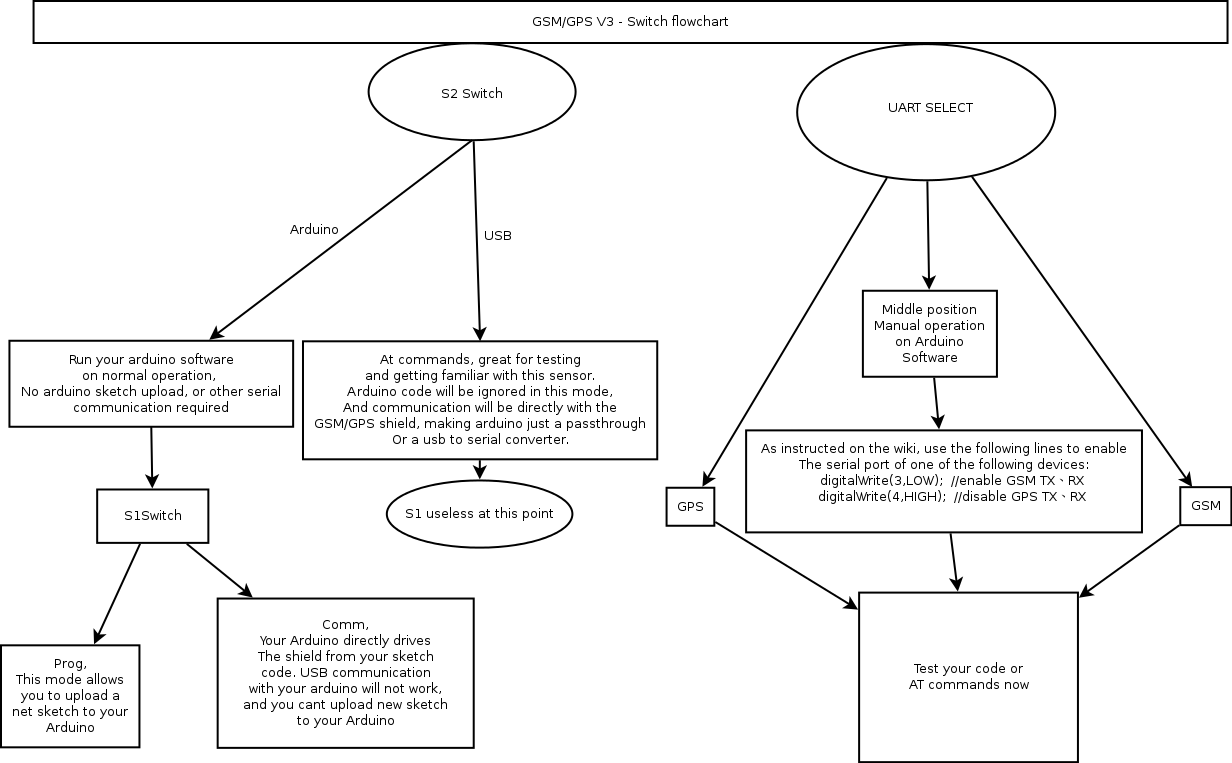
② when you pull the switch_S1 from Prog to Comm (or contrary)
③ when you open Arduino Serial Monitor or connect the serial port by other Serial Testers.To reboot the module (light up the State&Net LED), you can hit the button_Reset or you can re-open the Serial Monitor.
How to drive the module via USB port (AT command) using Leonardo after changing Serial to Serial1?
Hi, you are right that to modify the Serial into Serial1 for Leonardo using the sample sketches. But for to AT mode, it is very similar to this board, SIM808 with Leonardo mainboard SKU:DFR0355, i.e. you have to use the code below (For GPS debug) for AT command debugging, also the switches should be set as: S1: Comm; S2: Arduino; S3 should set as the same as above tutorial. One more note is the external power should be added as Leonardo costs more power even in GPS feature test.
void setup() {
Serial.begin(9600); //initialize Serial(i.e. USB port)
Serial1.begin(9600); //initialize Serial1
//Init the driver pins for GSM function
pinMode(3, OUTPUT);
pinMode(4, OUTPUT);
pinMode(5, OUTPUT);
//Output GSM Timing
digitalWrite(5, HIGH);
delay(1500);
digitalWrite(5, LOW);
digitalWrite(3, HIGH); //disable GSM TX、RX
digitalWrite(4, HIGH); //disable GPS TX、RX
while (!Serial) {
; // wait for serial port to connect.
// Needed for native USB port only
}
Serial.println("Input AT please...");
}
void loop() {
while (Serial1.available()) {
Serial.write(Serial1.read());
}
while (Serial.available()) {
Serial1.write(Serial.read());
}
delay(1);
}
}
Serial port terminal application warns “Normal power down” when reconnect after disconnect, and Network indication LEDs both turn off.
Choose disconnect, and connect again. Arduino board will reset at every connection to PC. During resetting, the Arduino board will emit a low pulse to pin PWRKEY of GPS module. So if GPS module is already on before connection, the low pulse will switch it off, if not, the pulse will switched it on.
I have tried restarting the shield multiple times, each time the shield initiate normally with Stat and Net LED turned on. The moment I connect to the shield via serial, both green light would turn off. I had tried diagnosing the problem with Module Tester(Serial monitor). On the rare occasion a connection was establish, it would display a response like normal power off. What's the problem with it?
Once the module detect the serial signal_Reset, it will reset, then the module would power down, namely the State and NET LED would turn off. And the the Reset signal can be triggered by any one of these operation
① hit the botton_RST(reset) on the shield/ Arduino card
② when you pull the switch_S1 from Prog to Comm (or contrary)
③ when you open Arduino Serial Monitor or connect the serial port by other Serial Testers.To reboot the module (light up the State&Net LED), you can hit the button_Reset or you can re-open the Serial Monitor.
Serial port terminal application send out all the strings on the screen after pressing Ctrl+Z, when trying to send message in GSM USB mode.
It is possible to send Ctrl characters when the terminal is set to Line Mode. We can choose the Line Mode in options-terminal-terminal mode, or we can send the Ctrl character though sending string box of Coolterm in hexadecimal format. Please refer to Ways to send Ctrl +Z in Coolterm.
And restart the serial port terminal application always works for other troubles.