ESP32-S3R8 1.85-inch Round Display Board

SKU: DFR1221

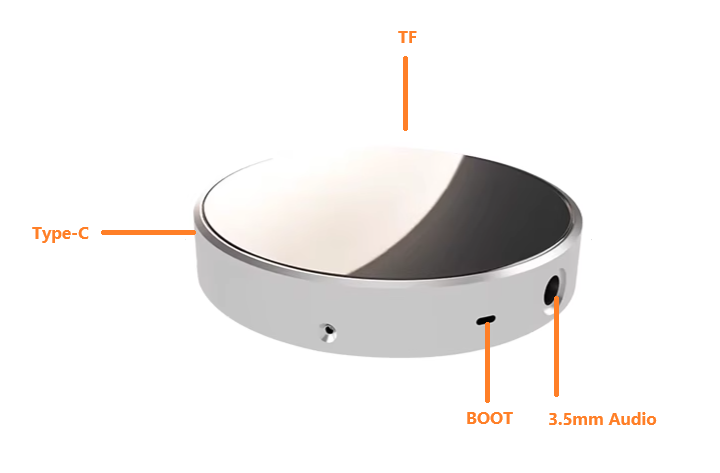
The 1.85-inch round display uses ESP32-S3R8 (dual-core MCU, WiFi/BLE5.0, 240MHz, 520KB SRAM, 8MB PSRAM, 448KB ROM, 16MB Flash). It features 262K-color 360x360 display, wide angle, capacitive touch. Onboard mic/3.5mm audio enable AI voice interaction. Built-in circuits include backlight, touch, I2S mic/DAC, TF, wireless power. Supports secondary dev via Arduino, ESP-IDF, MicroPython, GUITION.

Overhead shot of ESP32-S3 Round Display Development Board

Downloadable Resources

  • Docs
  • Tech Specs
  • 1. Example Code for Arduino-LVGL Development

    This article offers a detailed guide on setting up Arduino-LVGL development using an ESP32-S3 display board, including hardware/software preparation, a step-by-step setup process, and visual results.

    2. Example Code for Arduino-Audio Recording and Playback

    This sample code implements audio recording and playback. It requires an external speaker, headphone, or other device connected via the audio interface. After the code is burned, recording automatically begins. The recording time is 5 seconds. After recording is complete, the audio automatically plays.

    3. Example Code for MicroPython-Clock Dial

    To run MicroPython on the ESP32, you first need to flash the ESP32 firmware, then upload the screen driver (screen.py) and run the clock dial example code (test.py).

    Reference

    This article offers a comprehensive guide on setting up libraries for Arduino IDE and MicroPython, detailing network configuration, firmware downloads, and utilizing features such as secondary screens, weather updates, and multimedia playback.

    Specification

    Parameter Details
    Display color RGB 262K color
    Size 1.85inch
    Type TFT
    Driver chip ST77916
    Resolution 360*360
    Effective display area 45.68*45.68mm
    Viewing angle >60°
    Touch CST816 capacitive touch
    Interface USB Type-C
    Main control chip ESP32-S3R8
    Operating temperature -20°C~70°C
    Storage temperature -30°C~80°C
    Operating voltage 5V
    Power consumption 1W
    SD memory card 128MB
    Weight 50g
    Size 58x58x11mm

    Pinout

    FAQ

    • Unable to download code to the development board
      Please press and hold the BOOT button and then plug in the Type-C USB cable.
    • Serial port keeps printing reset information
      Please press and hold the BOOT button and then plug in the Type-C USB cable.
    • COM port keeps appearing and disappearing
      Please press and hold the BOOT button and then plug in the Type-C USB cable.
    • Cannot find the COM port
      Please press and hold the BOOT button and then plug in the Type-C USB cable.

    Explore More Related Questions >

    Was this article helpful?

    TOP