
Example Code for Arduino-Audio Recording and Playback
This sample code implements audio recording and playback. It requires an external speaker, headphone, or other device connected via the audio interface. After the code is burned, recording automatically begins. The recording time is 5 seconds. After recording is complete, the audio automatically plays.
Hardware Preparation
- ESP32-S3 1.85-inch round display development board x1
- Type-C USB data cable x1
Software Preparation
Other Preparation Work
When you use ESP32 for the first time, you need to know the following steps: Add the ESP32 development board to the Arduino IDE (How to add the ESP32 development board to the Arduino IDE?)
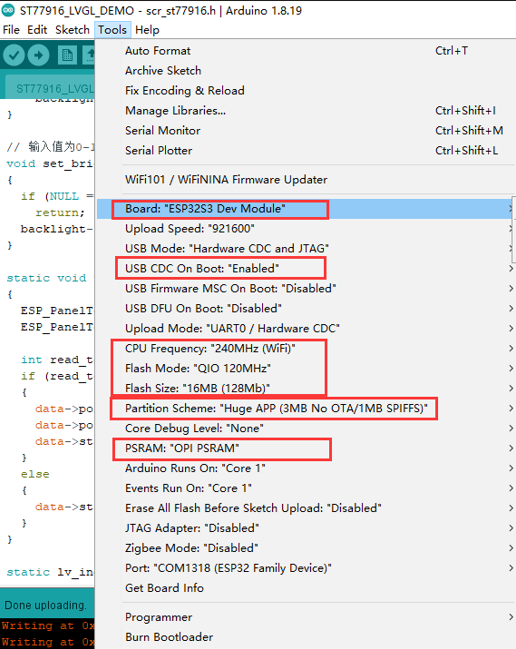
After installing the ESP32 board,set up the development board according to the figure below, and then burn the code
Sample Code
#include <Arduino.h>
#include <SPI.h>

#include "ESP_I2S.h"

#define SAMPLE_RATE (16000)
#define DATA_PIN (GPIO_NUM_46)
#define CLOCK_PIN (GPIO_NUM_45)
#define REC_TIME 5  //Recording time 5 seconds

const uint8_t DAC_SCK = 18;
const uint8_t DAC_WS = 16;
const uint8_t DAC_DOUT = -1;
const uint8_t DAC_DIN = 17;

void setup() {
  uint8_t *wav_buffer;
  size_t wav_size;
  I2SClass i2s;
  I2SClass i2s1;
  Serial.begin(115200);
  pinMode(48, OUTPUT);
  digitalWrite(48, HIGH);
  i2s.setPinsPdmRx(CLOCK_PIN, DATA_PIN);
  if (!i2s.begin(I2S_MODE_PDM_RX, SAMPLE_RATE, I2S_DATA_BIT_WIDTH_16BIT, I2S_SLOT_MODE_MONO)) {
    Serial.println("Failed to initialize I2S PDM RX");
  }
  i2s1.setPins(18, 16, 17);
  // i2s1.setPins(DAC_SCK, DAC_WS, DAC_DOUT, DAC_DIN);
  if (!i2s1.begin(I2S_MODE_STD, SAMPLE_RATE, I2S_DATA_BIT_WIDTH_16BIT, I2S_SLOT_MODE_MONO)) {
    Serial.println("MAX98357 initialization failed!");
  }
  Serial.println("start REC");
  wav_buffer = i2s.recordWAV(REC_TIME, &wav_size);
  Serial.println("start playing");
  i2s1.playWAV(wav_buffer, wav_size);
}

void loop() {
}
Result
This sample code implements audio recording and playback. It requires an external speaker, headphone, or other device connected via the audio interface. After the code is burned, recording automatically begins. The recording time is 5 seconds. After recording is complete, the audio automatically plays.
Was this article helpful?