Cherokey 4WD Mobile Platform

SKU: ROB0102

The Cherokey 4WD Arduino mobile robot (L298P 4WD Mobile Robot Control Kit) is versatile, compatible with Arduino UNO/MEGA, Romeo, etc. It has an embedded L298P motor driver (drives 2×6-12V DC motors, 2A max), integrated 2-way DC driver & XBee/APC220 socket (no extra shields needed). The expansion plate adds surface area for servos/sensors, with a prototyping area. Its high-strength aluminum chassis works outdoors (grass, gravel, etc.). Suitable for competitions/research, it includes installation steps, sample codes, supports keyboard control and motor direction adjustment.

Overhead shot of Cherokey 4WD Mobile Robot with Arduino components-DFRobot product sku:ROB0102 image.

Downloadable Resources

  • Docs
  • Tech Specs
  • Specification

    Parameter Description
    Motor Channels 2-channel DC motor driver
    Motor Control Dual H-bridge for bi-directional motor control
    Prototyping Area Solderable prototyping areas
    Servo Mounting Servo-sized holes
    Board Compatibility Mounting holes compatible with Arduino UNO, MEGA, Romeo, etc.
    Expansion Support Easy connection to external modules such as XBee, DFRobot Bluetooth, and APC220
    LEDs 7 white LEDs around the board edge for lighting effects
    Motor Type Gearboxed motors for higher torque
    Motor Specification
    Parameter 3V Value 6V Value
    Gear Ratio 1:120 1:120
    No-load speed 100RPM 200RPM
    No-load current 60mA 71mA
    Stall current 260mA 470mA
    Torque 1.2Kgcm 1.92Kgcm
    Size 55mm x 48.3mm x 23mm 55mm x 48.3mm x 23mm
    Weight 45g 45g

    Pinout

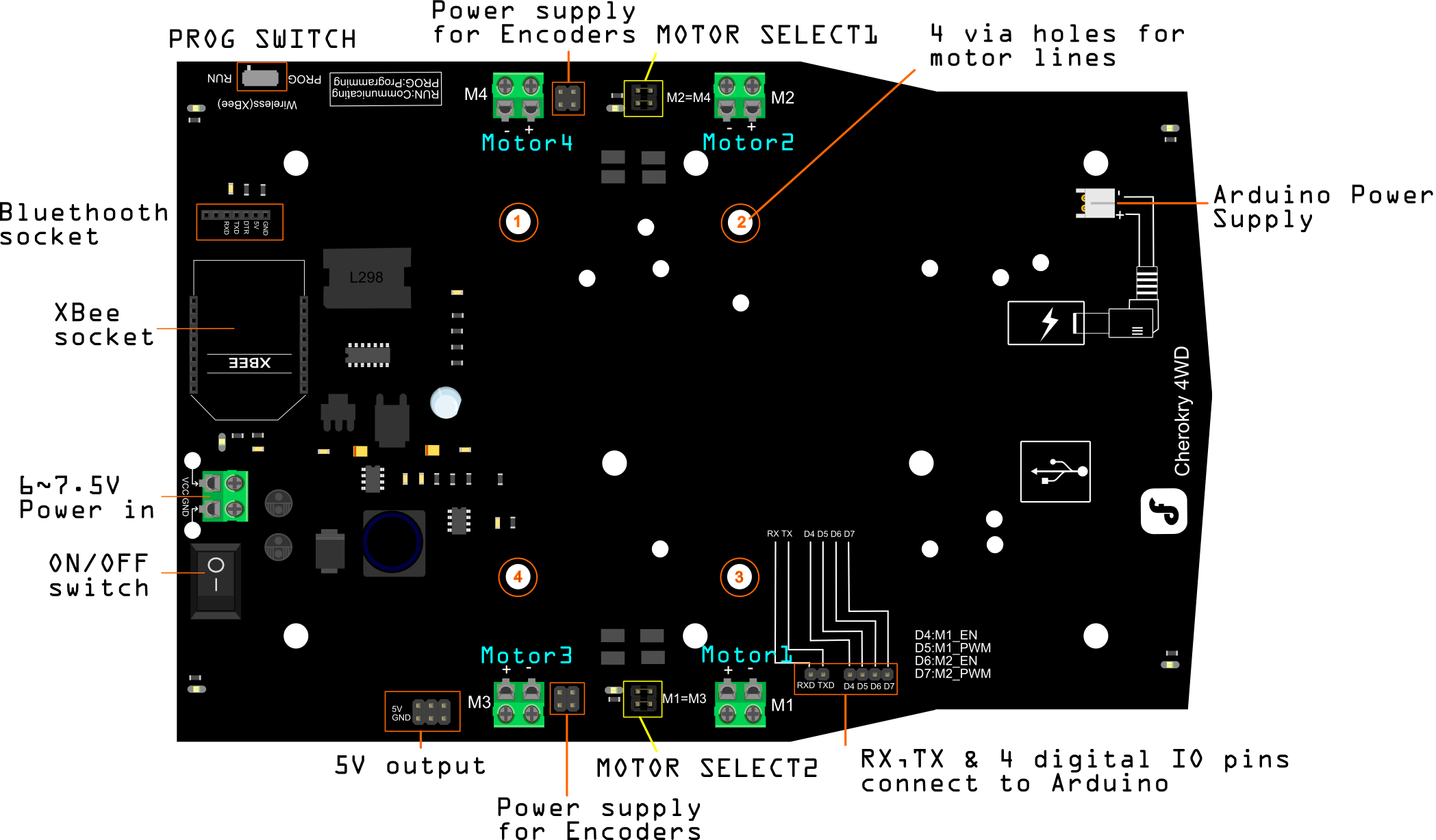
    Cherokey 4WD Mobile Platform Pin out

    In the above diagram the 4 digital I/O pins in the lower-right corner can connect to any digital pin of an Arduino or similar microcontroller. In order for it to work you must make sure the correct pins are assigned in your code.

    Note: D5 and D6 are PWM pins

    More Details:


    • PROG SWITCH:
      • PROG:Set the switch in this position when uploading code if you plug in an XBee or Bluetooth module on to the Cherokey PCB
      • RUN: Set the switch in this position to run the code after it has been uploaded
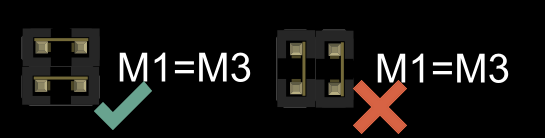
    • MOTOR SELECT1: Short the pins with a jumpers to control Motor 2 and Motor 4 simultaneously
    • MOTOR SELECT2: Short the pins with a jumper to control Motor 1 and Motor 3 simultaneously

    Note: If you want to control the motors independently, remove the jumpers from these pins

    Correct and incorrect method of shorting the pins

    FAQ

    • What to do if the Cherokey's direction is wrong?
      The Cherokey's direction may vary depending on the wiring of the motors. If you think the directions are wrong, try switching the positive and negative wires
    • If the Cherokey is only plugged in with USB power through the microcontroller, why the motors will not work?

      Batteries must be connected to make the motors move! If the Cherokey is only plugged in with USB power through the microcontroller, the motors will be under powered and will not work!

    • If batteries are installed but the motors are not moving, what should be done?
      make sure the switch at the rear of the Cherokey PCB is turned on
    • If a problem persists, what can be tried?
      try editing the code to change the motor direction - covered in the Changing the Motor Direction in Code section below

    Explore More Related Questions >

    Was this article helpful?

    TOP