
Example Code for Arduino-Motion Detection via UART
This article offers example code for Arduino-based motion detection via UART, detailing hardware and software setup, wiring, and sample code execution. It guides users through configuring a millimeter wave presence sensor with Arduino, enabling effective detection of moving objects and sensor mode adjustments.
Hardware Preparation
Software Preparation
- Arduino IDE,Click to download Arduino IDE
- DFRobot_C4001 library,Click to download the DFRobot_C4001 library.
Wiring Diagram

| mmWave | Arduino Uno |
|---|---|
| VIN | 5V |
| GND | GND |
| C/R | D5 |
| D/T | D4 |
Other Preparation Work
Please switch the DIP switch on the back of the sensor to the UART direction.
Sample Code
 /*!
  * @file  motionDetection.ino
  * @brief  Example of radar detecting whether an object is moving
  * @copyright Copyright (c) 2010 DFRobot Co.Ltd (http://www.dfrobot.com)
  * @license The MIT License (MIT)
  * @author ZhixinLiu(zhixin.liu@dfrobot.com)
  * @version V1.0
  * @date 2024-02-02
  * @url https://github.com/dfrobot/DFRobot_C4001
  */

#include "DFRobot_C4001.h"

//#define I2C_COMMUNICATION  //use I2C for communication, but use the serial port for communication if the line of codes were masked

#ifdef  I2C_COMMUNICATION
  /*
   * DEVICE_ADDR_0 = 0x2A     default iic_address
   * DEVICE_ADDR_1 = 0x2B
   */
  DFRobot_C4001_I2C radar(&Wire ,DEVICE_ADDR_0);
#else
/* ---------------------------------------------------------------------------------------------------------------------
 *    board   |             MCU                | Leonardo/Mega2560/M0 |    UNO    | ESP8266 | ESP32 |  microbit  |   m0  |
 *     VCC    |            3.3V/5V             |        VCC           |    VCC    |   VCC   |  VCC  |     X      |  vcc  |
 *     GND    |              GND               |        GND           |    GND    |   GND   |  GND  |     X      |  gnd  |
 *     RX     |              TX                |     Serial1 TX1      |     5     |   5/D6  |  D2   |     X      |  tx1  |
 *     TX     |              RX                |     Serial1 RX1      |     4     |   4/D7  |  D3   |     X      |  rx1  |
 * ----------------------------------------------------------------------------------------------------------------------*/
/* Baud rate cannot be changed */
  #if defined(ARDUINO_AVR_UNO) || defined(ESP8266)
    SoftwareSerial mySerial(4, 5);
    DFRobot_C4001_UART radar(&mySerial ,9600);
  #elif defined(ESP32)
    DFRobot_C4001_UART radar(&Serial1 ,9600 ,/*rx*/D2 ,/*tx*/D3);
  #else
    DFRobot_C4001_UART radar(&Serial1 ,9600);
  #endif
#endif

void setup()
{
  Serial.begin(115200);
  while(!Serial);
  while(!radar.begin()){
    Serial.println("NO Deivces !");
    delay(1000);
  }
  Serial.println("Device connected!");

  // exist Mode
  radar.setSensorMode(eExitMode);

  sSensorStatus_t data;
  data = radar.getStatus();
  //  0 stop  1 start
  Serial.print("work status  = ");
  Serial.println(data.workStatus);

  //  0 is exist   1 speed
  Serial.print("work mode  = ");
  Serial.println(data.workMode);

  //  0 no init    1 init success
  Serial.print("init status = ");
  Serial.println(data.initStatus);
  Serial.println();

  /*
   * min Detection range Minimum distance, unit cm, range 0.3~25m (30~2500), not exceeding max, otherwise the function is abnormal.
   * max Detection range Maximum distance, unit cm, range 2.4~25m (240~2500)
   * trig Detection range Maximum distance, unit cm, default trig = max
   */
  if(radar.setDetectionRange(/*min*/30, /*max*/1000, /*trig*/1000)){
    Serial.println("set detection range successfully!");
  }
  // set trigger sensitivity 0 - 9
  if(radar.setTrigSensitivity(1)){
    Serial.println("set trig sensitivity successfully!");
  }

  // set keep sensitivity 0 - 9
  if(radar.setKeepSensitivity(2)){
    Serial.println("set keep sensitivity successfully!");
  }
  /*
   * trig Trigger delay, unit 0.01s, range 0~2s (0~200)
   * keep Maintain the detection timeout, unit 0.5s, range 2~1500 seconds (4~3000)
   */
  if(radar.setDelay(/*trig*/100, /*keep*/4)){
    Serial.println("set delay successfully!");
  }


  // get confige params
  Serial.print("trig sensitivity = ");
  Serial.println(radar.getTrigSensitivity());
  Serial.print("keep sensitivity = ");
  Serial.println(radar.getKeepSensitivity());

  Serial.print("min range = ");
  Serial.println(radar.getMinRange());
  Serial.print("max range = ");
  Serial.println(radar.getMaxRange());
  Serial.print("trig range = ");
  Serial.println(radar.getTrigRange());

  Serial.print("keep time = ");
  Serial.println(radar.getKeepTimerout());

  Serial.print("trig delay = ");
  Serial.println(radar.getTrigDelay());

}

void loop()
{
  // Determine whether the object is moving
  if(radar.motionDetection()){
    Serial.println("exist motion");
    Serial.println();
  }
  delay(100);
}
Result
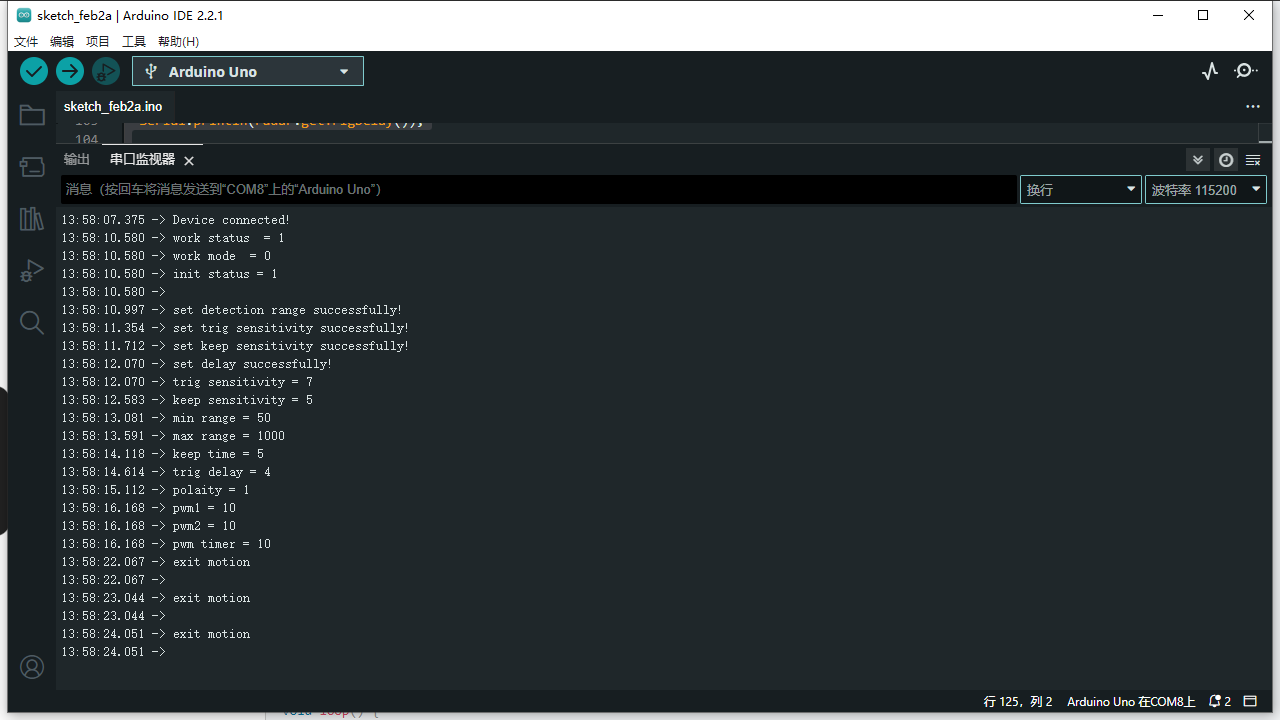
When someone is detected, "exist motion" will be output.
Was this article helpful?