Fermion: IN100 BLE Sensor Beacon

SKU: TEL0168

Fermion: BLE Sensor Beacon is a wireless beacon broadcasting sensor data via Bluetooth. It has built-in 11-bit ADC acquisition and I2C functions, supporting digital, analog, or I2C sensors. BLE-enabled devices (mobile phones, ESP32, etc.) can access data within range. Integrating low-power Bluetooth 5.3, it allows configurable data formats (iBeacon, Eddystone, user-defined) via a no-code graphical interface. After setup, it auto-collects and broadcasts sensor data as set.

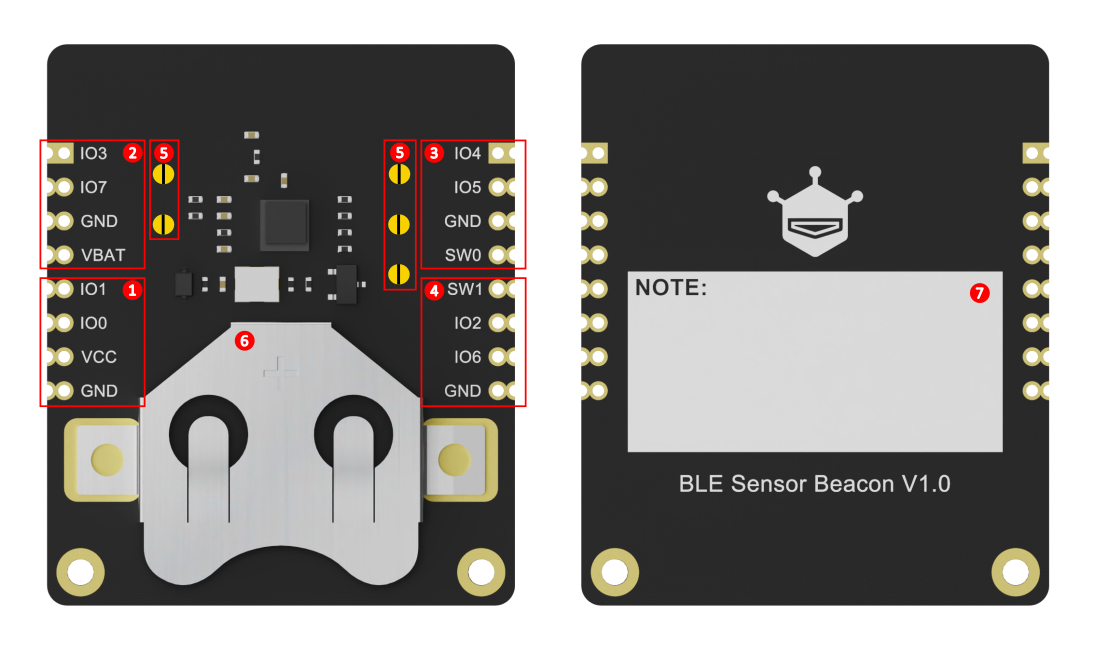
Board Overview of Fermion: BLE Sensor Beacon Pack
  • Docs
  • Tech Specs
  • Projects
  • 1. Getting Started

    This article offers crucial precautions for first-time users when configuring and testing a module, including using a 3.3V USB-TTL tool, the one-time burning warning, and methods for testing non-I2C and I2C sensors.

    2. Usage Example for Arduino-ESP32-Digital/Analog Sensor Data Acquisition

    The article serves as a detailed guide for utilizing Arduino ESP32 to acquire sensor data, focusing on the configuration of BLE Sensor Beacon and LM35 Temperature Sensor. It encompasses hardware and software preparation, wiring diagrams, and configuration steps for accurate data acquisition and processing, making it an essential resource for enhancing sensor-based projects.

    3. Usage Example for Arduino-ESP32-I2C Sensor Data Acquisition

    Acquire temperature and humidity data from a Fermion: SHT40 I2C sensor using the Fermion BLE Sensor Beacon, then read and display the data via an ESP32 or mobile app. Users will learn how to configure the beacon for I2C sensors and parse BLE broadcast data.

    Reference

    Specification

    Parameter Value
    Operation Voltage 1.1 ~3.6V DC
    Operation Current 9.1~13.8mA @2.4GHz TX mode-1Mbps
    Standby Current 0.625uA @Sleep with 32kHz RC, sleep timer
    Supported sensors Digital/Analog/I2C sensors
    Input signals digital/analogue, I2C
    Operating band 2.4 GHz ISM
    Modulation GFSK
    Transmit power +5.0dBm
    PCB Size 35 ×42 mm
    Mounting Hole Size inner diameter of 2mm/outer diameter of4mm

    Pinout

    No Name Function
    1 Serial port burning area VCC:3.3V Input; GND:Ground; IO0:RX(3.3V); IO1:TX(3.3V)
    2 I2C/Other sensors (coin cell) VBAT:Coin Cell Positive; IO3/IO7:SDA/SCL or digital/analog
    3 I2C/Other sensors (dynamic) SW0:Power sensor during broadcast; IO4/IO5:SDA/SCL or digital/analog
    4 Digital/Analog Sensors SW1:Pull down during broadcast; IO2:SDA/SCL; IO6:Analog (divider)
    5 Pull-up Resistor Selection Pad IO3/IO7/IO4/IO5/IO2 pull-up soldering points (default: no pull-up)
    6 Battery socket CR2032 button cell (positive→VBAT, negative→GND)
    7 NOTE Beacon information marker

    FAQ

    • How to Reset the Beacon for a Second 'Run in RAM' Test on Fermion: BLE Sensor Beacon?

      Currently, only digital/analog sensors support the "Run in RAM" test. When you are done with the test, you need to completely cut off the Beacon's power (both VCC and coin cell) to reset the Beacon.

      Note:

      If you are using the Arduino IDE with the esp32 BLE sample code which we posted in our wiki.
      We recommend that you roll back the SDK to a Stable version instead of the Development version. This is because as of 2024.3.15, the development version of the SDK has a string matching error when compiling BLE related code, which means the ESP32-C6/H2 does not support our sample code in wiki now.

    • How Do I Test I2C Sensor Compatibility with Fermion: BLE Sensor Beacon?

      Unfortunately, given the small RAM of the BLE Sensor Beacon's on-board MCU, the I2C sensor does not support the "Run in RAM" test and can only be "Burned".
      We recommend you to double check the I2C communication configuration before "Burn", as this step is irreversible.

      We have designed our own .cfg configuration file for some Fermion sensors. You can download it from our Github repo.
      If you need to integrate an I2C sensor in large quantities, you can raise an issue in this Github repo and we will evaluate your needs in a timely manner.

      BLE Sensor Beacon Github repo:

      https://github.com/DFRobot/DFRobot_FermionBLE

    • Do I Need an External Pull-up Resistor for I2C Sensor on Fermion: BLE Sensor Beacon?

      If you are using DFRobot's Gravity or Fermion series sensors. The I2C pull-up resistors for our sensors are built in on the sensors.
      If you are using an I2C sensor from another manufacturer and do not have a pull-up resistor. You can solder the TEL0168's on-board pads to connect the TEL0168's on-board pull-up resistors.

    • Which GPIO is Best to Connect My Analogue Sensors to on Fermion: BLE Sensor Beacon?

      We recommend you to connect to GPIO6, because the GPIO of BLE Sensor Beacon chip cannot exceed 1.6V if it is set to ADC mode, so if your analogue sensor output exceeds 1.6V, we recommend you to connect your sensor to GPIO6 which has the built-in voltage divider resistor.

    • What sensors is BLE Sensor Beacon compatible with?

      Almost any digital, analogue sensor with an output of 0~3.3V. As well as some I2C sensors.

    Explore More Related Questions >

    Was this article helpful?

    TOP