Lark Weather Station Sensor

SKU: EDU0157-EN

The Earth's atmosphere, influenced by wind speed/direction, temperature, humidity, and air pressure, requires precise detection for understanding its movement. Traditional meteorological data acquisition is cumbersome (integrating multiple sensors, wiring, programming, debugging, assembly), challenging educators and students. Commercial weather stations are specialized, non-redevelopable, and lack adaptability. To address these issues, we present the Lark Weather Station.

Overview of Lark Weather Station

Downloadable Resources

  • Docs
  • Tech Specs
  • Projects
  • Certifications
  • 1. Getting Started

    This guide provides step-by-step instructions for setting up a weather station, including assembly, calibration, and data collection, ensuring users can efficiently gather and export accurate weather data.

    2. Example Code for micro:bit-Makecode

    Use the Lark Weather Station with micro:bit via Makecode to read and display weather data.

    3. Example Code for Arduino-I2C-Arduino IDE

    Use the Lark Weather Station with DFRuino UNO R3 via I2C to read weather data including wind speed, wind direction, temperature, humidity, and air pressure.

    4. Example Code for Arduino-I2C-MindPlus

    This article offers detailed instructions and example code for integrating an Arduino using I2C with MindPlus to connect and gather data from a Lark Weather Station, covering hardware and software setups, wiring diagrams, and output results for monitoring temperature, humidity, wind speed, and air pressure.

    5. Example Code for Arduino-UART-Arduino IDE

    Use the Lark Weather Station with DFRuino UNO R3 via UART to read weather data including wind speed, wind direction, temperature, humidity, and air pressure.

    6. Example Code for UNIHIKER-MindPlus-Graphical Programming-Weather Data

    This article provides a detailed guide on setting up and programming UNIHIKER with Mind+ to display real-time weather data using the Lark Weather Station, including hardware and software preparations, wiring instructions, and a sample code demonstration.

    7. Example Code for UNIHIKER-Python-Weather Data

    This article details how to use UNIHIKER and Python to collect and display real-time weather data, including hardware and software setup, wiring instructions, and sample code for utilizing the Pinpong and Lark Weather Station libraries.

    Reference

    Specification

    Parameter Specification
    Working Voltage 3.3~5.5V DC
    Working Current 40mA
    Sleep Current 2mA
    Communication Mode I2C/UART
    Wind Speed 0.5~12m/s
    Wind Direction 8 directions
    Temperature -20~60℃ ±0.2℃
    Humidity 0~99%RH ±2%RH
    Air Pressure 300~1100hPa ±1Pa
    Storage 16M USB disk
    Size 160x55mm (main body)
    Weight 270g (main body)

    Structural Overview

    Note: The wind vane can be quickly inserted/removed by pressing. Do not pull forcefully.

    Number Name Function
    1 Compass Assists in orientation identification (south calibration).
    2 Anemometer Measures wind speed using internal sensors.
    3 Anemometer Cover Protects the anemometer cups during storage. Remove when using the compass.
    4 Louvere Box Ensures air circulation for temperature/humidity/pressure sensors.
    5 Wind Vane Detects wind direction (works with the wind direction shaft).
    6 Wind Direction Shaft Rotates with the wind vane to measure wind direction.
    7 Gravity Interface Supports I2C/UART communication with external controllers (e.g., Arduino).
    8 Type-C Interface For configuration, data export, and firmware upgrades.
    9 Adjustable Tripod Supports the weather station (optional).
    10 Expansion Port Connects to batteries or data transmission modules.
    11 1/4 Inch Thread Hole Secures the weather station to a tripod.
    12 Firmware Upgrade Button for initiating firmware upgrades.

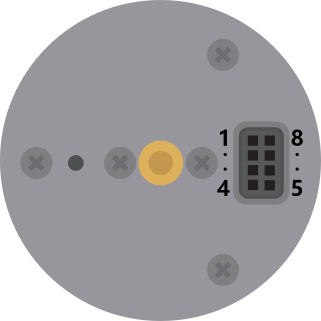
    Power Supply & Reserved Ports

    img

    Number Name Function Number Name Function
    1 V_GNSS Power supply for positioning modules. 5 V_DTU Power supply for communication modules.
    2 VBAT2 Battery charging port (connect to battery positive). 6 GND System ground.
    3 GND Battery negative terminal. 7 SCL I2C clock pin.
    4 VBAT1 Battery positive terminal (powers the Lark). 8 SDA I2C data pin.
  • CE CE
  • Was this article helpful?

    TOP