
Example Code for Arduino-I2C-Arduino IDE
Use the Lark Weather Station with DFRuino UNO R3 via I2C to read weather data including wind speed, wind direction, temperature, humidity, and air pressure.
Hardware Preparation
- DFRuino UNO R3 x1
- Gravity I/O Sensor Expansion Board x1
- Lark Weather Station x1
Software Preparation
- Arduino IDE Download Arduino IDE
- Download and install the Lark Weather Station Library. How to install the library?
Wiring Diagram
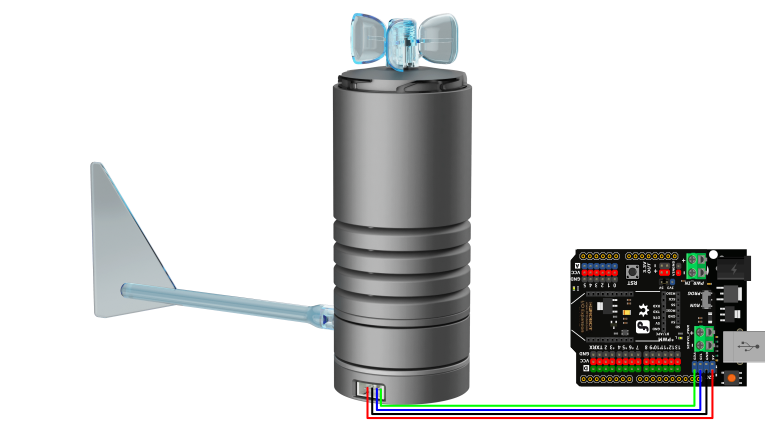
Other Preparation Work
No additional hardware or software configuration is required beyond the steps listed in Hardware Preparation and Software Preparation.
Sample Code
#include "DFRobot_LarkWeatherStation.h"
#define DEVICE_ADDR                  0x42
DFRobot_LarkWeatherStation_I2C atm(DEVICE_ADDR,&Wire);

void setup(void){
  Serial.begin(115200);
  mySerial.begin(9600);
  delay(1000);
  while(atm.begin()!= 0){
    Serial.println("init error");
    delay(1000);
  }
  Serial.println("init success");
  //atm.setTime(2023,3,1,17,20,0);
}

void loop(void){
    Serial.println(atm.getTimeStamp());
    Serial.print(atm.getValue("Speed").toFloat());
    Serial.println(atm.getUnit("Speed"));
    Serial.println(atm.getValue("Dir"));
    Serial.print(atm.getValue("Temp").toFloat());
    Serial.println(atm.getUnit("Temp"));
    Serial.print(atm.getValue("Humi").toFloat());
    Serial.println(atm.getUnit("Humi"));
    Serial.print(atm.getValue("Pressure").toFloat());
    Serial.println(atm.getUnit("Pressure"));
//    Serial.print(atm.getValue("Battery"));//Available when connected to a lithium battery
//    Serial.println(atm.getUnit("Battery")); //Available when connected to a lithium battery
//    Serial.print(atm.getValue("Lat"));//Available when connected to a GNSS module
//    Serial.print(atm.getValue("Lon"));//Available when connected to a GNSS module
    Serial.println("----------------------------");
//    Serial.println(atm.getInformation(true));
    delay(1000);
}
Result
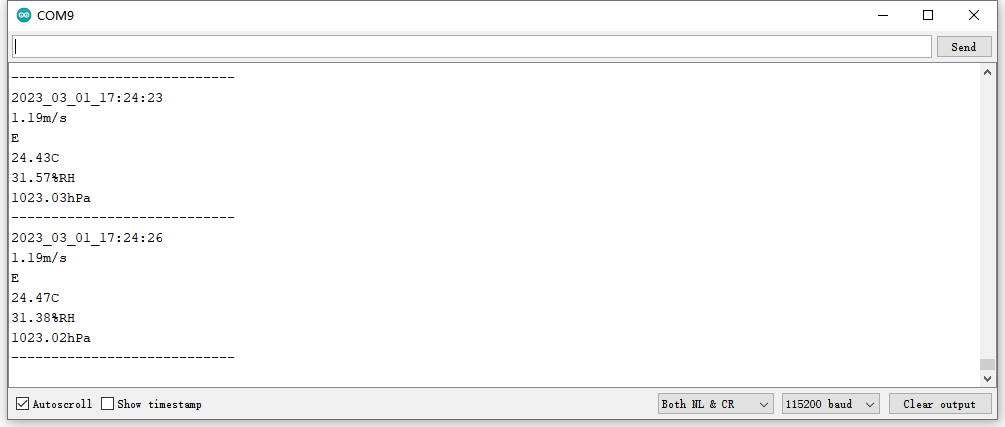
The serial monitor will output the time stamp, wind speed (with unit), wind direction, temperature (with unit), humidity (with unit), and air pressure (with unit) at 1-second intervals. A sample output is shown below:
Was this article helpful?